
Networking
How to Choose the Right UniFi Access Point in Kenya
How to Choose the Right UniFi Access Point in Kenya
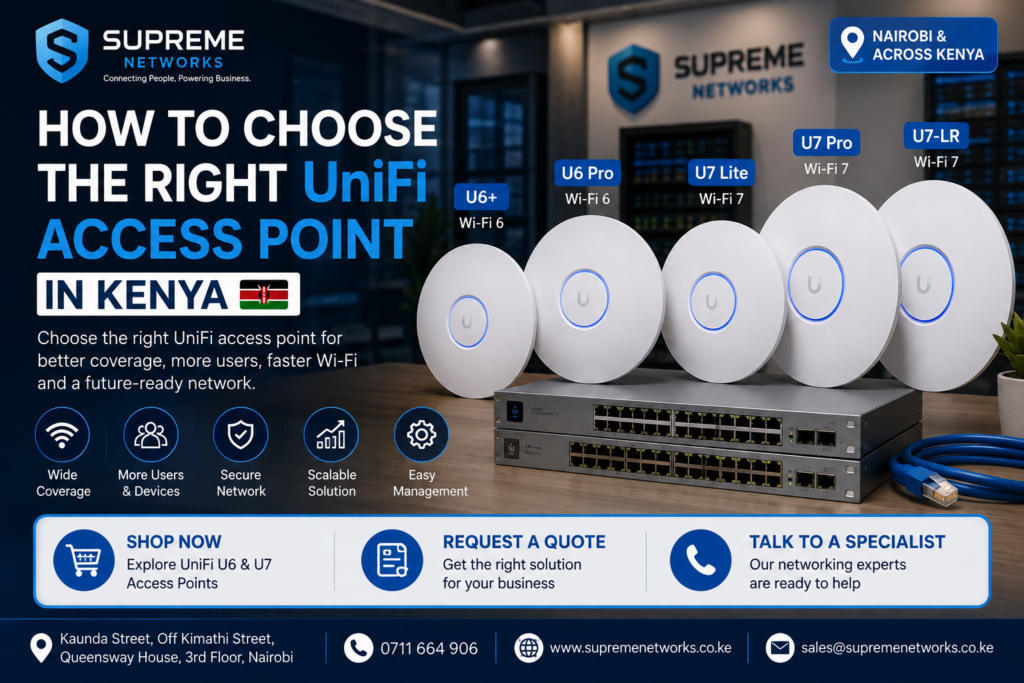
Choosing the right UniFi access point in Kenya starts with understanding your coverage area, number of users, connected devices, building layout, internet speed, and budget. A small office may work well with a UniFi U6+ or U7 Lite, while a busy office, hotel, school, or commercial network may require a U6 Pro, U7 Pro, U7-LR, or multiple access points. Supreme Networks supplies UniFi access points in Nairobi and across Kenya, together with PoE switches, injectors, network cables, routers, and other equipment needed for a complete Wi-Fi solution. Shop UniFi access points, request a quote, or talk to our networking team for help selecting the right model.
Need a UniFi Access Point in Kenya?
→ Shop UniFi Access Points
→ Request a Quote
→ Talk to a Networking Specialist
The best access point is not always the fastest or most expensive model. Instead, it is the model that solves your actual Wi-Fi problem.
This guide explains what to consider before buying a UniFi access point for your home or business.
Start With the Problem You Need to Solve
Before comparing UniFi specifications, ask one simple question:
What Wi-Fi problem am I trying to solve?
Common requirements include:
- Poor Wi-Fi coverage
- Slow wireless connections
- Too many connected devices
- Weak signal in some rooms
- Expanding an existing UniFi network
- Installing Wi-Fi in a new office
- Connecting several floors
- Providing guest Wi-Fi
- Upgrading from older Wi-Fi equipment
- Preparing for Wi-Fi 7 devices
Once you understand the problem, selecting the correct access point becomes much easier.
1. Consider the Size of Your Building
Coverage area is one of the first factors to consider.
A small office with a few rooms has different requirements from a hotel, school, warehouse, or multi-storey office.
Do not simply look for the access point with the longest advertised range.
Real-world Wi-Fi coverage depends heavily on the building.
Signal can be affected by:
- Concrete walls
- Glass
- Metal structures
- Multiple floors
- Closed doors
- Shelving
- Furniture
- Other wireless networks
Therefore, two buildings of the same size may require different numbers of access points.
Small Offices and Homes
For smaller environments, models such as the UniFi U6+ or U7 Lite may be good starting points.
However, placement remains important.
A centrally positioned access point can often provide better coverage than an expensive AP installed in the wrong location.
Larger Buildings
Large offices, schools, hotels, apartments, and warehouses will often require multiple access points.
Instead of trying to cover the entire property with one AP, distribute several access points strategically.
This creates a more reliable wireless network.
2. Consider How Many Users Will Connect
The number of users matters just as much as the size of the building.
For example, a large warehouse with five Wi-Fi users may have lower capacity requirements than a small conference room containing 50 people.
Think about how many people may connect at the same time.
Low to Moderate User Density
Examples include:
- Homes
- Small offices
- Small shops
- Reception areas
- Small restaurants
A value-focused model such as the U6+ or an appropriate U7 model may be sufficient.
Higher User Density
Examples include:
- Corporate offices
- Schools
- Universities
- Hotels
- Conference rooms
- Restaurants
- Shared workspaces
These environments may benefit from higher-capacity models such as the U6 Pro or U7 Pro, combined with proper AP placement.
3. Count Devices, Not Just People
One employee does not necessarily mean one Wi-Fi device.
A single person may connect:
- Laptop
- Smartphone
- Tablet
- Smartwatch
- Wireless phone
- Other smart devices
An office with 30 employees could therefore have significantly more than 30 devices connected.
Businesses may also have:
- Wireless printers
- Smart TVs
- Meeting-room equipment
- IoT devices
- Scanners
- Point-of-sale equipment
- Security equipment
Therefore, consider both the number of users and the total number of wireless devices.
4. Choose Between Wi-Fi 6 and Wi-Fi 7
UniFi now offers different generations of wireless access points.
For many customers, the main decision will be between Wi-Fi 6 and Wi-Fi 7.
Choose UniFi Wi-Fi 6 When:
- You need reliable modern Wi-Fi.
- Most devices use Wi-Fi 5 or Wi-Fi 6.
- You want a cost-effective upgrade.
- Your existing UniFi network already uses U6 models.
- You do not currently need Wi-Fi 7.
Popular choices include:
UniFi U6+
A practical option for everyday home and business Wi-Fi.
UniFi U6 Pro
A stronger choice for busier professional environments.
Choose UniFi Wi-Fi 7 When:
- You are building a new network.
- You want newer wireless technology.
- You expect to use more Wi-Fi 7 devices.
- You are upgrading your wider network infrastructure.
- You want more room for future growth.
Models to consider include:
UniFi U7 Lite
A practical entry into the UniFi Wi-Fi 7 generation.
UniFi U7 Pro
Designed for more demanding Wi-Fi 7 environments.
UniFi U7-LR
Worth considering where extended coverage is an important requirement.
5. Match the UniFi AP to the Application
Different environments create different Wi-Fi challenges.
Here is a simple starting point.
| Application | UniFi Models to Consider |
|---|---|
| Home | U6+, U7 Lite |
| Small Office | U6+, U7 Lite |
| Medium Office | U6 Pro, U7 Pro |
| Large Office | U6 Pro, U7 Pro, multiple APs |
| Hotel | U6 Pro, U7 Pro, multiple APs |
| School | U6 Pro, U7 Pro, multiple APs |
| Restaurant | U6+, U6 Pro, U7 models |
| Warehouse | U7-LR or multiple suitable APs |
| Premium Home | U7 Lite, U7 Pro |
| New Business Network | U7 series worth considering |
These are starting recommendations rather than fixed rules.
A proper network assessment may result in a different design depending on the site.
6. Don’t Choose Based on Range Alone
Customers often ask:
“Which UniFi access point has the longest range?”
Range is important, but it should not be the only factor.
Your access point may transmit a strong signal across a long distance. However, the phone or laptop also needs to communicate back to the AP.
Walls and interference can further reduce performance.
Therefore, using several correctly positioned access points can be better than relying on one long-range unit.
This is especially important in concrete buildings common in commercial and residential environments.
7. Consider Access Point Placement
Even an excellent access point can perform poorly when installed in the wrong location.
Whenever possible, avoid hiding an AP:
- Inside cabinets
- Behind large metal objects
- In corners
- Above unnecessary obstructions
- Near equipment causing interference
Ceiling-mounted UniFi access points should generally be positioned where they can distribute the wireless signal effectively across the intended area.
Larger installations should consider Wi-Fi planning or a site survey.
8. Think About Indoor and Outdoor Coverage
Indoor and outdoor Wi-Fi requirements are different.
If you need connectivity in areas such as:
- Compounds
- Gardens
- Parking areas
- Outdoor restaurants
- Schools
- Warehouses
- Workshops
- Outdoor business spaces
choose equipment designed for the intended environment.
Do not install an indoor-only access point outdoors unless the product is specifically rated for those conditions.
For projects requiring both indoor and outdoor coverage, the network can combine different UniFi AP models under the same broader UniFi ecosystem.
9. Check Your PoE Requirements
Many UniFi access points use Power over Ethernet (PoE).
This means an Ethernet cable can carry network data and electrical power to the access point.
However, PoE requirements vary between models.
Before buying, confirm whether your AP requires:
- PoE
- PoE+
- Another supported power standard
- Compatible PoE switch
- Compatible PoE injector
Do not assume every PoE switch will power every access point.
10. Check Your Ethernet Cabling
Good Wi-Fi depends on good wired infrastructure.
Your access point may connect back to your network using Ethernet.
Therefore, cable quality matters.
Depending on the installation, you may need:
- Cat6 cable
- Cat6A cable
- Patch panels
- Data cabinets
- Patch cords
- Network modules
- Faceplates
- Cable management accessories
For newer high-performance networks, cabling should be selected with current and future bandwidth requirements in mind.
Installing good cable now can reduce the need for another cabling project later.
11. Check Your Network Switch
Your switch is another important part of the UniFi solution.
Before choosing an access point, check:
- Available Ethernet ports
- Port speeds
- PoE capability
- PoE budget
- Uplink capacity
- Future expansion requirements
A Wi-Fi 7 access point may benefit from newer switching infrastructure depending on the model and network design.
Therefore, upgrading the AP without checking the switch could create another bottleneck.
12. Consider Your Internet Speed
A faster access point does not automatically mean faster internet.
Suppose your business internet connection is 50 Mbps.
Installing an advanced Wi-Fi 7 access point will not turn the internet connection into 500 Mbps.
Your final internet experience depends on the entire network.
This includes:
Internet connection → Router → Switch → Cabling → Access Point → Client Device
A bottleneck anywhere along this path can reduce performance.
13. Plan for Future Growth
Do not design the network only around today’s requirements.
Ask what could change over the next few years.
Will you:
- Hire more employees?
- Add another office?
- Introduce more laptops?
- Add wireless devices?
- Upgrade internet speeds?
- Move to Wi-Fi 7 devices?
- Expand to another floor?
- Add guest Wi-Fi?
If significant growth is expected, choosing newer infrastructure may reduce future upgrade costs.
This is where UniFi U7 access points can become particularly attractive for new deployments.
14. Do You Need One UniFi AP or Several?
For small spaces, one access point may be enough.
For larger environments, multiple APs often provide better results.
You may need several access points if the property has:
- Multiple floors
- Thick concrete walls
- Many rooms
- High user density
- Large open spaces
- Indoor and outdoor areas
- Long corridors
Instead of increasing wireless power, adding another correctly positioned AP can often provide a better user experience.
15. When Should You Consider a Wi-Fi Site Survey?
For a small home or office, choosing an AP may be relatively straightforward.
However, a site survey becomes more valuable for:
- Large offices
- Hotels
- Schools
- Hospitals
- Warehouses
- Apartment buildings
- Multi-floor buildings
- Large commercial premises
A site survey can help determine suitable AP locations and estimate how many access points may be required.
This reduces guesswork before purchasing equipment.
Which UniFi Access Point Should You Buy?
If you want a quick starting point:
Choose UniFi U6+ if:
You need reliable and affordable Wi-Fi 6 for a home, shop, small office, or normal business environment.
Choose UniFi U6 Pro if:
You have more users and need a professional Wi-Fi 6 solution for offices, schools, hotels, restaurants, or other busy environments.
Choose UniFi U7 Lite if:
You are building a new network and want to enter the Wi-Fi 7 generation without immediately moving to a higher-end model.
Choose UniFi U7 Pro if:
You need a newer high-performance Wi-Fi 7 solution for a professional network.
Consider UniFi U7-LR if:
Coverage is an important consideration and the model fits your overall network design.
Remember, there is no universal “best UniFi access point.”
The best model is the one that meets your coverage, capacity, application, infrastructure, and budget requirements.
Buy UniFi Access Points in Kenya
Supreme Networks supplies UniFi access points in Nairobi and across Kenya for residential, commercial, hospitality, education, retail, and enterprise networks.
Whether you need one access point for a small office or multiple APs for a larger network, we can help you identify the equipment required for the solution.
Available networking solutions can include:
- UniFi U6 access points
- UniFi U7 access points
- UniFi switches
- PoE switches
- PoE injectors
- Routers and gateways
- Network cables
- Data cabinets
- Patch panels
- Network accessories
- Structured cabling
- Wi-Fi installation
- Network upgrades
Not Sure Which UniFi AP to Buy?
You don’t need to guess.
Tell us:
1. Your location
2. Building or floor size
3. Number of floors
4. Approximate number of users
5. Number of connected devices
6. Current internet speed
7. Existing router/switch equipment
8. Indoor or outdoor coverage requirements
Our networking team can use this information to help identify a suitable solution.
Ready to Improve Your Wi-Fi?
→ Shop UniFi Access Points
Compare UniFi U6 and U7 models for your home or business.
→ Request a Quote
Get pricing for access points and the supporting network equipment required for your project.
→ Talk to a Networking Specialist
Get help choosing between U6+, U6 Pro, U7 Lite, U7 Pro, U7-LR, and other suitable UniFi solutions.
Supreme Networks
Kaunda Street, Off Kimathi Street, Queensway House, 3rd Floor, Nairobi
Call: 0711 664 906
Serving customers in Nairobi and across Kenya.
Frequently Asked Questions
Which UniFi access point is best?
There is no single best model for every network. The right AP depends on your coverage area, number of users, device density, building construction, network infrastructure, and budget.
Which UniFi access point is best for a small office?
The U6+ can be a practical Wi-Fi 6 option for many small offices. Customers building a newer Wi-Fi 7 network can also consider models such as the U7 Lite.
Which UniFi AP is best for a large office?
Larger and busier offices may consider models such as the U6 Pro or U7 Pro. However, large offices often require multiple access points rather than one powerful AP.
Should I buy UniFi Wi-Fi 6 or Wi-Fi 7?
Choose Wi-Fi 6 when you need reliable modern connectivity at a practical cost. Consider Wi-Fi 7 when installing a new network, supporting newer devices, or planning for future wireless requirements.
How many UniFi access points do I need?
The number depends on building size, construction, number of floors, users, devices, interference, and required coverage. Larger projects may benefit from a site survey.
Do UniFi access points require PoE?
Many UniFi access points use Power over Ethernet. However, exact power requirements vary between models. Check the specifications of your chosen AP before selecting a switch or injector.
Can Supreme Networks help me choose a UniFi access point?
Yes. Customers can provide details about their building, users, devices, existing network, and coverage requirements to help determine a suitable UniFi solution.
