
Uncategorized
MikroTik VLANs: Stop Putting Everything on One Network
Stop Putting Everything on One Network: Use MikroTik VLANs
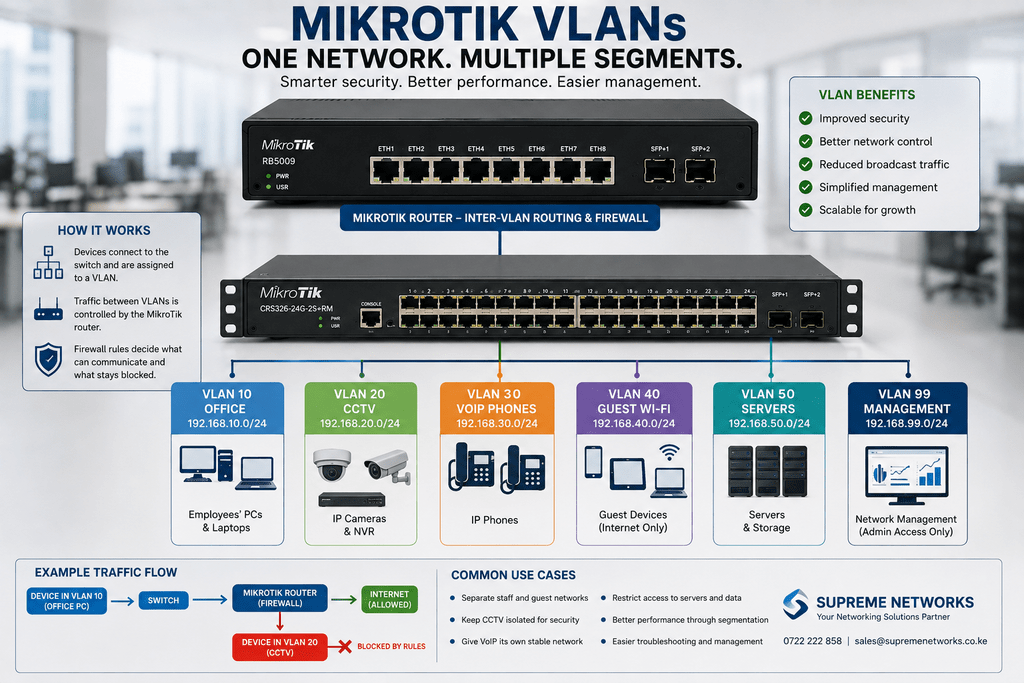
Computers, printers, CCTV cameras, IP phones, access points, servers, and guest devices can all share the same physical network infrastructure.
That does not mean they should all sit on the same network.
As a business grows, separating different types of devices can make the network easier to control and manage. MikroTik VLANs provide one way to achieve this without building a completely separate physical network for every department or service.
Picture a Typical Office
Imagine an office with 40 employees.
The network contains:
30 computers used by employees
20 IP cameras connected to an NVR
15 IP phones for communication
6 wireless access points
Several printers and servers
Guest devices connecting throughout the day
Everything may initially work on one network.
However, as the environment grows, managing access between all these devices becomes more difficult.
One Physical Network. Several Logical Networks.
A VLAN allows network administrators to create separate logical networks while using compatible shared infrastructure.
For example, the business could create:
| VLAN | Purpose |
|---|---|
| VLAN 10 | Office computers |
| VLAN 20 | CCTV cameras |
| VLAN 30 | VoIP phones |
| VLAN 40 | Guest Wi-Fi |
| VLAN 50 | Servers |
| VLAN 99 | Network management |
The exact VLAN numbers do not matter. What matters is the separation.
Now each category of device has a defined place within the network.
Why Separate Them?
Consider guest Wi-Fi.
Visitors generally need internet access. They probably do not need access to office printers, CCTV cameras, servers, or network-management interfaces.
With VLAN segmentation and suitable firewall rules, the guest network can be isolated from important business resources.
The same principle can be applied elsewhere.
CCTV cameras can remain within the surveillance network. IP phones can have their own network. Network administrators can restrict management interfaces to authorized devices.
The result is greater control over how traffic moves through the business.
VLANs Don’t Automatically Make a Network Secure
Creating VLANs is only part of the job.
If routing between those VLANs is unrestricted, devices may still communicate in ways the business did not intend.
This is where the router and firewall policies become important.
A MikroTik router running RouterOS can route traffic between VLANs and apply rules determining which networks can communicate.
For example:
Guest Wi-Fi → Internet: Allow
Guest Wi-Fi → Office: Block
Office → Printer network: Allow
Office → CCTV management: Allow only where required
CCTV → Office computers: Restrict
The actual rules should always reflect the organization’s requirements.
Your Switches and Access Points Matter Too
A MikroTik router cannot create a properly segmented network by itself.
The switches carrying multiple VLANs must support the required VLAN configuration. Wireless access points must also support the network design if different SSIDs are being mapped to different VLANs.
For example:
Staff Wi-Fi SSID → Staff VLAN
Guest Wi-Fi SSID → Guest VLAN
Both wireless networks may come from the same access points while remaining logically separated.
Where MikroTik Fits
Different MikroTik routers can support VLAN-based network designs depending on the scale and performance requirements.
A growing office may consider devices such as the MikroTik L009 or RB5009, while larger environments may require higher-performance routing equipment.
MikroTik also offers managed switches that can form part of the switching layer.
However, hardware should be selected based on the complete network rather than VLAN capability alone.
Segmentation Makes Growth Easier
A network with ten devices may not feel complicated.
A network with hundreds of devices, multiple departments, CCTV, VoIP, servers, wireless users, and visitors is very different.
Planning segmentation early can make future expansion easier.
Instead of asking:
“How do we connect this new device?”
you can ask:
“Which network should this device belong to?”
That is a much better foundation for a growing business.
Planning a Segmented Business Network?
Supreme Networks supplies MikroTik routers, managed switches, access points, network cabling, and related networking equipment for businesses and organizations in Kenya.
Whether you are separating staff, guest Wi-Fi, CCTV, VoIP, servers, or different departments, contact Supreme Networks for MikroTik product selection, pricing, availability, and networking assistance.
