
Uncategorized
MikroTik vs UniFi: Which Fits Your Business Network?
MikroTik or UniFi? Two Different Ways to Build a Business Network
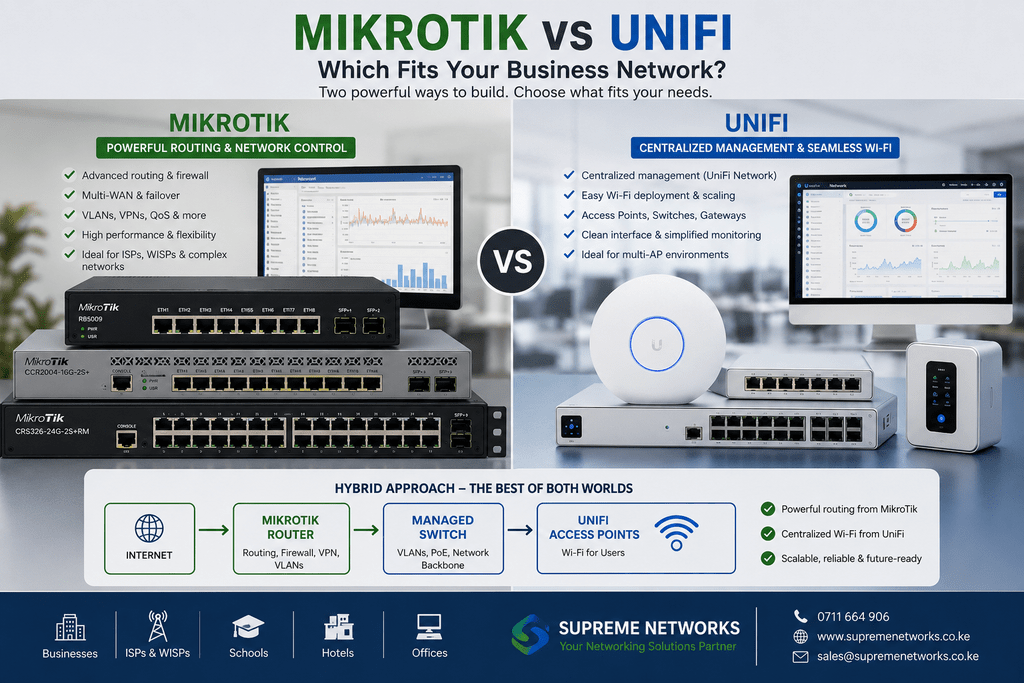
Two businesses can have almost identical networking requirements and still choose completely different equipment.
One may build around MikroTik for advanced routing and network control. Another may choose UniFi for centralized management and an integrated network ecosystem.
So, when considering MikroTik vs UniFi, the better question is not simply which brand is better.
It is: Which approach fits your network?
MikroTik: When Network Control Comes First
MikroTik is particularly strong where routing flexibility matters.
RouterOS provides administrators with extensive control over routing, firewall policies, VLANs, VPNs, bandwidth management, failover, and other network functions.
This makes MikroTik attractive for environments such as:
- Businesses with advanced routing requirements
- Multi-WAN and internet failover
- Branch-to-branch VPN connectivity
- ISPs and WISPs
- VLAN-heavy networks
- Fibre and high-capacity routing environments
Models range from compact routers through the L009 and RB5009 to powerful CCR routers.
Therefore, businesses can select hardware according to the size and complexity of the network.
UniFi: When Centralized Management Matters
UniFi takes a different approach.
Its ecosystem brings compatible gateways, switches, wireless access points, and other network devices into a centralized management environment.
This can make UniFi attractive to organizations that want an easier way to view and manage multiple parts of their network from one interface.
For businesses with several access points and switches, centralized visibility can simplify everyday administration.
What About Wi-Fi?
This is an important distinction.
MikroTik offers wireless networking products, but many MikroTik deployments are built primarily around its routing and switching capabilities.
UniFi, meanwhile, has become particularly well known for managed wireless deployments using multiple access points.
For an office, hotel, school, apartment building, or other environment requiring several APs, UniFi can provide a straightforward centralized approach to wireless management.
However, this does not mean the entire network has to use one brand.
You Don’t Always Have to Choose
A business network can combine technologies.
For example:
Internet
↓
MikroTik Router
↓
Managed Network Switch
↓
UniFi Access Points
In this type of deployment, MikroTik handles routing, firewall policies, VPNs, VLANs, or internet failover.
UniFi access points handle the wireless network.
This approach can give the business the strengths of both platforms.
MikroTik vs UniFi at a Glance
| Requirement | Consider |
|---|---|
| Advanced routing | MikroTik |
| Multi-WAN and failover | MikroTik |
| Complex routing policies | MikroTik |
| ISP/WISP networks | MikroTik |
| Centralized Wi-Fi management | UniFi |
| Multi-AP wireless deployments | UniFi |
| Integrated management ecosystem | UniFi |
| MikroTik routing + managed Wi-Fi | Combine both |
This is not an absolute rule.
The final choice depends on network size, technical requirements, management preferences, budget, and the experience of the person administering the network.
Choose the Architecture Before the Brand
It is easy to begin a network project by asking:
“Should we buy MikroTik or UniFi?”
A better starting point is:
“What does our network need to accomplish?”
How many users will connect?
How many access points are required?
Do you need multiple internet connections?
Will there be VLANs?
Do branches need VPN connectivity?
How much routing performance is required?
Who will manage the network after installation?
Once those questions are answered, choosing the equipment becomes much easier.
Building a MikroTik, UniFi or Hybrid Network?
Supreme Networks supplies MikroTik and UniFi networking equipment for businesses, organizations, installers, and network professionals in Kenya.
Whether your network requires MikroTik routing, UniFi wireless access points, managed switches, fibre connectivity, or a combination of technologies, contact Supreme Networks for product selection, pricing, availability, and networking assistance.
