
Uncategorized
MikroTik Site-to-Site VPN: Connect Your Offices
Two Offices, One Network: Connecting Branches with MikroTik
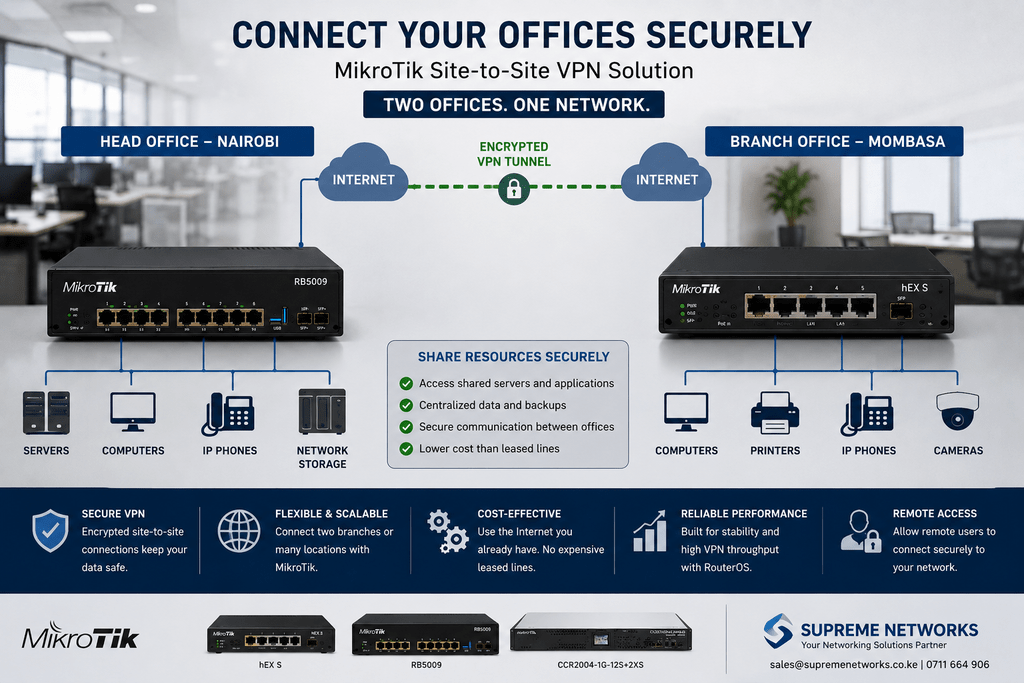
Your head office is in Nairobi. Another team works from a branch in a different town. Both locations need secure access to company systems, but they operate on separate internet connections.
This is where a MikroTik site-to-site VPN can become part of the network design.
Instead of treating every branch as an isolated network, MikroTik routers can help create secure connections between locations over the internet.
Think of the VPN as a Secure Bridge
Normally, devices at one office cannot directly access resources on another office’s private network.
A site-to-site VPN creates an encrypted connection between the two networks.
For example:
Head Office
MikroTik Router
↓
Encrypted VPN Tunnel
↓
MikroTik Router
Branch Office
Once configured correctly, authorized traffic can move securely between the locations according to the company’s network policies.
What Can Branch Offices Share?
The objective is not necessarily to connect everything to everything.
Businesses can determine which resources should be accessible between locations.
This could include internal applications, servers, business systems, shared network resources, or other services required by employees.
Firewall rules and network segmentation can then control how traffic moves between the sites.
What About Employees Working Remotely?
Branch-to-branch connectivity is only one requirement.
Some organizations also need employees to securely access company resources while working from home or travelling.
MikroTik RouterOS supports several VPN technologies that can be used for remote connectivity depending on the network design and client requirements.
Therefore, the same MikroTik infrastructure can form part of both site-to-site and remote-access VPN solutions.
Don’t Forget the Internet Connection
A VPN cannot perform better than the connections carrying it.
If one branch has limited upload capacity, high latency, or an unstable internet connection, users may still experience poor performance even with a powerful router.
Before deploying a VPN, consider:
- Internet speed at each location
- Upload and download capacity
- Number of remote users
- Applications being accessed
- Expected VPN traffic
- Router performance
- Network security requirements
For important locations, internet redundancy may also be worth considering.
Which MikroTik Router Fits?
A small branch with modest traffic may not need the same router as a busy head office.
For example, a smaller MikroTik router may handle a straightforward branch connection. Meanwhile, models such as the L009 or RB5009 can be considered as requirements increase.
Larger networks with significantly heavier routing and VPN workloads may require equipment from the MikroTik CCR series.
The important part is matching each router to the traffic and services it needs to handle.
Connect Offices Without Treating Them as Islands
As businesses expand, opening another branch should not necessarily mean creating another completely disconnected network.
With the right network design, MikroTik can help businesses securely connect offices, control traffic between locations, and provide remote access to authorized users.
Connecting Multiple Business Locations?
Supreme Networks supplies MikroTik routers and networking equipment for businesses, organizations, and multi-site networks in Kenya.
Whether you need to connect two offices, several branches, or remote employees, contact Supreme Networks for MikroTik product selection, pricing, availability, and networking assistance.
