
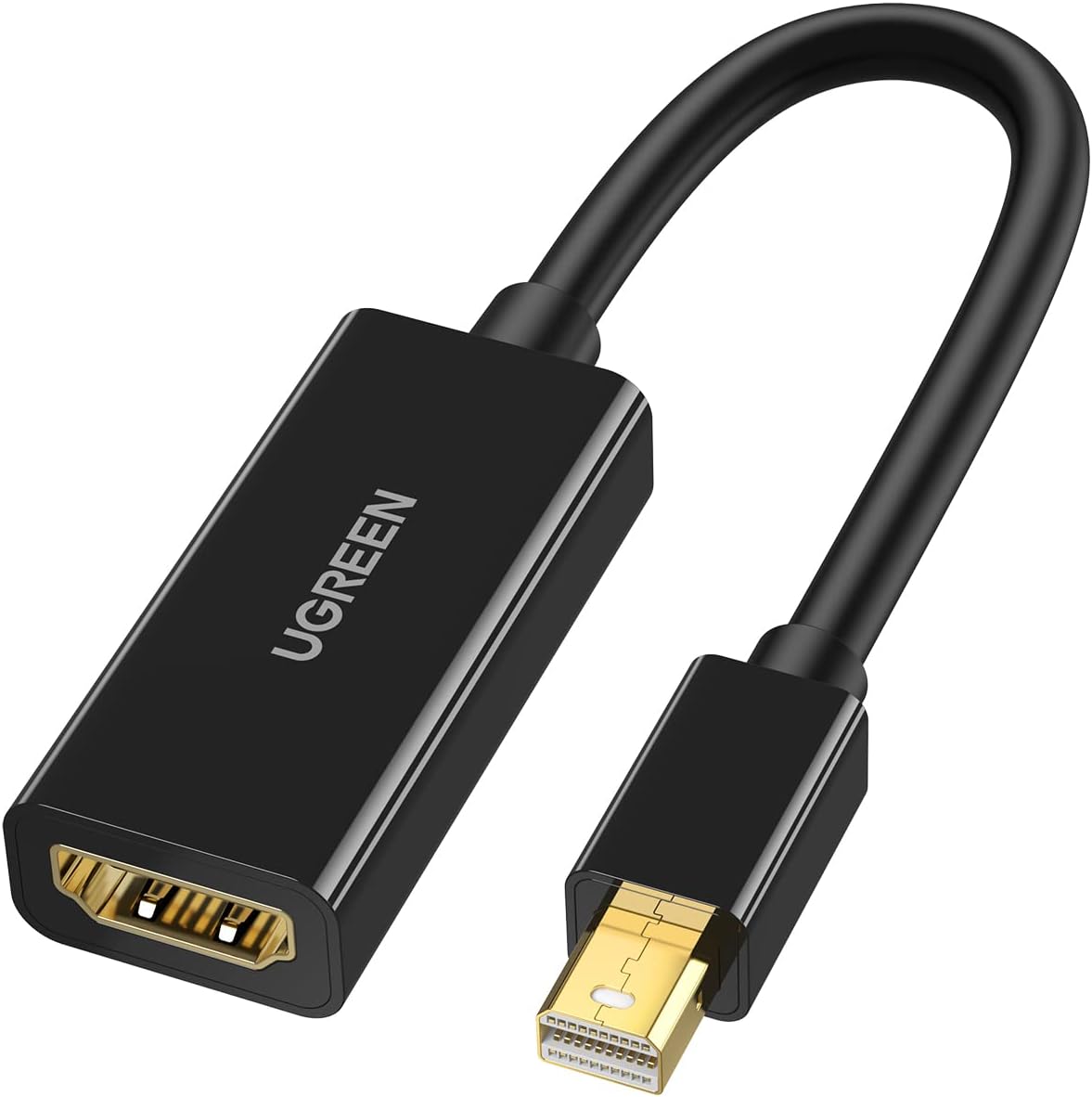
UGREEN Mini DP-HDMI Female Converter (4K) – MD112
Original price was: KSh 2,200.00.KSh 1,800.00Current price is: KSh 1,800.00. EXCL. VAT
UGREEN Mini DP to HDMI Converter 4K (Black) MD112
- Input: Mini DisplayPort Male (20pin)
- Output: HDMI Female (Type A 19pin)
- Resolution: 4Kx2K @30Hz (3840×2160), 1080p @60Hz.
- Audio Support: Yes.
- Compatibility: Mini DisplayPort 1.2 and Thunderbolt 2.0.
- Material: ABS shell, gold-plated connectors.
UGREEN Mini DP-HDMI Female Converter (4K) – MD112
The UGREEN MD112 Mini DisplayPort to HDMI Converter 4K provides a simple way to connect Mini DisplayPort-equipped computers to modern HDMI displays. It converts the digital video and audio signal from Mini DisplayPort (Mini DP) to a standard HDMI output, making it useful when your laptop or desktop does not have a built-in HDMI port.
It can be used with compatible MacBook, MacBook Pro, Mac mini, Microsoft Surface, Lenovo, Dell, HP, and other computers featuring Mini DisplayPort or compatible Thunderbolt 1/2 ports.
Mini DisplayPort to HDMI Conversion
The UGREEN MD112 features a Mini DisplayPort male connector on the source side and an HDMI female port on the display side.
A standard HDMI male-to-male cable is required to complete the connection.
The typical setup is:
Mini DisplayPort Computer → UGREEN MD112 → HDMI Cable → TV / Monitor / Projector
This allows users to continue using standard HDMI cables while adapting computers equipped with Mini DisplayPort.
Supports 4K Ultra HD
The UGREEN MD112 supports 4K Ultra HD output when connected to compatible Mini DisplayPort source equipment and an appropriate HDMI display.
This makes the adapter suitable for high-resolution applications such as presentations, video playback, photo viewing, productivity applications, and general multimedia use.
It is also backward compatible with lower resolutions, including Full HD 1920 × 1080, making it suitable for both 4K and conventional Full HD displays.
Video and Audio Through HDMI
Unlike VGA, both Mini DisplayPort and HDMI can carry digital audio alongside video.
Therefore, the MD112 can transmit video and audio through the HDMI connection when the source computer supports audio output through Mini DisplayPort.
This makes it convenient when connecting a laptop to a television, projector, or monitor with built-in speakers.
Mirror or Extend Your Display
When supported by the computer and operating system, the UGREEN MD112 can be used for either mirroring or extending the desktop.
Mirror Mode displays the same content on your computer and external screen. This is useful for presentations, meetings, classrooms, and video playback.
Extended Mode provides additional desktop space, allowing different applications to be displayed on the computer and external monitor. This can improve productivity when working with spreadsheets, documents, email, browsers, or multiple applications.
Ideal for Presentations
The compact MD112 is useful for business users who regularly connect laptops to projectors, conference-room TVs, and presentation screens.
For example, a Mini DisplayPort-equipped laptop can connect to a meeting-room HDMI projector using the MD112 and a standard HDMI cable.
Its small size also makes it convenient to keep in a laptop or presentation bag.
Suitable for Older Mac Computers
Mini DisplayPort was widely used on earlier generations of Apple computers. Therefore, the UGREEN MD112 can be useful for connecting compatible older MacBook, MacBook Pro, MacBook Air, Mac mini, and iMac models to HDMI displays.
It can also work with compatible Thunderbolt 1 and Thunderbolt 2 ports, which use the same physical connector as Mini DisplayPort.
However, it is not compatible with Thunderbolt 3/4 or USB-C ports without another appropriate adapter.
Wide Compatibility
The UGREEN MD112 can be used with compatible Mini DisplayPort-equipped devices such as:
- MacBook and MacBook Pro
- MacBook Air
- Mac mini
- iMac
- Microsoft Surface devices
- Lenovo laptops and workstations
- Dell laptops and desktops
- HP computers
- Mini DisplayPort graphics cards
- Thunderbolt 1/2-equipped computers
The HDMI side can connect to:
- TVs
- Computer monitors
- Projectors
- HDMI presentation displays
- Other compatible HDMI equipment
Plug and Play Operation
The MD112 requires no complicated software configuration or separate driver installation for normal operation.
Simply connect the Mini DisplayPort end to your computer, connect an HDMI cable to the adapter, and attach the other end of the HDMI cable to your display.
You can then select the required display mode from your computer’s display settings.
Compact and Portable Design
The adapter’s compact design makes it convenient for users who frequently travel between offices, meeting rooms, classrooms, or customer sites.
Instead of carrying a specialised Mini DisplayPort-to-HDMI cable, the MD112 lets you use commonly available standard HDMI cables.
Key Features
- Mini DisplayPort Male to HDMI Female
- Supports 4K Ultra HD video
- Supports Full HD 1080p
- Digital video transmission
- Supports digital audio over HDMI
- Supports mirror display mode
- Supports extended desktop mode
- Compatible with Mini DisplayPort
- Compatible with supported Thunderbolt 1/2 ports
- Works with TVs, monitors, and projectors
- No external power required
- Plug-and-play operation
- Compact and portable
- Black finish
Technical Specifications
| Specification | Details |
|---|---|
| Brand | UGREEN |
| Model | MD112 |
| Product Type | Mini DisplayPort to HDMI Converter |
| Source Connector | Mini DisplayPort Male |
| Display Connector | HDMI Female |
| Maximum Resolution | Up to 4K* |
| Full HD | 1920 × 1080 Supported |
| Video Transmission | Yes |
| Audio Transmission | Yes* |
| Display Modes | Mirror / Extend |
| Mini DisplayPort | Supported |
| Thunderbolt 1/2 | Compatible |
| USB-C / Thunderbolt 3/4 | No |
| External Power | Not Required |
| Driver Required | Normally No |
| Colour | Black |
Ideal Applications
The UGREEN MD112 Mini DP to HDMI Converter is suitable for office presentations, classrooms, conference rooms, home entertainment, multi-monitor workstations, older Mac computers, Microsoft Surface devices, and other Mini DisplayPort-equipped systems.
Be the first to review “UGREEN Mini DP-HDMI Female Converter (4K) – MD112”
Related products
UGREEN PRODUCTS
UGREEN PRODUCTS
UGREEN PRODUCTS
UGREEN PRODUCTS
UGREEN PRODUCTS
UGREEN PRODUCTS
UGREEN PRODUCTS
UGREEN Type C to USB 3.0 A Adapter Cable with Lanyard- US270
Reviews
There are no reviews yet.