
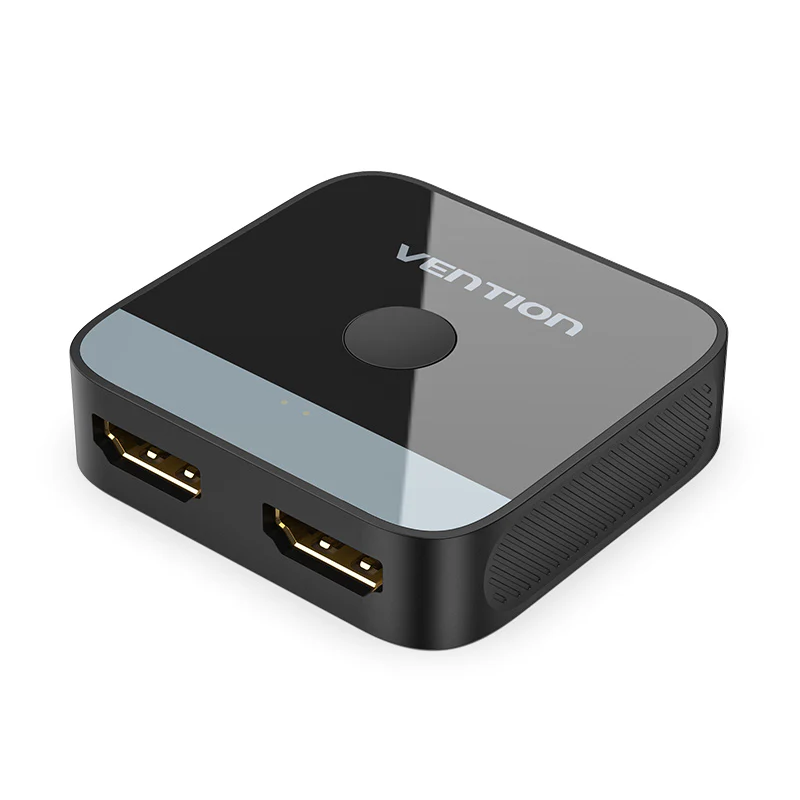
Vention 2-Port HDMI Bi-Direction Switcher Silver AFUH0
Original price was: KSh 3,000.00.KSh 2,400.00Current price is: KSh 2,400.00. EXCL. VAT
Vention 2-Port HDMI Bi-Direction Switcher Silver AFUH0
The Vention AFUH0 2-Port HDMI Bi-Directional Switcher Silver is a practical HDMI selector for connecting two HDMI sources to one display or one HDMI source to two selectable displays. It allows quick switching between connected devices using a simple button, reducing the need to unplug HDMI cables. It is ideal for TVs, monitors, projectors, PCs, laptops, gaming consoles, TV boxes, and other HDMI-enabled equipment.
Vention 2-Port HDMI Bi-Direction Switcher Silver AFUH0
The Vention 2-Port HDMI Bi-Directional Switcher Silver AFUH0 provides a simple and flexible way to manage multiple HDMI connections. Designed for both home and professional environments, it allows you to switch between HDMI devices without repeatedly plugging and unplugging cables.
Its bi-directional design supports two different connection modes. You can connect two HDMI source devices to one display, or you can connect one HDMI source to two displays and select which display receives the signal. Therefore, one compact device can handle different HDMI switching requirements.
Whether you are connecting computers, gaming consoles, TV boxes, projectors, monitors, or televisions, the Vention AFUH0 helps create a cleaner and more convenient HDMI setup.
Two HDMI Sources to One Display
The Vention AFUH0 can work as a conventional 2-in-1-out HDMI switch. In this configuration, two HDMI source devices connect to the switcher while a single HDMI display acts as the output.
For example, you can connect a laptop and gaming console to one monitor. Instead of disconnecting the laptop whenever you want to use the console, simply press the selector button to change the active HDMI source.
This setup is especially useful when your television, monitor, or projector has limited available HDMI ports.
One HDMI Source to Two Displays
The switcher can also operate in the opposite direction as a 1-in-2-out HDMI selector. You can connect one HDMI source device to two different displays and then select the display you want to use.
For instance, a desktop computer can be connected to both a monitor and projector. You can then switch between the two depending on whether you are working normally or making a presentation.
However, the two outputs are selectable rather than simultaneous. Therefore, when used in this configuration, the switcher is intended to send the signal to one selected display at a time.
Easy One-Button Switching
Changing between connected HDMI devices is straightforward. The Vention AFUH0 features a convenient manual selector button that lets you choose the active HDMI connection.
As a result, you can leave your equipment connected and simply press the button whenever you need to change the source or display.
This feature is particularly useful for devices that are switched frequently, such as computers, gaming consoles, media players, and presentation laptops.
LED Status Indicators
The Vention HDMI switcher includes LED indicators to help identify the selected connection. Therefore, you can quickly determine which HDMI port is currently active.
The indicators are particularly useful when the switcher is installed among several devices and cables in a workstation, entertainment centre, or conference-room setup.
Convenient HDMI Audio and Video Connection
HDMI carries digital video and audio between compatible devices. Consequently, the Vention AFUH0 provides a convenient way to manage HDMI multimedia connections without introducing unnecessary complexity into your setup.
It can be used for everyday activities such as watching movies, displaying presentations, gaming, working with an external monitor, or connecting multimedia equipment.
Ideal for Gaming Consoles
The Vention AFUH0 HDMI Bi-Directional Switcher is useful for gaming setups where a television or monitor has limited HDMI inputs.
You can connect two compatible HDMI source devices to the switcher and use one HDMI input on your display. For example, a gaming console and computer can remain connected while you switch between them using the selector button.
Therefore, you spend less time changing cables and more time using your devices.
Useful for TVs and Entertainment Systems
Modern entertainment setups often include several HDMI devices. These may include TV boxes, gaming consoles, computers, media players, and other equipment.
However, your television may not have enough available HDMI ports for every device. The Vention AFUH0 provides an additional switching option, allowing two sources to share one HDMI input.
Furthermore, its compact construction means it can be positioned conveniently alongside your other entertainment equipment.
Practical for Offices and Meeting Rooms
The Vention AFUH0 is equally useful in professional environments. For example, two presentation laptops can share one projector or meeting-room display. Users can then switch between the computers using the selector button.
Alternatively, a single office computer can be connected to a monitor and projector. This arrangement provides a convenient way to select the appropriate display during meetings or presentations.
Therefore, the switcher is suitable for offices, conference rooms, training centres, classrooms, and boardrooms.
Reduce Repeated Cable Connection
Frequently plugging and unplugging HDMI cables can be inconvenient, particularly when HDMI ports are positioned behind televisions, monitors, or other equipment.
With the Vention HDMI switcher, compatible devices can remain connected. You only need to use the selector button when changing between the available connections.
As a result, your HDMI setup becomes easier to manage while reducing unnecessary cable handling.
Compact and Professional Silver Design
The Vention AFUH0 features a compact silver design that complements modern computers, monitors, televisions, gaming equipment, and office electronics.
Its small footprint also helps reduce clutter around your workstation or entertainment area. Therefore, it can be placed conveniently on a desk, entertainment cabinet, meeting table, or near a projector installation.
Simple Installation
The Vention AFUH0 does not require a complicated installation process. Connect your HDMI cables to the appropriate ports and use the button to select the required connection.
For a 2-source to 1-display setup, connect both source devices to the switcher and connect the remaining HDMI connection to your display.
For a 1-source to 2-display setup, connect the source to the switcher and connect the other HDMI ports to the two displays. You can then select which display receives the signal.
Key Features
- Brand: Vention
- Model: AFUH0
- Product Type: HDMI Bi-Directional Switcher
- HDMI Ports: 2-Port switching configuration
- Colour: Silver
- Supports bi-directional HDMI operation
- Works as a 2-input to 1-output HDMI switch
- Works as a 1-input to 2-output HDMI selector
- Simple push-button switching
- LED indicators show the selected connection
- Helps reduce repeated HDMI cable plugging and unplugging
- Suitable for digital HDMI audio and video connections
- Compact design for convenient placement
- Suitable for home, office, gaming, and presentation environments
- Easy to integrate into existing HDMI setups
Compatible Applications
The Vention 2-Port HDMI Bi-Directional Switcher can be used in many HDMI connection scenarios, including:
- Desktop PCs
- Laptops
- Computer monitors
- Televisions and smart TVs
- Projectors
- Gaming consoles
- TV boxes
- Media players
- Home entertainment systems
- Office workstations
- Conference rooms
- Meeting rooms
- Training rooms
- Classrooms
- Presentation systems
Flexible HDMI Switching Solution
The Vention AFUH0 2-Port HDMI Bi-Directional Switcher Silver is designed for users who want a simple way to manage multiple HDMI connections. Instead of constantly disconnecting and reconnecting cables, you can keep compatible equipment connected and switch between devices whenever required.
Its bi-directional operation also adds flexibility. Use it to connect two HDMI sources to one TV, monitor, or projector. Alternatively, connect one HDMI source to two displays and select the screen you want to use.
Type: HDMI bi-directional switcher
- Ports: 2 HDMI inputs / 1 HDMI output (or 1 input / 2 outputs)
- Direction: Bi-directional – can switch two devices to one display or one device between two displays
- Resolution Support: Up to 4K @ 60 Hz, HDR, 3D content
- Switching: Manual push-button with LED indicators for active port
- Plug & Play: No external power required
- Connector Quality: Gold-plated HDMI ports for stable signal
- Build: Durable aluminum body in silver finish
- Size: Compact and portable for easy placement
- Use Cases: Home entertainment, gaming consoles, office presentations, multimedia setups
- Additional Features: Heat-dissipating design, reliable performance, easy device management
QUICK LINKS
Vention 2-Port HDMI Bi-Direction Switcher ABS Type-AKOB0
Nexa Multifunction Slide Cover Socket Silver
Nexa Silver Pop-up Multifunction Socket with Cable Socket
Nexa Multifunction Flip-up Socket – Silver
HP Proliant ML350 G6 2-Port Power Supply Backplane Board
Be the first to review “Vention 2-Port HDMI Bi-Direction Switcher Silver AFUH0”
Related products
Vention Products
Vention Products
Vention Products
Vention Products
Vention Products
Vention Products
Vention Products
Accessories
Reviews
There are no reviews yet.