
Buy D-Link adapters in Kenya at Supreme Networks for wireless networking and convenient connectivity on compatible laptops and desktop computers. Explore D-Link USB Wi-Fi adapters designed to provide wireless network access without requiring an internal wireless expansion card.
Our D-Link adapter selection includes the D-Link DWA-X1850 AX1800 Wi-Fi 6 USB Adapter, which supports compatible dual-band wireless networking using the 802.11ax Wi-Fi standard. This adapter can be used to add or upgrade wireless connectivity on supported computers.
D-Link wireless USB adapters are useful for office workstations, desktop computers without built-in Wi-Fi, compatible laptops and home networking environments. Compare supported wireless standards, frequency bands, USB interfaces, operating-system requirements and driver availability before ordering.
Wi-Fi 6 technology can provide improved wireless efficiency and performance under suitable conditions when used with compatible networking equipment. Actual connection speeds depend on the router, wireless environment, connected computer and network conditions.
Explore our D-Link Routers, D-Link Wireless Access Points, D-Link Range Extenders and Networking Accessories for related connectivity products.
Shop D-Link adapters in Nairobi at Supreme Networks, with delivery options across Kenya. Contact our sales team for product specifications, availability, bulk orders and quotations.
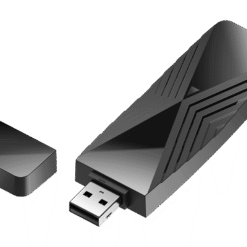
D link Adapters
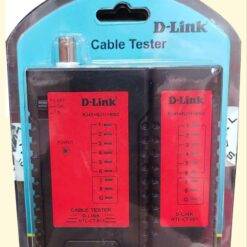
D link Adapters
Buy D-Link Adapters in Kenya for Wireless Networking
Supreme Networks supplies D-Link adapters in Kenya for compatible desktop computers, laptops, home networks and business networking environments. Explore D-Link wireless USB adapters for adding Wi-Fi connectivity or upgrading an existing computer's wireless connection.
Wireless network adapters allow compatible computers to communicate with Wi-Fi routers and wireless access points. They provide an alternative to internal wireless network cards and can be useful when a computer has no built-in Wi-Fi or requires a different wireless interface.
Our listed range includes the D-Link DWA-X1850 AX1800 Wi-Fi 6 USB Adapter. Compare its specifications with your computer and wireless network requirements before ordering.
D-Link DWA-X1850 AX1800 Wi-Fi 6 USB Adapter
Overview of the D-Link DWA-X1850
The D-Link DWA-X1850 is an AX1800-class Wi-Fi 6 USB wireless adapter designed to provide wireless connectivity to compatible computers.
It supports the IEEE 802.11ax wireless standard and can connect to suitable wireless routers and access points.
This adapter can be considered for compatible desktop computers and laptops requiring dual-band wireless networking.
D-Link AX1800 Wireless Performance
AX1800 is a combined wireless speed classification. It does not represent a guaranteed internet speed or the throughput of a single wireless connection.
The DWA-X1850 supports theoretical wireless link rates of up to approximately 574Mbps on 2.4GHz and 1201Mbps on 5GHz under supported conditions.
Actual performance depends on the connected router, signal quality, interference, computer hardware and network traffic.
Dual-Band Wi-Fi Connectivity
The D-Link DWA-X1850 supports compatible 2.4GHz and 5GHz wireless networks.
The 2.4GHz band is commonly used where broader coverage is important, while the 5GHz band can offer higher throughput under suitable conditions.
The available performance depends on the wireless environment and router capabilities.
USB Connectivity
The DWA-X1850 connects to a compatible computer through a USB interface.
This allows wireless connectivity to be added without installing an internal expansion card.
Confirm the required USB interface, operating system and driver support before purchasing.
Wi-Fi 6 Compatibility
Wi-Fi 6, also known as IEEE 802.11ax, introduces improvements in wireless efficiency and performance in supported environments.
The DWA-X1850 can take advantage of compatible Wi-Fi 6 network features when connected to suitable equipment.
Available features depend on the router and adapter configuration.
Benefits of D-Link USB Wi-Fi Adapters
Add Wi-Fi to a Desktop Computer
Some desktop computers do not include built-in wireless connectivity.
A compatible D-Link USB Wi-Fi adapter can provide wireless network access without requiring an internal wireless card.
This can be useful where installing Ethernet cabling is inconvenient.
Upgrade an Existing Wireless Connection
A USB wireless adapter can provide an alternative Wi-Fi interface for compatible computers.
It may be useful when existing wireless hardware lacks a required standard or feature.
Performance improvements are not guaranteed and depend on the original adapter, router and wireless conditions.
Convenient External Installation
USB Wi-Fi adapters connect externally to compatible computers.
They generally avoid the need to open a desktop computer to install an internal expansion card.
Some models require driver installation or additional setup.
Wireless Connectivity for Home Offices
Home office computers can use compatible wireless adapters to connect to existing Wi-Fi networks.
Suitable wireless coverage and router capacity are important for reliable connectivity.
Wireless Networking for Business Computers
Business workstations may require wireless connectivity where Ethernet network outlets are unavailable.
USB Wi-Fi adapters can provide a practical option when supported by the organization's IT policies and operating systems.
Understanding D-Link Wi-Fi Adapter Technology
What Is a Wireless USB Adapter?
A wireless USB adapter is a network interface that connects a compatible computer to a wireless network through a USB port.
It communicates with supported Wi-Fi routers and access points using the wireless standards available on the adapter.
Wi-Fi 4 vs Wi-Fi 5 vs Wi-Fi 6
Wi-Fi 4 refers to IEEE 802.11n, Wi-Fi 5 refers to IEEE 802.11ac and Wi-Fi 6 refers to IEEE 802.11ax.
Each generation introduces different wireless capabilities and performance characteristics.
The appropriate adapter depends on the existing router, computer compatibility and required network performance.
What Is 802.11ax?
IEEE 802.11ax is the wireless networking standard associated with Wi-Fi 6.
It includes technologies designed to improve wireless efficiency and support compatible devices in environments with multiple connected clients.
What Is OFDMA?
Orthogonal Frequency Division Multiple Access, or OFDMA, is a technology used in Wi-Fi 6 to help allocate wireless channel resources efficiently.
Its benefits depend on the capabilities and configuration of the connected network equipment.
What Is MU-MIMO?
Multi-User Multiple Input Multiple Output, or MU-MIMO, allows supported wireless equipment to communicate with multiple compatible devices using multiple spatial streams.
The available functionality depends on the wireless hardware and network conditions.
What Is Dual-Band Wi-Fi?
Dual-band Wi-Fi equipment supports suitable wireless connections on both the 2.4GHz and 5GHz frequency bands.
Choose the band according to signal quality, router support and the required network performance.
D-Link USB Wi-Fi Adapters for Desktop Computers
Desktop Computers Without Built-In Wi-Fi
A compatible USB wireless adapter can add Wi-Fi connectivity to a desktop computer that does not include a suitable wireless network interface.
This allows the computer to connect to an existing wireless network.
Office Desktop Workstations
Office workstations can use wireless adapters where suitable Wi-Fi coverage is available.
For business-critical applications, consider whether a wired Ethernet connection would better meet the organization's reliability requirements.
Computer Laboratories
Computer laboratories may use compatible USB Wi-Fi adapters where wireless connectivity is required.
For multiple computers, confirm driver support, device management requirements and wireless network capacity before purchasing in quantity.
Desktop Wi-Fi Adapter vs PCIe Wi-Fi Card
USB adapters provide an external installation option, while PCIe wireless cards require compatible internal expansion slots.
Neither interface is automatically better in every situation. Performance depends on the specific hardware, antenna arrangement and network conditions.
D-Link Wi-Fi Adapters for Laptops
Adding an External Wireless Interface
A compatible USB Wi-Fi adapter can provide an additional wireless network interface for a laptop.
It may be useful when the existing wireless hardware is unsuitable for the required network connection.
Upgrading Laptop Wireless Connectivity
Some older laptops use wireless hardware supporting earlier Wi-Fi standards.
A suitable USB adapter may provide access to newer wireless capabilities when the computer and operating system support it.
USB Port Requirements
Before buying a D-Link wireless adapter, confirm that the laptop has a compatible USB port.
Also check the operating-system requirements and availability of supported drivers.
Using Wi-Fi Adapters with USB Hubs
Some wireless adapters may function through compatible USB hubs, but performance and power availability can vary.
For troubleshooting or best compatibility, connecting the adapter directly to a suitable computer USB port may be preferable.
D-Link Wi-Fi 6 Adapters for Home Networks
Connecting to a Wi-Fi 6 Router
A Wi-Fi 6 adapter can communicate with a compatible Wi-Fi 6 router using supported wireless features.
For the best results, confirm the router's wireless configuration, security settings and available frequency bands.
Connecting to Older Wi-Fi Routers
Many Wi-Fi 6 adapters support backward compatibility with earlier Wi-Fi standards.
However, connection capabilities depend on the exact adapter and router specifications.
Wireless Coverage Considerations
A new wireless adapter does not automatically resolve poor Wi-Fi coverage.
Router placement, walls, interference, distance and the wireless environment can affect signal quality.
Where coverage is insufficient, a suitable access point or range extender may be needed.
Internet Speed vs Wi-Fi Link Speed
The speed displayed for a wireless connection is not necessarily the actual internet speed.
Internet performance depends on the internet service, router, network congestion and connected devices.
D-Link Wireless Adapters for Business Networks
Office Wireless Connectivity
Business computers can use compatible wireless adapters to connect to office Wi-Fi networks.
Network administrators should confirm that the adapters support the required security settings and operating systems.
Small Business Networks
Small businesses may use wireless adapters for workstations located away from wired Ethernet outlets.
The wireless network should have sufficient capacity and coverage for the connected devices.
Schools and Educational Institutions
Schools may use compatible Wi-Fi adapters for classroom computers and administrative workstations.
Check device compatibility and centralized IT support requirements before deployment.
Temporary Workstations
USB wireless adapters can be useful for temporary computer installations where permanent wired cabling is not available.
Confirm the security and performance requirements of the intended network.
How to Choose the Best D-Link Adapter in Kenya
Identify the Required Connection
Determine whether you need a wireless network adapter, wired Ethernet adapter or another connectivity accessory.
Different adapters perform different functions.
Check Wi-Fi Standards
Confirm whether the adapter supports the wireless standard required by your router and network.
For example, the DWA-X1850 is an AX1800-class Wi-Fi 6 adapter.
Check Wireless Frequency Bands
Choose an adapter supporting the frequency bands used by your wireless network.
Dual-band adapters can connect to compatible 2.4GHz and 5GHz networks.
Check Operating-System Compatibility
Confirm the exact adapter's supported operating systems before ordering.
Do not assume that every D-Link USB adapter supports every version of Windows, Linux or macOS.
Confirm Driver Availability
Some wireless adapters require drivers or software for proper operation.
Check the manufacturer's support information for the exact hardware revision and operating system.
Compare USB Interfaces
Confirm the adapter's required USB interface and the ports available on the computer.
Using an unsuitable or slower interface may affect compatibility or performance.
Consider Wireless Signal Strength
Wireless performance depends on the adapter's radio characteristics, antenna arrangement and surrounding environment.
A higher advertised speed class does not guarantee better reception in every location.
Check Network Security Compatibility
Confirm that the adapter and operating system support the wireless authentication and encryption settings required by the network.
Compatibility with specific security features varies by model and software configuration.
Consider the Intended Application
For ordinary office browsing, video meetings and cloud applications, select an adapter that meets the network's performance requirements.
For applications requiring consistently low latency or high reliability, also evaluate a suitable wired Ethernet connection.
Installing a D-Link USB Wi-Fi Adapter
Step 1: Check System Requirements
Confirm that the computer has a supported operating system and compatible USB interface.
Step 2: Obtain the Correct Driver
Follow the installation instructions for the exact D-Link adapter and hardware revision.
Where a driver is required, obtain it from the manufacturer's official support resources.
Step 3: Connect the Adapter
Insert the adapter into a compatible USB port according to the installation instructions.
Step 4: Select the Wireless Network
Use the computer's network settings to identify an available compatible Wi-Fi network.
Step 5: Enter Network Credentials
Connect using the authorized network password or other required authentication method.
Step 6: Test Connectivity
Confirm that the computer can communicate with the local network and access the internet where permitted.
Step 7: Check Connection Performance
If performance is below expectations, review signal strength, router settings, USB connection and driver status.
Troubleshooting D-Link Wireless Adapters
Adapter Not Detected
If the computer does not detect the adapter, check the USB port, driver installation and operating-system compatibility.
Try another suitable USB port where appropriate.
Wi-Fi Network Not Visible
Confirm that the router is broadcasting a supported frequency band and wireless standard.
Check the adapter's supported channels and regional wireless settings.
Slow Wireless Connection
Slow connections may result from interference, weak signal strength, router limitations or network congestion.
Compare the connection under different conditions and verify the actual link speed.
Frequent Disconnections
Wireless disconnections can be caused by poor signal quality, driver problems, USB power management or interference.
Review the relevant system settings and manufacturer troubleshooting guidance.
Adapter Connected but No Internet
A successful Wi-Fi connection does not guarantee internet access.
Check router connectivity, network configuration and the internet service.
Frequently Asked Questions About D-Link Adapters
What Is a D-Link Wi-Fi Adapter?
A D-Link Wi-Fi adapter is a networking device that allows compatible computers to connect to supported wireless networks.
What Is the D-Link DWA-X1850?
The D-Link DWA-X1850 is an AX1800-class Wi-Fi 6 USB adapter designed for compatible desktop computers and laptops.
Does the DWA-X1850 Support Wi-Fi 6?
Yes. The DWA-X1850 supports the IEEE 802.11ax wireless standard, commonly known as Wi-Fi 6.
Is the D-Link DWA-X1850 Dual-Band?
Yes. It supports compatible 2.4GHz and 5GHz wireless networks.
Can I Add Wi-Fi to a Desktop Computer?
Yes. A compatible D-Link USB Wi-Fi adapter can provide wireless connectivity to a desktop computer without built-in Wi-Fi.
Can a D-Link USB Adapter Work with an Older Router?
It may work with older routers supporting compatible wireless standards and security settings. Check the exact adapter specifications.
Will a Wi-Fi 6 Adapter Increase Internet Speed?
It may improve the local wireless connection in suitable conditions, but it cannot exceed the limitations of the internet service, router and other network components.
Does a D-Link Wi-Fi Adapter Need a Driver?
Driver requirements depend on the adapter model, hardware revision and operating system.
Can I Use the DWA-X1850 with a Laptop?
Yes, provided the laptop has a compatible USB interface and supported operating system.
Is a USB Wi-Fi Adapter Better Than Ethernet?
USB Wi-Fi adapters provide wireless flexibility, while wired Ethernet can offer predictable performance where suitable cabling is available.
Does a Wi-Fi Adapter Extend Router Coverage?
A Wi-Fi adapter provides connectivity for the computer on which it is installed. It does not function as a dedicated wireless range extender simply by being connected.
What Is the Difference Between a Wi-Fi Adapter and a Range Extender?
A Wi-Fi adapter connects a compatible computer to a wireless network, while a range extender is designed to extend wireless coverage in suitable network environments.
Where Can I Buy D-Link Adapters in Nairobi?
Supreme Networks supplies D-Link wireless adapters in Nairobi, Kenya, with delivery options across the country.
Order D-Link Adapters Online in Kenya
Buy D-Link adapters in Kenya from Supreme Networks for compatible desktop computers, laptops, home networking and office connectivity.
Explore the D-Link DWA-X1850 AX1800 Wi-Fi 6 USB Adapter and related networking products for suitable wireless installations.
For product specifications, quotations and bulk orders, contact Supreme Networks at Queensway House, 3rd Floor, Kaunda Street, Nairobi, Kenya.
Call 0711664906 or email [email protected] for assistance selecting compatible D-Link networking equipment and arranging delivery across Kenya.