
Buy LG monitors in Kenya at Supreme Networks. Explore LG UltraGear gaming displays and curved ultrawide monitors for gaming, multitasking, entertainment and professional computing.
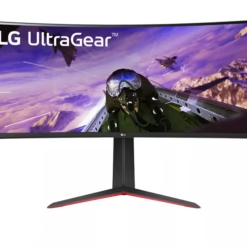
Our featured model is the LG UltraGear 34GP63A-B 34-Inch Curved Gaming Monitor, designed for users seeking an immersive ultrawide display experience.
The LG UltraGear 34GP63A-B features a 34-inch curved screen with 3440 × 1440 WQHD resolution and a 21:9 aspect ratio. This provides additional horizontal workspace compared with a conventional 16:9 Full HD monitor.
For gaming, the monitor supports a refresh rate of up to 160Hz, helping deliver smoother motion when connected to compatible hardware. Its curved display is suitable for immersive gaming, multimedia and supported productivity applications.
LG UltraGear monitors are designed for gaming-oriented performance. However, their larger screens can also benefit users who work with spreadsheets, multiple windows, timelines and other applications requiring additional horizontal space.
Before buying an LG monitor, compare the screen size, native resolution, refresh rate, panel technology, video connections and mounting requirements. Ensure your computer supports the intended display resolution and refresh rate.
Explore our wider Computer Monitors in Kenya category to compare LG displays with HP, Dell, Lenovo and Dahua monitors.
Supreme Networks supplies LG monitors in Nairobi, Kenya. Contact us for specifications, quotations, product availability and delivery options across Kenya.
Buy LG Monitors in Kenya
LG monitors in Kenya offer display solutions for gaming, productivity, entertainment and professional computing. Supreme Networks supplies LG computer displays for customers seeking high-resolution screens and immersive viewing experiences.
Our featured LG monitor is the UltraGear 34GP63A-B, a 34-inch curved ultrawide gaming display. It combines WQHD resolution with a high refresh rate for compatible gaming and multitasking applications.
LG UltraGear Gaming Monitors
LG UltraGear is LG's gaming-oriented monitor range. Models within this family offer different combinations of screen sizes, resolutions, panel technologies and refresh rates.
Gaming monitors can provide smoother motion and more responsive visual performance when used with suitable computers and graphics hardware.
Before choosing an UltraGear monitor, compare the exact model specifications rather than assuming all UltraGear displays have the same features.
LG UltraGear 34GP63A-B 34-Inch Curved Gaming Monitor
The LG UltraGear 34GP63A-B is a 34-inch curved ultrawide monitor designed for gaming and compatible productivity applications.
Its 3440 × 1440 WQHD resolution provides a wide workspace for supported games, multiple application windows and multimedia content.
34-Inch Ultrawide Display
The 34-inch screen provides additional horizontal viewing space compared with conventional widescreen monitors.
This can be useful when working with multiple documents, spreadsheets, browser windows or editing timelines.
3440 × 1440 WQHD Resolution
The monitor uses a native resolution of 3440 × 1440 pixels, commonly described as ultrawide QHD or WQHD.
It offers more horizontal pixels than standard 2560 × 1440 QHD displays.
Curved Screen Design
The curved display provides a viewing surface designed for immersive use.
Curved ultrawide monitors are popular for compatible gaming, multimedia and multitasking applications.
Up to 160Hz Refresh Rate
The LG 34GP63A-B supports a refresh rate of up to 160Hz under compatible operating conditions.
A higher refresh rate can provide smoother motion when the computer, graphics hardware and video connection support the selected display mode.
21:9 Aspect Ratio
The ultrawide 21:9 aspect ratio provides additional horizontal screen space compared with traditional 16:9 displays.
However, some games and video content may not fully support ultrawide formats.
Benefits of LG Curved Ultrawide Monitors
Immersive Gaming
A large curved screen can provide an engaging experience in games that support ultrawide resolutions.
Additional Workspace
Ultrawide displays can accommodate multiple application windows without requiring two separate monitors.
Improved Multitasking
Users can arrange documents, browsers and other compatible applications across the wider screen.
High-Resolution Viewing
WQHD resolution provides more pixels than Full HD, supporting detailed images and additional workspace.
Gaming and Productivity in One Display
LG UltraGear ultrawide monitors can serve gaming setups and compatible office workstations.
LG Ultrawide vs Standard Monitors
Standard 16:9 Monitors
Traditional 16:9 monitors are widely used for office computing, education, entertainment and gaming.
Common resolutions include 1920 × 1080 Full HD and 2560 × 1440 QHD.
Ultrawide 21:9 Monitors
Ultrawide monitors offer a wider viewing area. They can be useful for multitasking, compatible gaming and creative applications.
The LG 34GP63A-B uses a 21:9 ultrawide format.
Which Monitor Should You Choose?
Choose a standard monitor if you prefer a conventional screen format or have limited desk space.
Consider an ultrawide display if you need additional horizontal workspace or enjoy compatible immersive games.
LG Monitors for Gaming
Gaming Refresh Rates
Refresh rate describes how frequently a monitor updates its image.
High-refresh-rate monitors may provide smoother motion when supported by the connected computer.
Graphics Card Compatibility
Running games at 3440 × 1440 resolution can require more graphics processing power than standard Full HD.
Check the graphics card specifications and the requirements of your games.
Gaming Response Time
Pixel response time affects how quickly pixels change between states.
Compare the manufacturer's response-time specifications and independent performance information where available.
Adaptive Refresh Technologies
Compatible adaptive refresh technologies can help reduce certain visual artefacts during gaming.
Check the exact monitor specifications and graphics hardware compatibility.
LG Monitors for Office and Professional Work
Office Productivity
An ultrawide monitor can provide additional workspace for documents, spreadsheets, email and business applications.
Software Development
Developers may use the wider screen to display code editors, documentation and other tools side by side.
Content Creation
Ultrawide monitors can provide useful workspace for compatible video editing timelines and creative applications.
For colour-critical work, check the monitor's colour accuracy and calibration capabilities.
Financial and Business Applications
Users working with large spreadsheets or multiple applications may benefit from the additional horizontal display area.
How to Choose the Right LG Monitor
1. Determine Your Main Application
Choose based on whether the monitor will be used primarily for gaming, office productivity, multimedia or professional applications.
2. Compare Screen Size
Consider desk dimensions, viewing distance and available workspace.
3. Check the Resolution
Higher resolutions provide additional pixels but may require more graphics processing power.
4. Review the Refresh Rate
For gaming, check whether your computer can deliver the desired frame rate at the monitor's native resolution.
5. Confirm Video Connections
Check the monitor's available video inputs and your computer's output connections.
Ensure the selected connection supports the required resolution and refresh rate.
6. Consider Mounting Options
Check the monitor's mounting specifications before purchasing a wall bracket or monitor arm.
7. Compare Warranty Terms
Review the applicable warranty and support conditions for the selected LG monitor.
Frequently Asked Questions About LG Monitors
Where Can I Buy LG Monitors in Kenya?
Supreme Networks lists LG monitors for customers in Nairobi and across Kenya. Contact us to confirm product availability and specifications.
Do You Sell LG UltraGear Gaming Monitors?
Yes. Our featured model is the LG UltraGear 34GP63A-B 34-inch curved gaming monitor.
What Is the Resolution of the LG 34GP63A-B?
The LG 34GP63A-B has a native resolution of 3440 × 1440 pixels.
Is the LG 34GP63A-B a Curved Monitor?
Yes. It features a curved ultrawide display.
What Is the Refresh Rate of the LG 34GP63A-B?
The monitor supports up to 160Hz under compatible operating conditions.
Can I Use an LG Gaming Monitor for Office Work?
Yes. Compatible gaming monitors can also be used for spreadsheets, document processing, browsing and other office applications.
Is an Ultrawide Monitor Better Than Two Monitors?
An ultrawide display offers a continuous viewing surface, while two monitors provide separate screens. The better option depends on your workflow and available desk space.
Can I Connect an LG Ultrawide Monitor to a Laptop?
Yes, if the laptop supports a compatible video connection and the required display resolution.
Does Every Game Support 21:9 Resolution?
No. Ultrawide support varies by game. Some games may display black bars or use a narrower image format.
Do You Supply LG Monitors for Business Orders?
Contact Supreme Networks for quotations and product enquiries relating to suitable business orders.
Order LG Monitors in Nairobi, Kenya
Shop LG monitors in Kenya at Supreme Networks. Explore the LG UltraGear 34GP63A-B curved gaming monitor for compatible gaming, entertainment and professional computing applications.
Contact us for product specifications, quotations and delivery enquiries.
Visit Supreme Networks at Queensway House, 3rd Floor, Kaunda Street, Nairobi.
Call 0711664906 or email [email protected].