
Power Your ISP Growth with MikroTik Network Solutions
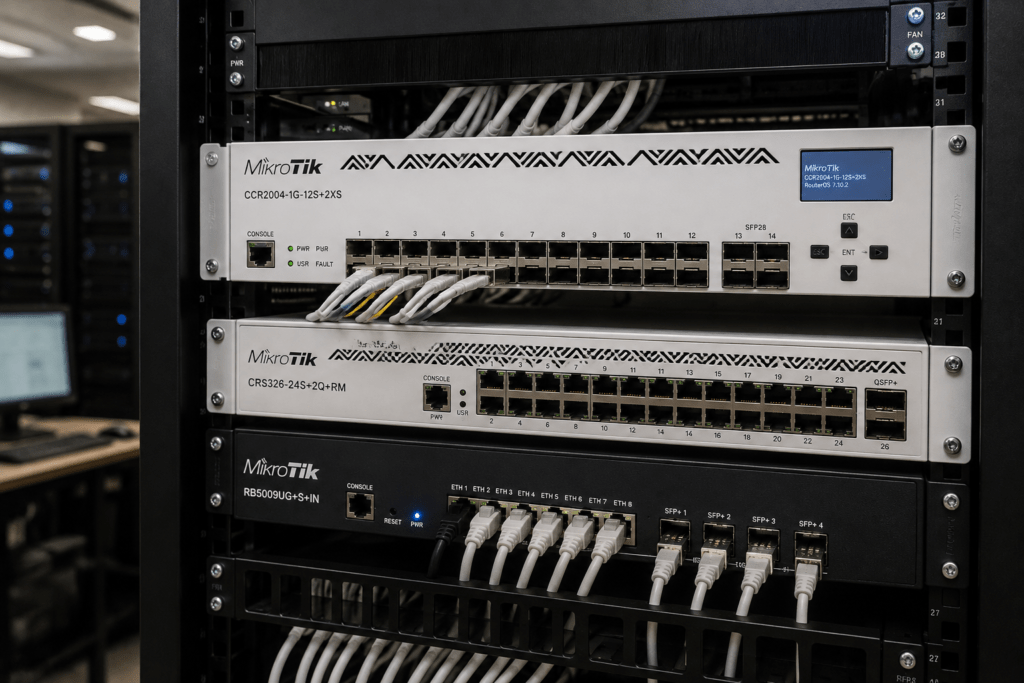
MikroTik ISP solutions give Internet Service Providers and WISPs a flexible platform for building reliable and scalable networks. From subscriber routing and bandwidth management to fiber backbones, switching and high-speed connectivity, MikroTik provides equipment for different stages of ISP growth.
At Supreme Networks, we supply MikroTik routers, Cloud Core Routers, CRS switches, wireless equipment and fiber networking solutions to ISPs and WISPs in Nairobi and across Kenya. Whether you are starting a new network or upgrading existing infrastructure, choosing equipment based on traffic, subscribers and future growth can help you avoid expensive bottlenecks.
Planning an ISP or WISP network? Contact Supreme Networks for MikroTik equipment, current availability, pricing and quotations.
Build an ISP Network That Can Grow
An ISP network rarely remains the same.
You may start with a small number of subscribers and later serve hundreds or thousands. Internet capacity can increase from a few hundred megabits to several gigabits. In addition, customers may demand faster packages and more reliable connectivity.
Your network infrastructure must grow with these requirements.
A simplified ISP network may follow this structure:
Upstream Internet → Edge Router → Core Network → Distribution → Access Network → Subscribers
Separating these roles makes expansion easier. For example, you can upgrade your core without replacing every device in the access network.
Why MikroTik Works Well for ISP Networks
MikroTik combines networking hardware with RouterOS, its network operating system. RouterOS provides routing, PPP functionality, traffic queues and other features commonly used in service-provider environments.
Depending on the network design, MikroTik can form part of:
- Internet gateways
- Subscriber networks
- PPPoE deployments
- Bandwidth management
- VLAN networks
- Fiber backbones
- Wireless distribution
- Multi-WAN networks
- Network monitoring
- Core and distribution switching
This makes MikroTik useful for both new WISPs and established service providers.
Choose Your Router Based on Traffic, Not Just Users
One of the most common questions when choosing an ISP router is:
“How many users can this MikroTik router handle?”
There is no single useful answer based only on subscriber count.
Two ISPs with 500 subscribers can generate very different workloads. One may sell lower-speed residential packages. Another may provide high-speed connections to businesses and heavy residential users.
Instead, consider:
- Peak bandwidth
- Subscriber packages
- Concurrent connections
- PPPoE sessions
- Firewall configuration
- Bandwidth queues
- VPN traffic
- Routing requirements
- Number of upstream connections
- Expected growth
The router should handle both today’s traffic and reasonable future expansion.
Start with the Right Routing Platform
Smaller ISPs do not necessarily need the largest Cloud Core Router.
A suitable RouterBOARD platform can provide a practical starting point. Then, as traffic increases, the network can move to higher-capacity routing hardware.
The important thing is to establish a clear upgrade path.
For example:
Smaller network → Higher-performance RouterBOARD → Cloud Core Router → Higher-capacity CCR infrastructure
The exact progression depends on the network workload.
RB5009 for Growing Networks
The MikroTik RB5009 can be an attractive platform for smaller ISP environments and particular roles within larger networks.
It provides Gigabit, multi-gigabit and SFP+ connectivity, making it useful where networks are beginning to move beyond conventional Gigabit infrastructure.
Possible applications include:
- Small ISP gateways
- WISP networks
- Branch POPs
- Distribution locations
- Business internet networks
- Network management
However, the RB5009 should still be sized according to the configuration and traffic it needs to handle.
As network demands increase, a Cloud Core Router may become more appropriate.
Scale with Cloud Core Routers
MikroTik’s Cloud Core Router (CCR) family targets more demanding routing environments.
These routers can form part of ISP cores, high-capacity gateways and enterprise networks.
Common CCR families include:
CCR2004
The CCR2004 can provide a useful entry point into modern Cloud Core Router infrastructure.
It can suit growing service-provider environments that need more routing capacity and faster connectivity than smaller RouterBOARD platforms.
CCR2116
The CCR2116 moves into more demanding ISP and enterprise workloads.
It can be considered when traffic, routing requirements and network services have grown beyond smaller platforms.
CCR2216
The CCR2216 targets high-capacity networking environments and includes substantially faster interface options. MikroTik’s current RouterOS documentation also identifies the CCR2116 and CCR2216 among platforms supporting specific hardware-offloaded Layer 3 functions.
The goal is not to purchase the biggest CCR available.
Instead, select a router that provides sufficient performance and interfaces for your current workload and expected growth.
Know When Your ISP Router Needs an Upgrade
Do not replace a router simply because a newer MikroTik model has been released.
Instead, monitor your network.
Warning signs may include:
- High CPU utilization during peak periods
- Increasing latency
- Interfaces approaching capacity
- Growing peak bandwidth
- Increasing subscriber sessions
- More complex bandwidth policies
- Additional upstream connections
- Need for faster uplinks
- Network expansion into new locations
If these conditions appear regularly, it may be time to review the routing platform.
Planning early is better than waiting until customers experience severe congestion.
Build a Strong Core with MikroTik Switching
Routing is only one part of an ISP network.
As traffic moves from customers toward the internet gateway, switches aggregate traffic from different parts of the network.
MikroTik’s Cloud Router Switch (CRS) family provides managed switching options for different network roles. MikroTik documents CRS devices for applications ranging from managed switching to carrier-oriented switching, depending on the series and configuration.
A structured ISP network may have:
Access → Distribution → Core
Each layer performs a different role.
Access equipment connects customers or remote infrastructure. Distribution switches aggregate traffic. Meanwhile, the core carries larger amounts of traffic between major network components.
Don’t Let Gigabit Become Your Bottleneck
Gigabit Ethernet can provide enough bandwidth for many individual network connections.
Problems arise when traffic becomes aggregated.
For example, several access networks may feed into one distribution switch. Each may carry hundreds of megabits.
Combined traffic can eventually saturate a 1Gbps uplink.
At this stage, increasing customer package speeds without upgrading the backbone can create congestion.
Therefore, monitor uplink utilization as your subscriber base grows.
Move Your Backbone to 10 Gigabit
A 10 Gigabit backbone provides considerably more capacity between high-traffic areas of the network.
Selected MikroTik routers and CRS switches include SFP+ connectivity that can form part of a 10GbE infrastructure.
For example:
Access Network → Distribution → 10G Core → CCR → Upstream Internet
This approach allows you to retain Gigabit connectivity where it remains sufficient while increasing capacity across critical backbone links.
You do not need to upgrade everything at once.
Instead, upgrade the areas carrying the most aggregated traffic.
Build Your Fiber Network for Expansion
Fiber is an important part of modern ISP infrastructure.
It can connect:
- POP locations
- Towers
- Distribution sites
- Core routers
- Data centres
- Buildings
- Business customers
- Remote network cabinets
MikroTik routers and switches with SFP and SFP+ interfaces can integrate into fiber network designs.
However, selecting the correct transceiver is essential.
Choose the Right SFP and SFP+ Modules
Not all optical modules are the same.
Before selecting an SFP or SFP+ module, consider:
- Required speed
- Single-mode or multimode fiber
- Wavelength
- Transmission distance
- Connector type
- Router or switch compatibility
For example, a transceiver designed for a short multimode connection is not interchangeable with one designed for a long-distance single-mode link.
Correctly matching your optics and fiber infrastructure can prevent installation problems later.
Manage Subscribers with PPPoE
PPPoE remains an important subscriber-access technology in many ISP environments.
RouterOS provides PPPoE functionality, including the ability to operate PPPoE services across VLANs in supported configurations.
An ISP can use PPP profiles and related RouterOS functionality as part of subscriber management.
However, subscriber sessions create workload.
Therefore, when choosing a router, consider both the number of active sessions and the traffic passing through them.
Manage Bandwidth More Effectively
ISPs commonly offer several internet packages.
One subscriber may purchase 10 Mbps while another receives 50 Mbps, 100 Mbps or more.
RouterOS provides queue mechanisms for rate limiting, traffic prioritization and bandwidth sharing. MikroTik documents both Simple Queues and Queue Trees for different traffic-management requirements.
However, complex queue structures can increase processing demands.
For this reason, bandwidth management and router sizing should be considered together.
As subscriber numbers increase, review whether the router still handles the required traffic policies efficiently.
Organize Your Network with VLANs
As an ISP expands, separating different types of network traffic becomes increasingly useful.
VLANs can help organize:
- Subscribers
- Network management
- Business customers
- Wireless infrastructure
- Distribution sites
- Network services
- Different coverage areas
A well-planned VLAN structure can make troubleshooting and expansion easier.
However, avoid unnecessary complexity.
Every VLAN should have a clear purpose, and the network structure should be properly documented.
Build a Better WISP Network
Wireless Internet Service Providers face an additional challenge because part of the access infrastructure operates over wireless links.
A simplified WISP design could look like:
Upstream → MikroTik Router → Core Switch → Wireless Distribution → Subscribers
As the network grows, monitor both the wired and wireless sections.
A powerful router cannot solve congestion on an overloaded wireless link.
Likewise, upgrading wireless equipment will not fix a saturated core connection.
Capacity planning should therefore cover the entire route between the subscriber and upstream provider.
Connect Remote Sites
Point-to-point wireless links can provide connectivity between network sites where running fiber is difficult or expensive.
They may connect:
- Towers
- POP locations
- Buildings
- Remote distribution points
- Business customers
- Network cabinets
However, a successful wireless link requires more than two radios.
Consider:
- Line of sight
- Distance
- Frequency
- Interference
- Required throughput
- Antenna characteristics
- Installation height
Design the link around the required capacity rather than simply the maximum distance advertised by the hardware.
Build Redundancy Before You Need It
Customers expect their internet service to remain available.
Therefore, growing ISPs should identify single points of failure before those failures cause major outages.
Depending on the network, redundancy may include:
- Multiple upstream providers
- Backup fiber routes
- Secondary routers
- Redundant switches
- Alternative network paths
- Backup wireless links
- Backup power
A secondary internet connection alone does not make the entire network redundant.
Consider routing, switching, physical links and power together.
Protect Critical Network Equipment
ISP equipment often operates continuously.
Therefore, power problems can cause significant service interruptions.
Important network locations should consider suitable:
- UPS systems
- Battery backup
- Surge protection
- Generators
- Solar backup
- Power monitoring
Remote POPs and towers may require additional power planning.
A well-designed network needs reliable power as much as it needs reliable routing.
Monitor Your Network Before Customers Complain
Network monitoring gives you visibility into how infrastructure performs during both normal and peak periods.
Important indicators include:
- Interface utilization
- Peak bandwidth
- Router CPU usage
- Memory utilization
- Latency
- Packet loss
- Link status
- Network availability
Historical data is especially valuable.
It can show whether traffic is increasing by 5%, 10% or considerably more each month.
That information helps you plan upgrades before capacity becomes a problem.
Create a Clear Upgrade Path
A growing ISP should know what happens when its current infrastructure reaches capacity.
A simplified progression could look like:
Stage 1 – Build
Suitable MikroTik router → Gigabit switching → Wireless or fiber access
Stage 2 – Grow
RB5009 / CCR → SFP+ switching → 10G backbone
Stage 3 – Scale
Higher-capacity CCR → High-density core switching → Multiple high-speed links
The exact products will differ between networks.
The important principle is to avoid building infrastructure with no practical path for expansion.
Which MikroTik Equipment Does Your ISP Need?
Instead of starting with a product model, start with your requirements.
Ask:
- How many subscribers do we currently serve?
- What is our peak bandwidth?
- How fast is our upstream connection?
- What router are we currently using?
- Do we use PPPoE?
- How do we manage subscriber bandwidth?
- Do we require SFP or SFP+?
- Are Gigabit uplinks becoming congested?
- Do we need 10G connectivity?
- Do we need additional fiber links?
- What are our redundancy requirements?
- How quickly is traffic growing?
These answers provide a much stronger basis for equipment selection.
MikroTik ISP Solutions for Networks in Kenya
Supreme Networks supplies MikroTik ISP solutions for Internet Service Providers and WISPs in Nairobi and across Kenya.
Our MikroTik networking range can include:
- RB5009 routers
- Cloud Core Routers
- CCR2004
- CCR2116
- CCR2216
- CRS managed switches
- SFP and SFP+ switching
- Fiber networking equipment
- 10 Gigabit networking
- PoE networking
- Wireless networking equipment
- Network accessories
Whether you are launching a new WISP, upgrading your existing router or moving your backbone from Gigabit to 10G, equipment selection should match the network you are actually building.
Is Your ISP Ready for the Next Stage?
Your infrastructure should not become the reason you cannot add subscribers, introduce faster packages or expand into new areas.
If your traffic is growing, uplinks are approaching capacity or your existing router is under increasing load, now is the time to review the network.
At Supreme Networks, we can help you identify MikroTik equipment based on your current infrastructure and expansion plans.
Tell us your:
Current router | Subscriber count | Peak bandwidth | Upstream capacity | Required interfaces | Planned growth
Contact Supreme Networks for MikroTik ISP routers, CCRs, CRS switches, fiber equipment and network solutions in Nairobi and across Kenya.