
Connect Every Branch with MikroTik VPN Solutions
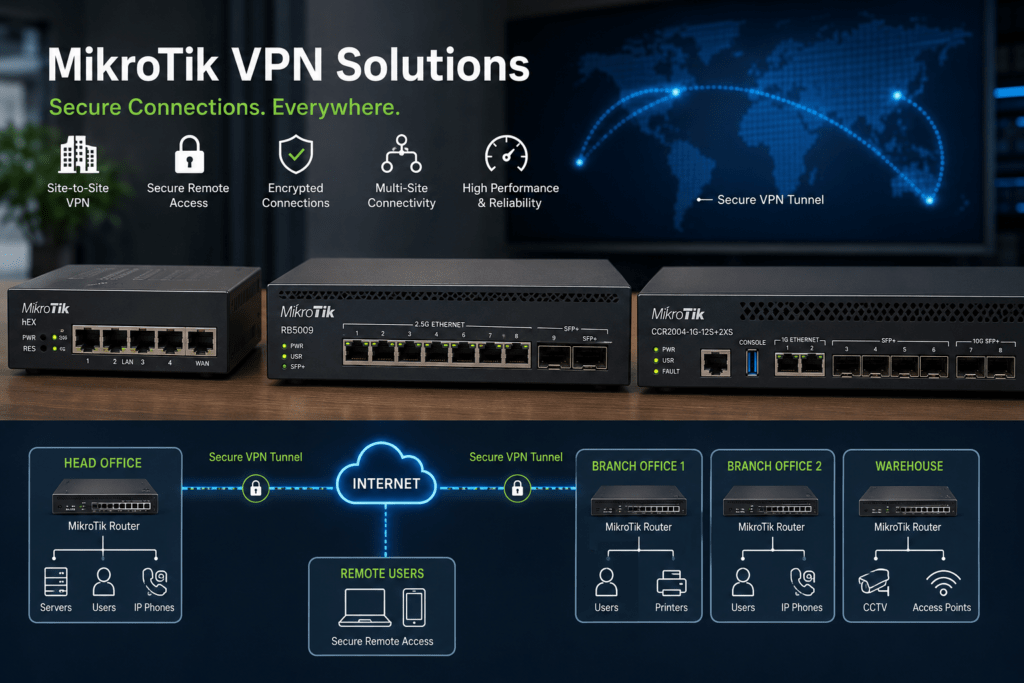
MikroTik VPN solutions help businesses securely connect offices, branches, remote employees and other locations across the internet. Instead of operating every site as an isolated network, organizations can create secure connections that allow authorized users and systems to communicate between locations.
MikroTik RouterOS supports several VPN technologies that can form part of remote-access and site-to-site network designs. Combined with suitable MikroTik routers, businesses can create flexible connectivity for small offices, growing organizations and multi-location operations.
At Supreme Networks, we supply MikroTik routers and networking equipment for businesses in Nairobi and across Kenya. Whether you need to connect two offices or develop a wider branch network, we can help you select hardware based on your internet speed, VPN traffic and network requirements.
Need to connect multiple locations? Contact Supreme Networks for MikroTik router availability, pricing and quotations.
Why Businesses Need VPN Connectivity
Modern organizations do not always operate from one building.
A company may have:
- Head office
- Branch offices
- Warehouses
- Retail locations
- Remote employees
- Server locations
- Project sites
Each location may require access to shared business resources.
Without suitable connectivity, these networks operate independently.
A VPN can create an encrypted connection across an existing internet connection.
For example:
Head Office ⇄ Secure VPN ⇄ Branch Office
This allows approved network traffic to travel between locations without requiring the organizations to expose internal services directly to the public internet.
What Is a Site-to-Site VPN?
A site-to-site VPN connects two networks rather than simply connecting one user.
Consider a company with offices in two locations.
Office A
Computers | Printers | Servers
↓
MikroTik Router
↓
Encrypted VPN
↓
↓
Computers | Printers | Systems
Office B
Once correctly configured, authorized resources can communicate between the locations according to network policies.
Employees do not necessarily need to manually establish a VPN connection every time they work.
The routers maintain the site-to-site connection.
Connect Head Office and Branches
Branch connectivity is one of the strongest applications for MikroTik VPN solutions.
For example, a Nairobi head office may need to communicate with branches in other parts of Kenya.
A typical design could use:
Branch A ↘
Branch B → Head Office
Branch C ↗
Each branch can use its own internet connection while establishing secure connectivity to the central network.
This can help organizations centralize selected business resources.
Connect Warehouses to the Main Office
Warehouses often need access to systems hosted at the main office or another location.
These may include:
- Inventory systems
- ERP platforms
- Shared applications
- File servers
- Business databases
- Network management
A site-to-site VPN can provide secure communication between the warehouse and the main network.
For example:
Warehouse → MikroTik Router ⇄ VPN ⇄ MikroTik Router → Head Office
This can provide a more structured solution than exposing internal applications directly to the internet.
Connect Retail Branches
Businesses operating multiple shops or outlets can also use VPN connectivity.
A central office may need access to:
- POS systems
- Inventory systems
- Business applications
- Network devices
- Branch servers
Each location can maintain its own local network while communicating with authorized central services.
This creates a scalable structure as additional branches are opened.
Secure Remote Employee Access
Not every user works from a branch office.
Employees may need access while:
- Working from home
- Travelling
- Visiting customer sites
- Working remotely
- Providing technical support
Remote-access VPNs can provide a controlled path into the business network.
A simplified connection looks like:
Remote Employee → Internet → Secure VPN → MikroTik Router → Authorized Resources
The user should only receive access to the resources required for their role.
VPN Is More Than Remote Desktop
VPN and remote desktop are sometimes confused.
They solve different problems.
A VPN creates secure network connectivity between a user or remote network and another network.
Remote desktop allows a user to control a computer remotely.
In some environments, both technologies may be used together.
For example:
Remote User → VPN → Business Network → Remote Desktop → Office Computer
This prevents the remote desktop service from being unnecessarily exposed directly to the internet.
MikroTik RouterOS VPN Options
RouterOS supports several VPN technologies.
Depending on RouterOS version, equipment and requirements, available technologies can include:
- WireGuard
- IPsec
- L2TP
- SSTP
- OpenVPN
- Other supported tunnelling options
The best protocol depends on factors such as:
- Device compatibility
- Security requirements
- Performance
- Network design
- Client operating systems
- Remote-access requirements
There is no single VPN protocol that is automatically the best choice for every organization.
WireGuard for Modern VPN Connectivity
WireGuard has become a popular VPN technology because of its relatively simple architecture and modern cryptographic design.
RouterOS supports WireGuard, allowing suitable MikroTik routers to form part of WireGuard deployments.
Potential applications include:
- Remote employee access
- Site-to-site connectivity
- Administrator access
- Branch networking
However, successful deployment still requires correct routing, firewall policies and key management.
IPsec for Site-to-Site Connectivity
IPsec is widely used for encrypted network connections.
It can be useful when connecting:
Office ⇄ Office
or
Business ⇄ Data Centre
IPsec can also provide interoperability with networking equipment from other manufacturers when compatible configurations are used.
This can be useful when one site uses MikroTik while another uses a different networking platform.
Choose the Router Based on VPN Traffic
One of the most important considerations is performance.
Encryption requires processing power.
Therefore, router selection should consider:
- Number of VPN users
- Number of branch tunnels
- Internet speed
- Expected VPN throughput
- Encryption requirements
- Firewall workload
- Routing workload
- Other services running on the router
A router that handles normal internet traffic comfortably may provide lower throughput when processing encrypted VPN traffic.
Small Office VPN Networks
A small organization connecting two locations may not require high-end routing hardware.
For example:
Office A → MikroTik Router ⇄ VPN ⇄ MikroTik Router ← Office B
If the internet connections and VPN traffic are modest, suitable entry-level or mid-range MikroTik routers may meet the requirement.
However, equipment should still be selected according to expected traffic rather than simply the number of employees.
MikroTik hEX for Smaller Branches
Selected MikroTik hEX models can be useful for smaller wired branch networks.
For example:
Internet → hEX → Switch → Branch Users
The router can provide internet connectivity while also participating in the organization’s VPN architecture.
Wireless access can then be provided through separate access points where required.
MikroTik L009 for Growing Branch Networks
The MikroTik L009 can provide another option for businesses requiring more flexible routing and connectivity.
It may suit:
- Branch offices
- Growing business networks
- Multi-VLAN environments
- VPN connectivity
- Managed networks
The exact suitability depends on internet speed, encryption workload and other RouterOS services.
RB5009 for Higher-Performance VPN Networks
Businesses with faster internet connections or greater VPN requirements can consider the MikroTik RB5009.
Its connectivity and performance make it an attractive option for:
- Head offices
- Larger branches
- Multi-site networks
- Faster VPN connectivity
- Business gateways
- VLAN networks
For more demanding environments, MikroTik Cloud Core Router platforms can provide additional capacity.
Connect More Than Two Locations
A multi-site network may contain many branches.
For example:
Branch 1
↓
Branch 2 → Head Office ← Branch 3
↓
Branch 4
The network architecture should be planned before adding large numbers of tunnels.
Important considerations include:
- IP addressing
- Routing
- Firewall policies
- Bandwidth
- Redundancy
- VPN topology
- Network monitoring
Good planning prevents the network from becoming unnecessarily complicated as new locations are added.
Avoid Overlapping IP Addresses
One common problem when connecting previously independent networks is duplicate IP addressing.
For example:
Head Office: 192.168.1.0/24
Branch Office: 192.168.1.0/24
Both sites use the same subnet.
This can complicate routing between them.
Therefore, organizations planning multi-site connectivity should develop a structured IP-addressing plan.
For example:
Head Office → 10.10.10.0/24
Branch 1 → 10.10.20.0/24
Branch 2 → 10.10.30.0/24
Branch 3 → 10.10.40.0/24
A clear addressing structure makes future expansion easier.
Use VLANs Within Branch Networks
A branch does not necessarily need to operate as one flat network.
It may contain:
Staff | Guests | CCTV | VoIP
VLANs can separate these services.
The VPN can then be configured to carry only the traffic that needs to communicate with other sites.
For example, head office employees may need access to branch business systems without requiring access to guest Wi-Fi.
This provides greater network control.
Don’t Send Everything Through the VPN
Not every internet request from a branch needs to travel through head office.
For example, a branch employee visiting a public website may use the branch’s local internet connection.
Meanwhile, traffic intended for an internal head-office server can travel through the VPN.
This is one reason network routing should be designed around actual requirements.
Sending unnecessary traffic through a VPN can consume bandwidth and increase latency.
VPN and Dual-WAN Connectivity
Businesses that depend heavily on branch connectivity may also need internet redundancy.
A branch could have:
Primary ISP + Backup ISP → MikroTik Router
If the primary connection fails, the backup connection can help maintain internet availability.
However, VPN failover also needs to be considered.
The network should determine how tunnels reconnect or reroute when the WAN connection changes.
Protect VPN Access with Firewall Policies
Creating a VPN does not mean every remote device should have unrestricted access to the entire network.
Firewall policies can limit access according to business requirements.
For example:
Remote Employee → Business Application
may be allowed.
However:
Remote Employee → CCTV Network
may not be necessary.
Access should follow the principle of providing users with the network resources required for their work.
Consider Your Internet Upload Speed
VPN performance depends on both ends of the connection.
Suppose a branch has:
100 Mbps download
but only:
10 Mbps upload
Traffic leaving that branch toward head office may be limited by the available upload bandwidth.
Therefore, internet package specifications matter when designing site-to-site connectivity.
A faster router cannot compensate for an undersized internet connection.
Latency Also Matters
Bandwidth is not the only consideration.
Distance and internet routing can introduce latency between locations.
This can affect applications that require frequent communication between client devices and central servers.
Before moving business applications across a VPN, consider how they behave over wide-area connections.
Some applications tolerate latency better than others.
Monitor Your VPN Connections
Multi-site networks should be monitored.
Administrators may need visibility into:
- Tunnel status
- Internet availability
- Bandwidth utilization
- Router CPU usage
- Packet loss
- Latency
- Branch connectivity
Monitoring helps identify whether a problem originates from the VPN, router, internet connection or remote network.
Document Your Multi-Site Network
Documentation becomes increasingly important as more branches are added.
Maintain records of:
- IP addressing
- VPN endpoints
- VLANs
- Router models
- ISP connections
- Firewall policies
- Branch locations
- Network diagrams
Good documentation makes troubleshooting and future expansion much easier.
Plan for Business Growth
Imagine starting with:
Head Office + 1 Branch
Later, the business expands to:
Head Office + 8 Branches + Warehouse + Remote Employees
The network architecture should be able to grow without requiring a complete redesign.
Therefore, plan:
- IP addressing
- Router capacity
- VPN topology
- Firewall policies
- Internet redundancy
- Monitoring
before the network becomes complicated.
How to Plan Your MikroTik VPN Network
Before selecting MikroTik routers, determine:
- How many locations need to connect?
- What are the internet speeds at each location?
- How much traffic will cross the VPN?
- How many remote employees require access?
- Which business systems need to communicate?
- Do locations use different IP subnets?
- Are VLANs required?
- Is dual-WAN connectivity required?
- What VPN technology will be used?
- What level of redundancy is required?
- Will the number of branches increase?
- Who will manage the network?
These answers provide a better foundation for selecting equipment.
MikroTik VPN Solutions for Businesses in Kenya
Supreme Networks supplies MikroTik VPN solutions and networking equipment for businesses with offices, branches and remote locations in Nairobi and across Kenya.
Our MikroTik networking range can include:
- hEX routers
- L009 routers
- RB5009 routers
- Cloud Core Routers
- Managed switches
- Wireless access points
- Fiber networking equipment
- SFP and SFP+ connectivity
Whether you need to connect two offices or build a larger multi-branch network, the router should match your internet speed, VPN traffic and future expansion requirements.
Bring Your Business Locations Together
Your branches should not have to operate like completely separate businesses simply because they are in different locations.
With suitable MikroTik routers and a properly designed VPN architecture, you can create secure connectivity between offices, warehouses, remote employees and other business sites.
Contact Supreme Networks for MikroTik VPN routers and multi-site networking solutions in Nairobi and across Kenya.
Tell us your number of locations, internet speeds, current routers and what resources need to communicate between sites, and we can help you identify suitable MikroTik equipment.