
Power More Devices with MikroTik PoE Networking
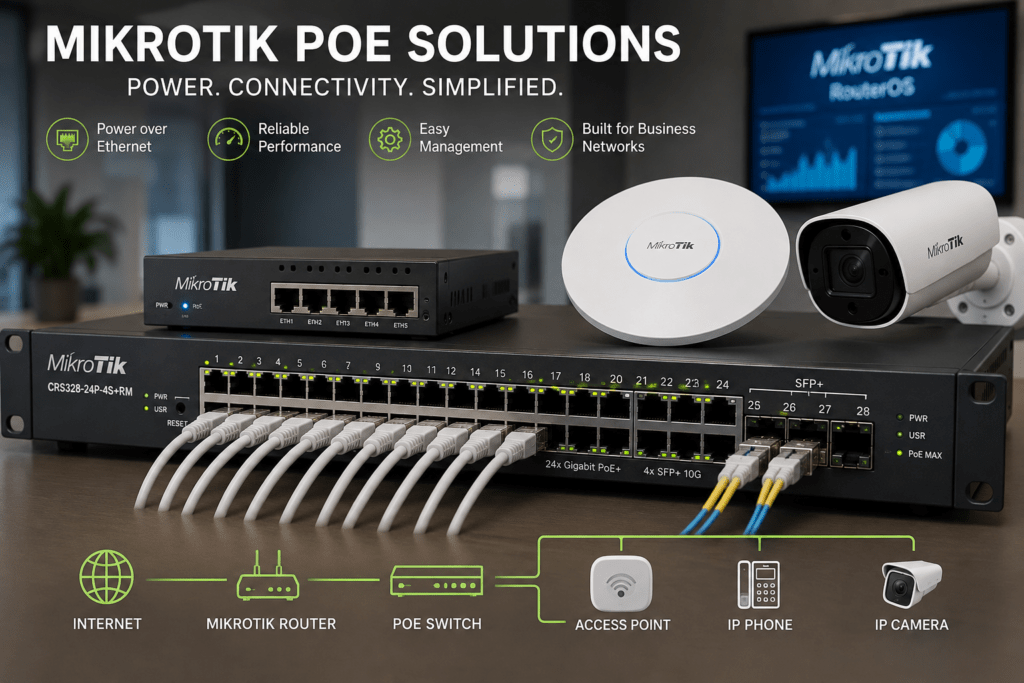
MikroTik PoE solutions make it easier to power and connect compatible network devices through Ethernet cabling. From wireless access points and IP cameras to wireless radios and VoIP phones, PoE can reduce separate power connections while creating cleaner and more manageable network installations.
MikroTik provides PoE-capable switches, routers and networking equipment for offices, CCTV systems, wireless networks, ISPs and WISPs. However, choosing the right equipment requires more than counting Ethernet ports. You also need to consider PoE standards, voltage, power consumption and the total power budget.
At Supreme Networks, we supply MikroTik PoE networking equipment to businesses, installers, ISPs and organizations in Nairobi and across Kenya. Whether you need to power a few access points or build a larger managed PoE network, we can help you identify suitable equipment for your application.
Need MikroTik PoE equipment? Contact Supreme Networks for current pricing, availability and a quotation based on the devices you need to power.
What Is PoE and Why Does It Matter?
Power over Ethernet, commonly known as PoE, allows compatible network devices to receive electrical power through Ethernet cabling.
Traditionally, a network device may require two separate connections:
Ethernet cable → Network connectivity
Power adapter → Electrical power
With PoE, a suitable network cable can carry network data and provide power to a compatible device.
A basic installation may therefore look like:
PoE Switch → Ethernet Cable → Powered Device
As a result, installers can place network devices in locations where electrical sockets may not be conveniently available.
What Can You Power with PoE?
PoE has become important because modern networks contain many devices that need both power and network connectivity.
Depending on compatibility, PoE can be used with:
- Wireless access points
- IP CCTV cameras
- VoIP phones
- Wireless radios
- Intercom devices
- Network controllers
- Other compatible Ethernet devices
However, the presence of an Ethernet port does not automatically mean a device supports PoE.
Always check the specifications before connecting power.
Why Use MikroTik PoE Solutions?
MikroTik provides networking equipment that can help businesses and service providers combine routing, switching, connectivity and PoE within the same infrastructure.
Depending on the model, MikroTik equipment can provide features such as:
- PoE input
- PoE output
- Gigabit Ethernet
- Managed switching
- VLAN support
- SFP connectivity
- SFP+ connectivity
- RouterOS or SwOS management
This flexibility makes MikroTik PoE solutions useful across several network environments.
Power Your Wi-Fi Access Points
Wireless access points are one of the most common applications for PoE.
Professional Wi-Fi equipment is often installed on ceilings or walls to improve wireless coverage. Unfortunately, these locations may not have nearby electrical sockets.
PoE provides a practical alternative.
For example:
MikroTik Router → PoE Switch → Wireless Access Points
Ethernet cabling runs from the network cabinet to each compatible access point.
Therefore, the access point receives its network connection and power without requiring a separate power adapter beside it.
Build Better Office Wi-Fi
A small office may work with one wireless router. However, larger offices often require several access points.
For example, separate access points may provide coverage for:
Reception | Offices | Meeting Rooms | Corridors | Warehouses
A central PoE switch can make this type of deployment easier to manage.
Moreover, the switch can connect the access points to the router and the rest of the business network.
If the network uses VLANs, staff and guest wireless traffic can also be separated where required.
Power IP Cameras with PoE
IP CCTV is another major use case for PoE.
Instead of installing an electrical socket beside every compatible camera, a PoE switch can provide both connectivity and power through network cabling.
A typical installation could use:
IP Cameras → PoE Switch → NVR / Network
This can simplify CCTV installations in:
- Offices
- Warehouses
- Schools
- Hotels
- Retail shops
- Compounds
- Residential developments
For larger CCTV networks, multiple PoE switches can serve different sections of the property.
Combine Fiber and PoE for Larger Sites
Large sites may require cameras or access points far from the main network cabinet.
In this situation, fiber and PoE can work together.
For example:
Core Network → Fiber → Remote PoE Switch → Cameras / Access Points
The fiber carries network traffic between locations. Meanwhile, the remote switch supplies Ethernet connectivity and power to nearby devices.
This architecture can work particularly well for campuses, hotels, warehouses and large compounds.
Use PoE for Wireless ISP Equipment
ISPs and WISPs often install networking equipment on rooftops, towers and other remote locations.
Running separate data and power cables can make these installations more complicated.
Therefore, compatible PoE equipment can simplify connectivity to wireless infrastructure.
A WISP installation may use:
MikroTik Router → PoE Switch → Wireless Equipment
However, wireless networking equipment can have specific power requirements.
Always confirm voltage and PoE compatibility before connecting devices.
Understand PoE-In and PoE-Out
When comparing MikroTik equipment, you will frequently encounter the terms PoE-in and PoE-out.
They mean different things.
What Is PoE-In?
PoE-in means that a compatible MikroTik device can receive power through an Ethernet connection.
Therefore, the device itself can potentially operate without a separate power adapter at its installation point, depending on its supported power options.
What Is PoE-Out?
PoE-out means that a compatible device can provide power through an Ethernet port to another supported device.
For example:
MikroTik Device with PoE-Out → Ethernet → Compatible Access Point
However, available PoE-out capabilities differ between MikroTik models.
Always check the specifications of the exact product.
Passive PoE vs Standard PoE
This is one of the most important areas to understand when building a PoE network.
Not every device marked PoE uses exactly the same method of delivering power.
Some networking equipment can use passive PoE. Meanwhile, other devices use standards such as IEEE 802.3af or 802.3at.
These technologies should not automatically be treated as interchangeable.
Before connecting equipment, confirm:
- Supported PoE method
- Input voltage
- Output voltage
- Maximum power
- Device compatibility
Checking these specifications before installation can prevent connection problems and possible equipment damage.
Don’t Choose a PoE Switch by Port Count Alone
Imagine that you need to connect eight IP cameras.
It may seem logical to simply buy an eight-port PoE switch.
However, there is another important specification:
PoE power budget.
A switch can have enough physical ports but still lack sufficient power for all connected devices.
Therefore, always consider both:
Number of PoE ports + Available PoE power
This becomes increasingly important as the number and power requirements of connected devices increase.
Calculate Your PoE Power Budget
Suppose your network has:
4 access points × 12W = 48W
and
4 cameras × 10W = 40W
The theoretical combined requirement is:
48W + 40W = 88W
Therefore, the PoE source needs sufficient capacity for the connected equipment.
In practice, it is also sensible to leave reasonable headroom rather than operating continuously at the absolute power limit.
This provides flexibility if additional devices are introduced later.
Plan for Future Devices
Business networks rarely remain unchanged.
Today, you may have four access points. Next year, you may need six.
Similarly, a CCTV installation may expand from eight cameras to twelve.
Therefore, when selecting a MikroTik PoE switch, consider:
- Current devices
- Expected expansion
- Available ports
- Remaining PoE budget
- Required uplink capacity
A little spare capacity can make future expansion significantly easier.
MikroTik PoE Switches
MikroTik offers several switch families that can fit PoE networking requirements.
Depending on the model, these switches can combine PoE with managed switching and fiber connectivity.
This makes them useful for networks that need more than basic power delivery.
For example, a business may require:
PoE + VLANs + Gigabit Ethernet + Fiber Uplink
Rather than using separate equipment for each requirement, a suitable managed PoE switch can provide several functions within the network.
MikroTik CRS112 for Compact PoE Deployments
The MikroTik CRS112-8P-4S-IN is one model that can be considered where PoE-capable Ethernet ports and SFP connectivity are required.
Potential applications include:
- Wireless deployments
- CCTV networks
- Small business networks
- Remote network cabinets
- WISP infrastructure
Its suitability still depends on the power requirements of the devices being connected.
Therefore, check the complete specifications before deployment.
MikroTik CRS328 for Larger Networks
When more powered devices are required, selected models within the MikroTik CRS328 family provide options for higher-density networking.
These can suit environments with multiple:
- Wireless access points
- IP cameras
- IP phones
- Other network devices
For example, an office could use one central PoE switch to serve wireless and voice infrastructure across several areas.
A larger port count also provides more room for expansion.
PoE for Business Networks
A modern office may have several systems sharing the same network infrastructure.
For example:
Internet
↓
MikroTik Router
↓
Managed PoE Switch
↓
Wi-Fi | CCTV | VoIP | Other Devices
Computers, printers and servers can also connect through the same switching infrastructure where appropriate.
VLANs can then separate different types of traffic.
This creates a more organized network than operating separate unmanaged systems for each service.
PoE for Hotels
Hotels can have large numbers of network devices distributed throughout a building.
These may include:
- Wireless access points
- CCTV cameras
- IP phones
- Intercom equipment
- Other compatible network devices
PoE switches can serve different floors or sections of the hotel.
Meanwhile, fiber or high-speed Ethernet uplinks can connect those switches to the network core.
This provides a scalable architecture for larger hospitality networks.
PoE for Schools and Campuses
Schools can also benefit from centralized PoE networking.
For example, a campus may require connectivity for:
- Classroom access points
- Office access points
- CCTV cameras
- IP phones
- Wireless links
Separate PoE switches can serve different buildings.
Fiber can then connect those buildings back to a central network.
As a result, the campus can expand without requiring every network device to connect directly to one switch.
PoE for Warehouses
Warehouses often require network equipment in areas where power outlets are not conveniently located.
PoE can help connect devices such as:
- Wireless access points
- CCTV cameras
- Network terminals
- Other compatible equipment
However, warehouses can also present challenges involving long cable routes and physical obstacles.
Therefore, network design should consider device placement, cabling distance and the location of network cabinets.
Centralize Your Network Power
One major advantage of PoE is centralized power management.
Instead of having individual power adapters distributed around a building, powered devices can depend on switches located in controlled network cabinets.
This also makes it easier to introduce backup power.
For example:
UPS → MikroTik PoE Switch → Access Points / Cameras
During a short power interruption, a correctly sized UPS can continue powering the switch and its connected devices.
The actual backup time will depend on the UPS capacity and total electrical load.
Don’t Forget the UPS
A PoE switch may power several critical devices simultaneously.
If that switch loses power, all those devices can go offline at once.
Therefore, businesses should consider suitable backup power for critical PoE infrastructure.
The UPS should be selected according to:
- PoE switch consumption
- Connected device load
- Router load
- Other network equipment
- Required backup time
For larger networks, power planning should form part of the overall network design.
Network Cabling Matters
PoE relies on the Ethernet cabling between the switch and the powered device.
Poor-quality cable, incorrect termination or unsuitable installation practices can create both connectivity and power problems.
Therefore, use appropriate network cable and proper structured cabling practices.
For new installations, also consider the data speed the cabling needs to support.
The best PoE switch cannot compensate for poor network cabling.
Don’t Ignore the Switch Uplink
A PoE switch does more than supply power.
It also carries network traffic.
For example, a switch serving several high-resolution IP cameras and access points may carry substantial amounts of data.
Therefore, check whether the uplink provides enough network capacity.
Depending on the deployment, you may require:
- Gigabit Ethernet
- SFP
- SFP+
- 10 Gigabit uplinks
This becomes particularly important in larger networks.
When Fiber Uplinks Make Sense
Fiber can be useful when the PoE switch is installed far from the main network.
For example:
Main Building → Fiber → Gatehouse PoE Switch
The remote switch can then power cameras and access points around the gatehouse.
Fiber can also help connect network equipment between different buildings where conventional Ethernet distances become impractical.
Build a Scalable PoE Network
Rather than treating PoE as simply a way to power individual devices, consider it as part of the complete network architecture.
A scalable design could use:
Internet → Router → Core Switch → PoE Access Switches → Powered Devices
This approach separates the network into logical layers.
As the organization grows, additional PoE access switches can be introduced without redesigning the entire network.
How to Choose the Right MikroTik PoE Solution
Before buying MikroTik PoE equipment, determine:
- Which devices require PoE?
- How many devices will connect?
- What PoE method does each device support?
- What voltage is required?
- How much power does each device consume?
- What total PoE budget is required?
- How many Ethernet ports are needed?
- Do you need VLAN support?
- Do you require SFP or SFP+?
- Will the network expand?
- Is fiber required between locations?
- Will the PoE equipment require UPS backup?
These questions can quickly narrow down suitable equipment.
Common PoE Mistakes to Avoid
PoE installations can become problematic when equipment is selected without checking the complete requirements.
Avoid:
- Assuming every PoE device is compatible
- Ignoring voltage requirements
- Selecting switches by port count alone
- Ignoring the total PoE budget
- Forgetting uplink capacity
- Using poor-quality Ethernet cabling
- Leaving no room for expansion
- Ignoring backup power
Good planning can prevent many of these problems before installation begins.
MikroTik PoE Solutions for Networks in Kenya
Supreme Networks supplies MikroTik PoE solutions for businesses, CCTV installers, ISPs, WISPs, schools, hotels and organizations in Nairobi and across Kenya.
Our MikroTik networking range can include:
- MikroTik PoE switches
- CRS PoE switches
- PoE-capable routers
- Managed switches
- Wireless networking equipment
- SFP and SFP+ connectivity
- Fiber networking equipment
- PoE networking accessories
Specific models and availability can vary. Therefore, contact us for current stock and pricing.
Power Your Network the Smarter Way
PoE can make network installations cleaner, easier to expand and simpler to manage. However, the correct solution depends on more than the number of ports.
You need to consider device compatibility, voltage, power consumption, total PoE budget, network capacity and future expansion.
At Supreme Networks, we can help you identify suitable MikroTik PoE equipment based on what you intend to connect.
Contact Supreme Networks for MikroTik PoE switches, networking equipment and quotations in Nairobi and across Kenya.
Tell us the devices you want to power, their quantity and PoE requirements, and we can help you choose the right MikroTik solution.