
MikroTik Networking Solutions for Business, Enterprise & ISPs
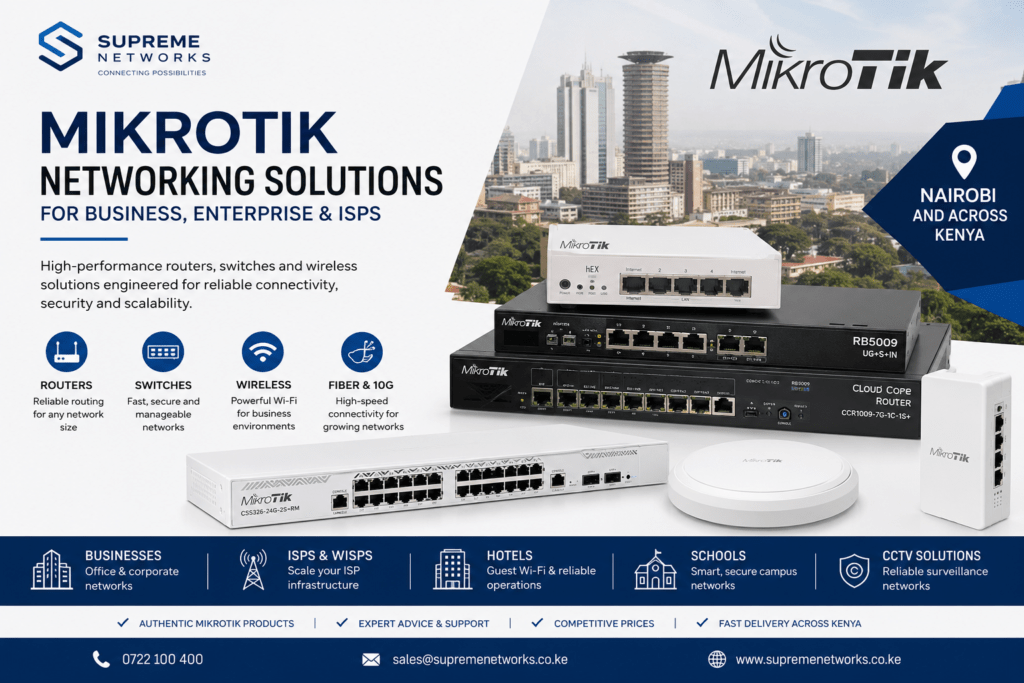
Building a reliable network starts with choosing equipment that matches your users, traffic, applications and future growth. MikroTik networking solutions provide businesses, ISPs, WISPs and institutions with flexible options for routing, switching, wireless connectivity, fiber networking and network management.
At Supreme Networks, we supply MikroTik routers, managed switches, wireless devices and networking accessories to customers in Nairobi and across Kenya. Whether you are upgrading an office network, building an ISP infrastructure or deploying a multi-site network, we can help you identify MikroTik equipment that fits the application.
Looking for MikroTik equipment for your network? Contact Supreme Networks for product availability, quotations and assistance choosing the right solution.
Why Choose MikroTik for Your Network?
MikroTik offers networking hardware for everything from small office installations to demanding enterprise and service-provider networks.
One of its main advantages is the broad range of products available within the same networking ecosystem. Therefore, businesses can combine routers, managed switches, wireless equipment and fiber connectivity as their networks grow.
MikroTik solutions can be used in:
- Business and corporate networks
- ISP and WISP infrastructure
- Hotels and hospitality networks
- Schools and campus networks
- CCTV surveillance networks
- Apartments and residential developments
- Warehouses and industrial facilities
- Retail businesses
- Branch networks
- Server and data environments
- Public Wi-Fi and hotspot deployments
However, the correct MikroTik product depends on the network requirements. A router suitable for a small office may not provide the performance required by an ISP or a large organization.
MikroTik Routers for Different Network Requirements
The router sits at the heart of many networks. It manages traffic between the internet, local devices and other networks.
MikroTik provides routers for small offices, businesses, enterprises and internet service providers.
Popular MikroTik router families include:
- hEX Series
- hAP Series
- L009 Series
- RB5009 Series
- RB4011 Series
- Chateau Series
- Cloud Core Router (CCR) Series
For example, the MikroTik L009 can suit businesses looking for flexible routing and connectivity without moving immediately into higher-end enterprise hardware.
The RB5009 series provides a step up for networks that need higher performance, multi-gigabit connectivity and additional expansion options.
Meanwhile, MikroTik’s CCR series targets demanding routing environments such as enterprise networks and ISP infrastructure.
When selecting a router, consider internet speed, network traffic, users, VPN requirements, Ethernet interfaces, SFP/SFP+ connectivity and expected growth.
MikroTik Switching for Growing Networks
As a network expands, switches connect computers, wireless access points, IP phones, servers, CCTV cameras and other Ethernet devices.
MikroTik provides managed switching solutions ranging from compact desktop models to high-capacity rackmount switches with fiber and 10 Gigabit connectivity.
Two important MikroTik switch families are CRS and CSS.
Cloud Router Switch (CRS) products combine advanced switching features with the flexibility available on supported RouterOS configurations.
Cloud Smart Switch (CSS) products focus primarily on switching and use MikroTik’s SwOS platform.
Depending on the model, MikroTik switches can provide:
- Gigabit Ethernet
- Power over Ethernet
- SFP fiber connectivity
- SFP+ 10 Gigabit connectivity
- VLAN support
- Network management
- High-speed uplinks
- Rackmount installation
These capabilities make MikroTik switching suitable for both traditional business LANs and more specialized network environments.
Power Your Network with MikroTik PoE
Power over Ethernet can simplify installations by allowing compatible devices to receive power through Ethernet cabling.
Selected MikroTik routers and switches provide PoE capabilities for compatible network equipment.
A typical deployment might look like:
Internet → MikroTik Router → PoE Switch → Access Points / IP Cameras / Other Network Devices
This approach can reduce the need for separate power adapters near every endpoint.
However, PoE compatibility is important. Always check the required voltage, PoE standard, port output and total power budget before connecting equipment.
For larger installations, calculating the total PoE requirement before choosing a switch can prevent power limitations later.
MikroTik Wireless Solutions for Business Connectivity
Reliable Wi-Fi has become essential for offices, hotels, schools, restaurants, warehouses and other organizations.
MikroTik provides wireless products for both indoor and outdoor deployments. Depending on the model, these solutions can support modern Wi-Fi standards, dual-band connectivity and centralized network management.
MikroTik wireless solutions can be used for:
- Office Wi-Fi
- Hotel guest networks
- School and campus Wi-Fi
- Public hotspots
- Warehouse connectivity
- Outdoor wireless coverage
- Point-to-point wireless links
- Point-to-multipoint networks
- WISP deployments
For larger environments, careful access point placement and capacity planning are just as important as selecting the access point itself.
Build and Scale ISP Networks with MikroTik
MikroTik has a strong presence in ISP and WISP networking because RouterOS provides extensive routing and network-management capabilities.
Service providers may use MikroTik equipment for:
- Internet gateways
- Advanced routing
- VLAN management
- PPPoE services
- Bandwidth management
- Quality of Service
- Firewall policies
- VPN connectivity
- Fiber uplinks
- Network monitoring
- Subscriber networks
- Redundant network designs
A smaller ISP may have very different hardware requirements from a provider carrying large amounts of traffic.
Therefore, router selection should consider subscriber numbers, internet capacity, routing requirements, concurrent traffic and expected growth.
As requirements increase, networks can move toward higher-performance CCR routers and high-capacity CRS switches.
MikroTik Fiber Networking for Faster Infrastructure
Fiber connectivity is increasingly important for organizations that need fast network backbones, longer transmission distances or connectivity between buildings.
Many MikroTik routers and switches include SFP or SFP+ interfaces.
SFP interfaces can provide fiber or compatible copper connectivity depending on the module and device. SFP+ interfaces are commonly used for higher-speed links, including 10 Gigabit Ethernet.
MikroTik fiber solutions can be useful for:
- Building-to-building connectivity
- ISP infrastructure
- Campus networks
- Server rooms
- Network cabinets
- Enterprise backbones
- Data environments
- Long-distance network links
The correct fiber installation should match the switch or router, transceiver type, fiber cable and required distance.
Move Beyond Gigabit with MikroTik 10G Networking
Gigabit Ethernet remains suitable for many endpoints. However, network backbones can require considerably more bandwidth.
Servers, network storage, virtualization environments, high-capacity wireless networks and ISP infrastructure can all generate traffic that makes faster uplinks beneficial.
MikroTik provides routers and switches with SFP+ and other high-speed interfaces suitable for 10 Gigabit network designs.
Rather than replacing every Gigabit connection, businesses can deploy 10GbE strategically.
For example:
Internet Gateway → 10G Core Switch → Access Switches → Users
Servers and storage systems can also connect directly to the high-speed core where required.
This approach provides additional backbone capacity while allowing standard Gigabit devices to remain connected at the network edge.
RouterOS: The Intelligence Behind MikroTik Networks
Hardware is only part of the MikroTik ecosystem.
Many MikroTik RouterBOARD devices run RouterOS, which provides a wide range of networking features.
Depending on the hardware and configuration, RouterOS can support:
- Routing
- VLANs
- Firewall management
- VPNs
- Quality of Service
- Bandwidth control
- Network monitoring
- Failover
- Multiple internet connections
- Hotspot functionality
- Traffic management
This flexibility allows MikroTik equipment to serve very different network environments.
However, configuration should always follow the actual network requirements. Adding unnecessary complexity can make a network more difficult to maintain.
MikroTik Solutions for Office Networks
Business networks have evolved beyond simply connecting a few computers to the internet.
Modern offices may have computers, wireless access points, printers, servers, IP phones, CCTV cameras and cloud-connected devices sharing the same infrastructure.
A typical MikroTik office network could follow this structure:
Internet → MikroTik Router → Managed Switch → PCs / Access Points / Servers / Printers / IP Phones
VLANs can then separate different services where necessary.
For example, an organization may separate:
- Staff network
- Guest Wi-Fi
- CCTV network
- VoIP network
- Server network
This improves network organization and creates a better foundation for future expansion.
MikroTik for CCTV and IP Surveillance Networks
Modern CCTV systems depend heavily on network infrastructure.
High-resolution IP cameras continuously transmit data to network video recorders, servers or monitoring systems. Therefore, poor network design can affect surveillance performance.
MikroTik routers and switches can form part of an IP CCTV network connecting cameras, recorders and monitoring equipment.
When planning a surveillance network, consider:
- Number of cameras
- Camera resolution
- Required bandwidth
- PoE requirements
- Switch capacity
- Fiber uplinks
- Network segmentation
- Recording infrastructure
- Remote connectivity
- Future camera expansion
Large installations may also benefit from managed switching and fiber connectivity between buildings or network cabinets.
Smarter Networks for Hotels and Hospitality
Hotels need connectivity for both guests and internal business operations.
A well-designed network can separate guest internet access from administrative systems, CCTV, VoIP and other operational services.
MikroTik equipment can form part of a hotel network that includes:
Internet Gateway → Router → Core Switch → Access Switches → Wi-Fi / CCTV / Offices / VoIP
Bandwidth management can also help distribute available internet capacity more effectively among users.
Furthermore, VLANs can provide logical separation between different network services.
Reliable Networking for Schools and Campuses
Schools, universities and training institutions often need to connect many different areas.
These can include classrooms, laboratories, administration offices, libraries, computer rooms, CCTV systems and wireless access points.
MikroTik equipment can form part of a scalable campus network using managed switching, VLANs, wireless connectivity and fiber backbones.
As the institution grows, additional buildings and users can be incorporated into the network without redesigning everything from the beginning.
Choosing the Right MikroTik Equipment
A common mistake is selecting networking hardware based only on price or port count.
Instead, start with the requirements.
Before choosing MikroTik equipment, consider:
- What is your internet speed?
- How many users will connect?
- How many network devices are required?
- Do you need PoE?
- Do you require SFP or SFP+?
- Is Gigabit Ethernet sufficient?
- Will you require 2.5G or 10G connectivity?
- Do you need VLANs?
- Will the router handle VPN traffic?
- How much wireless coverage is required?
- Will the network expand?
- Are you connecting multiple buildings?
Answering these questions makes it easier to choose between MikroTik product families.
For example, a small office and an ISP should not automatically use the same router simply because both have a 1Gbps internet connection. Their traffic patterns, users and networking requirements can be very different.
Find the Right MikroTik Solution for Your Network
There is no single MikroTik router, switch or wireless device that is best for every network.
The right solution depends on what you are trying to build.
At Supreme Networks, we supply MikroTik networking equipment for customers in Nairobi and across Kenya, including solutions for business networks, ISPs, WISPs, schools, hotels, CCTV networks and other organizations.
Our MikroTik product range includes routers, managed switches, wireless devices, fiber networking equipment and related accessories.
Whether you are starting a new network or upgrading an existing installation, choosing equipment with the correct performance and expansion capabilities can reduce unnecessary replacements later.
Need Help Choosing Your MikroTik Equipment?
Choosing between an L009, RB5009, CCR router, CRS switch or MikroTik wireless solution can be difficult when several models appear to meet the same requirement.
Supreme Networks can help you evaluate your network based on users, internet capacity, interfaces, PoE requirements, fiber connectivity and expected growth.
Contact Supreme Networks today for MikroTik product availability, pricing, quotations and networking solutions in Nairobi and across Kenya.