
Connect Buildings and Remote Sites with MikroTik Fiber
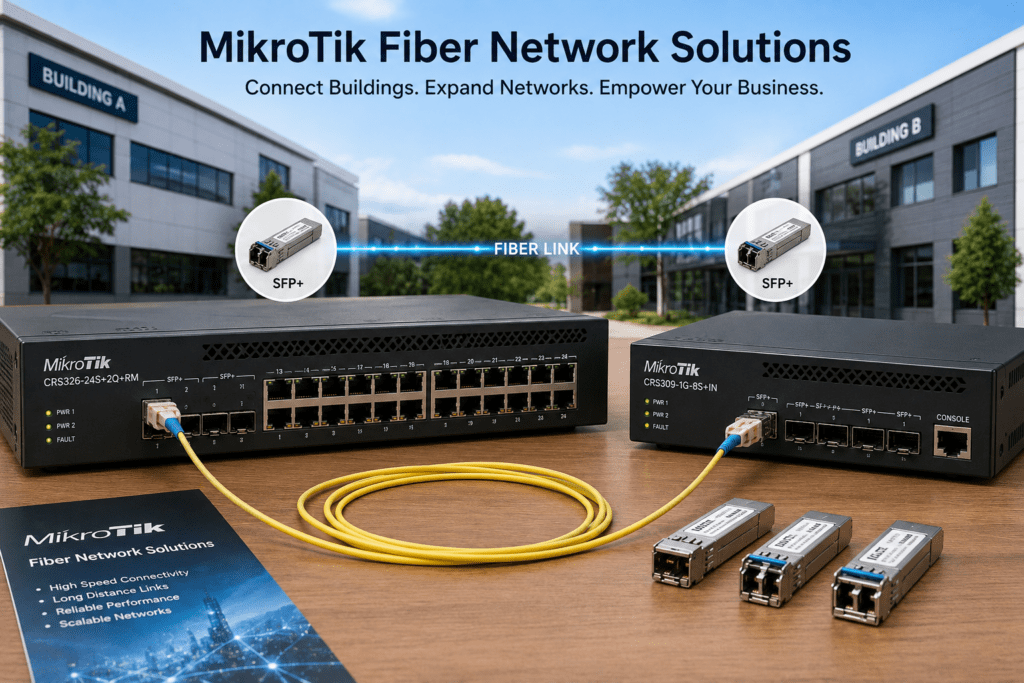
MikroTik fiber network solutions help businesses, schools, hotels, campuses, warehouses, and ISPs connect buildings and remote locations over reliable, high-speed links. When standard Ethernet cannot provide enough distance or backbone capacity, fiber offers a practical and scalable alternative.
MikroTik routers and switches with SFP and SFP+ ports can support both Gigabit and 10 Gigabit fiber networks. Therefore, businesses can connect offices, server rooms, CCTV systems, access switches, and remote network cabinets through one structured infrastructure.
At Supreme Networks, we supply MikroTik fiber networking equipment for projects in Nairobi and across Kenya. Whether you want to connect two buildings or create a larger campus backbone, we can help you select suitable routers, switches, SFP modules, and related networking equipment.
Need to connect buildings or remote network locations? Contact Supreme Networks for MikroTik fiber equipment, current pricing, availability, and quotations.
Why Use Fiber Between Buildings?
Ethernet cabling works well inside offices and for shorter network connections. However, it becomes less practical when buildings are far apart.
Fiber provides several advantages:
- Longer transmission distances
- High network capacity
- Gigabit and 10 Gigabit connectivity
- Resistance to electromagnetic interference
- Better scalability for future expansion
As a result, fiber works well as a network backbone. Standard Ethernet can then continue connecting computers, access points, cameras, phones, and other devices inside each building.
Connect Two Buildings Through One Network
Consider a company operating from two separate buildings.
Instead of creating two completely independent networks, the company can connect both locations using fiber.
A simple design could look like:
Main Office → MikroTik Switch → Fiber → MikroTik Switch → Second Building
The second building can then connect computers, wireless access points, printers, IP phones, and other network equipment.
Therefore, both buildings can operate as part of one structured network.
Connect Multiple Buildings with a Fiber Backbone
Larger organizations may need to connect several buildings.
For example:
Main Office → Fiber Core → Warehouse | Security Office | Workshop
Each building can have its own local network switch. Users and devices then connect to that switch through standard Ethernet cabling.
Meanwhile, fiber carries the combined traffic between each building and the central network.
This approach creates a cleaner and more scalable network than attempting long copper connections between buildings.
Fiber Networks for Schools and Campuses
Schools and campuses often have several buildings spread across a large compound.
These may include:
- Administration blocks
- Classrooms
- Computer laboratories
- Libraries
- Dormitories
- Security offices
A fiber backbone can connect these locations to one central network.
For example:
Core Network → Fiber → Classroom Block → Switch → Wi-Fi & Computers
Similarly, additional fiber links can connect the library, administration block, laboratories, and other buildings.
As the campus expands, new network locations can also be added to the backbone.
Build a Better Hotel Network with Fiber
Hotels often need to carry large amounts of network traffic across different floors, wings, or buildings.
The network may support:
- Guest Wi-Fi
- Administration
- CCTV
- VoIP
- Access control
- Servers
- Business systems
Fiber can provide high-capacity connections between the main server room and remote network cabinets.
For example:
Server Room → Fiber Backbone → Floor Switches → Network Devices
The floor switches can then provide Ethernet and PoE connectivity to nearby access points, cameras, phones, and other equipment.
Therefore, the hotel does not need to run every connection directly back to the server room.
Extend Your Network to Warehouses
Warehouses can be difficult to network because of their size.
Wireless access points, CCTV cameras, computers, and other devices may be located far from the main server room.
Instead, you can extend the network through fiber:
Main Network → Fiber → Warehouse Switch → Local Devices
The warehouse switch can then serve access points, cameras, computers, and other equipment.
Consequently, fewer long cable runs are required.
Carry CCTV Traffic Over Fiber
Large IP CCTV systems can generate significant network traffic. In addition, cameras may be installed far from the NVR or main network.
Fiber can connect groups of remote cameras back to the recording infrastructure.
For example:
IP Cameras → PoE Switch → Fiber → Core Switch → NVR
The remote PoE switch powers and connects the cameras. Meanwhile, fiber carries the combined video traffic back to the main network.
This design can work particularly well for large compounds, warehouses, schools, hotels, and commercial properties.
Connect Gatehouses and Security Points
Gatehouses are often located far from the main office.
However, they may require several network services, including:
- CCTV cameras
- Access control
- Intercom systems
- Computers
- Wireless access points
A fiber link can extend the main network to the gatehouse.
Main Building → Fiber → Gatehouse Switch → Security Devices
As a result, the gatehouse receives a dedicated network connection without depending entirely on long-distance wireless links.
Why Not Use Ethernet Cable Instead?
Standard copper Ethernet has practical distance limitations.
For conventional Ethernet installations, approximately 100 metres is commonly used as the maximum channel length. Trying to extend copper significantly beyond its intended distance can cause connectivity and performance problems.
Fiber provides a better option when buildings or network points are farther apart.
Furthermore, fiber carries information using light instead of electrical signals. Therefore, it can provide useful electrical isolation when connecting equipment located in separate buildings.
Single-Mode or Multimode Fiber?
Choosing the correct fiber type is important.
Single-Mode Fiber
Single-mode fiber is commonly used for longer network connections.
Typical applications include:
- Building-to-building links
- Campus networks
- ISP infrastructure
- Long network backbones
- Remote network sites
Multimode Fiber
Multimode fiber is commonly used for shorter high-speed connections.
For example, it may be used in:
- Server rooms
- Equipment racks
- Data environments
- Short backbone links
Therefore, the right choice depends on the required distance, network speed, and existing infrastructure.
What Is an SFP Port?
Many MikroTik routers and switches include SFP ports.
An SFP port accepts a compatible transceiver based on the network requirement.
For example:
MikroTik Switch → SFP Module → Fiber → SFP Module → MikroTik Switch
The modules provide the optical connection between the networking equipment and fiber cable.
However, both ends must use compatible equipment and optics.
When Should You Use SFP+?
SFP+ becomes especially important when your network requires 10 Gigabit Ethernet.
For example:
MikroTik Router → SFP+ → 10G Core Switch → SFP+ Fiber → Distribution Switch
This setup provides substantially more backbone capacity than a conventional Gigabit connection.
However, every component in the connection must support the required speed.
Choose the Right SFP or SFP+ Module
Do not select a fiber module simply because it fits into the port.
Before choosing an SFP or SFP+ module, check:
- Required network speed
- Fiber type
- Wavelength
- Transmission distance
- Connector type
- Device compatibility
Two modules may physically fit the same SFP slot but still be unsuitable for the same connection.
Therefore, always check the complete optical specifications before purchasing.
Distance Matters When Choosing Fiber Equipment
Before buying fiber equipment, determine the approximate distance between the two endpoints.
For example, a 300-metre building connection has different requirements from a link covering several kilometres.
However, you should not simply purchase the module with the longest advertised range.
Instead, match the transceivers to the actual fiber type, distance, speed, and equipment being used.
Do You Need Gigabit or 10 Gigabit Fiber?
Not every fiber network needs 10Gbps.
A small remote office may work comfortably with Gigabit connectivity. However, a backbone carrying traffic from many users, cameras, servers, or access points may benefit from 10 Gigabit connectivity.
Consider:
- Number of users
- Internet speed
- CCTV traffic
- Server traffic
- Wireless traffic
- Expected network growth
Ideally, your backbone should provide enough capacity for today’s requirements while leaving room for future expansion.
Internet Speed and Network Speed Are Different
Suppose your business has a 100 Mbps internet connection.
You may wonder why you need a Gigabit or 10 Gigabit local network.
The reason is simple: not all network traffic goes to the internet.
Local traffic can include:
- CCTV video
- Server access
- Backups
- File transfers
- Network storage
- Internal applications
Therefore, your internal network may need considerably more capacity than your internet connection.
Use MikroTik CRS Switches for Fiber Networks
The MikroTik Cloud Router Switch (CRS) family includes models with SFP and SFP+ interfaces.
Depending on the model, CRS switches can form part of:
- Business fiber networks
- Campus backbones
- CCTV networks
- ISP infrastructure
- Server networks
- Distribution networks
However, the right model depends on the required Ethernet ports, fiber ports, uplink speed, and switching capacity.
CRS326 for Copper and Fiber Networks
Selected MikroTik CRS326 models combine Gigabit Ethernet connectivity with SFP+ uplinks.
For example:
Computers → Gigabit
Access Points → Gigabit
Core Network → SFP+
This allows businesses to retain Gigabit connections for normal devices while using faster connectivity for the backbone.
Therefore, you can improve network capacity without replacing every endpoint.
CRS309 for 10G Connectivity
The MikroTik CRS309 provides multiple SFP+ interfaces.
As a result, it can form part of 10G networks connecting:
- Routers
- Servers
- Network storage
- Distribution switches
- Fiber backbones
It can provide a useful high-speed layer where several 10G connections are required.
CRS317 for Larger 10G Networks
Networks requiring more SFP+ connections can consider suitable MikroTik CRS317 models.
Possible applications include ISP cores, fiber aggregation, server environments, campus networks, and high-capacity distribution.
Therefore, a higher-density SFP+ switch can provide a more centralized approach when many fiber connections terminate at one location.
Combine Fiber with PoE
Fiber and PoE solve different problems, but they work well together.
Fiber carries data between network locations. Meanwhile, a remote PoE switch can provide power and Ethernet connectivity to local devices.
For example:
Main Building → Fiber → Remote PoE Switch → Cameras | Access Points | Phones
This design can be particularly useful for large compounds, schools, hotels, CCTV installations, and warehouses.
Protect Equipment at Remote Locations
Remember that the switch at the remote end still requires electrical power.
Therefore, consider:
- UPS backup
- Surge protection
- Secure network cabinets
- Ventilation
- Physical security
- Environmental conditions
Outdoor or semi-outdoor installations may require additional protection.
After all, a reliable fiber link cannot keep the network running if the equipment at one end loses power.
Fiber or Wireless: Which Should You Choose?
Sometimes installing fiber between buildings is difficult or expensive.
In such cases, a point-to-point wireless connection may provide an alternative.
Fiber offers excellent capacity, reliability, and long-term scalability.
Wireless can provide faster deployment where trenching or installing fiber is impractical.
Therefore, your choice should depend on distance, terrain, bandwidth requirements, installation conditions, and budget.
Some organizations can also use wireless as a backup connection to their main fiber link.
Plan for Future Expansion
When installing new fiber, avoid thinking only about today’s requirements.
Additional fiber capacity can support:
- Future buildings
- Redundant links
- Additional services
- Network expansion
Installing spare capacity during the original project may be easier than installing another cable later.
Document Your Fiber Network
Good documentation makes troubleshooting and future upgrades easier.
Record important details such as:
- Fiber routes
- Building endpoints
- Cable type
- Strand assignments
- SFP models
- Wavelengths
- Switch ports
- Link speeds
In addition, label cables, patch panels, switches, and fiber connections clearly.
What Do You Need for a MikroTik Fiber Network?
Before selecting equipment, answer these questions:
- Which locations need to connect?
- What is the approximate distance?
- Is fiber already installed?
- Is it single-mode or multimode?
- What network speed is required?
- Do you need Gigabit or 10G?
- How many fiber links are required?
- Do remote switches require PoE?
- What devices will connect at each site?
- Do you require network redundancy?
- How much growth do you expect?
- Do you require SFP or SFP+?
These answers make it much easier to identify the right MikroTik switches, routers, and optical equipment.
MikroTik Fiber Network Solutions for Your Project
Supreme Networks supplies MikroTik fiber network solutions for businesses, schools, hotels, CCTV projects, campuses, and ISPs in Nairobi and across Kenya.
Our MikroTik networking range can include:
- CRS managed switches
- SFP switches
- SFP+ switches
- 10G switches
- RB5009 routers
- Cloud Core Routers
- Fiber networking equipment
- SFP and SFP+ connectivity
- PoE networking equipment
Whether you need a simple connection between two buildings or a larger fiber backbone, the solution should match the required distance, capacity, applications, and future growth.
Bring Your Buildings onto One Network
Separate buildings do not need to operate as separate networks.
A properly designed fiber backbone can connect offices, warehouses, classrooms, CCTV systems, Wi-Fi networks, and remote network cabinets through one structured infrastructure.
Contact Supreme Networks for MikroTik fiber switches, SFP/SFP+ equipment, and networking solutions in Nairobi and across Kenya.
Tell us the locations you need to connect, approximate distance, required speed, and existing fiber infrastructure, and we can help you identify suitable MikroTik equipment.