
Move Beyond Gigabit with MikroTik Fiber & 10G Networking
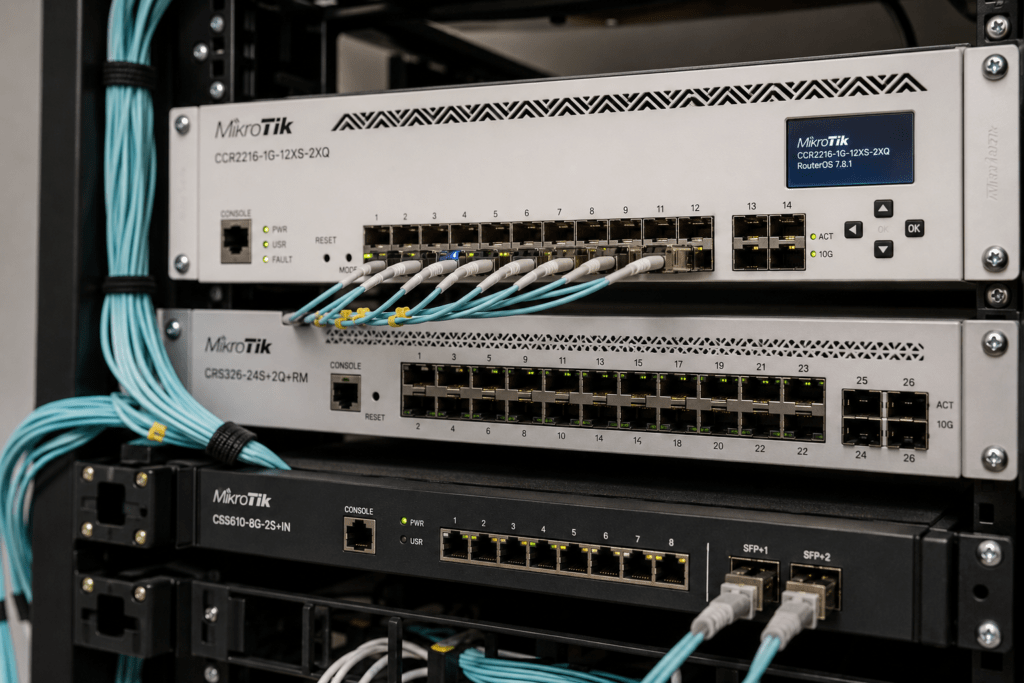
MikroTik fiber and 10G networking solutions help businesses, ISPs and organizations build faster network backbones using SFP, SFP+ and high-speed switching infrastructure. As traffic grows between switches, servers, storage systems and internet gateways, conventional Gigabit links can eventually become a network bottleneck.
MikroTik offers routers and switches with fiber and high-speed interfaces for different network requirements. These solutions can support everything from connecting two buildings to developing 10 Gigabit core networks and higher-capacity ISP infrastructure.
At Supreme Networks, we supply MikroTik routers, switches, SFP networking equipment and related solutions to customers in Nairobi and across Kenya.
Planning a fiber or 10G network? Contact Supreme Networks for MikroTik equipment availability, pricing and quotations based on your network requirements.
When Gigabit Is No Longer Enough
Gigabit Ethernet remains suitable for many computers, printers, IP phones and other network devices.
However, the network backbone has a different job.
A switch may collect traffic from 24 or 48 Gigabit devices before forwarding that traffic through a single uplink. Servers and network storage can also generate significant local traffic.
Therefore, even when individual users do not require 10Gbps connections, the links connecting major parts of the network may benefit from additional capacity.
This is where 10 Gigabit networking becomes valuable.
Think About the Network Backbone
A backbone connects important parts of your network.
For example:
Internet → Router → Core Switch → Access Switches → Users
In a larger environment, the design may become:
Internet → Router → 10G Core → Distribution Switches → Access Switches → Users
The edge can continue using Gigabit Ethernet while the backbone operates at a higher speed.
As a result, traffic from multiple users can move between switches without depending on a single Gigabit connection.
Where Does Fiber Fit into the Network?
Fiber is useful when you need high bandwidth, longer transmission distances or connectivity between different network locations.
Common applications include:
- Building-to-building connections
- Office network backbones
- Campus networks
- ISP infrastructure
- Server rooms
- Data environments
- Distribution cabinets
- CCTV networks
- Hotel networks
- Warehouse networks
Unlike conventional copper Ethernet, fiber can also provide connectivity over considerably longer distances when the correct optics and cable are used.
Understanding SFP
SFP, or Small Form-factor Pluggable, is a modular interface commonly found on network switches and routers.
Instead of permanently building one type of fiber interface into the device, an SFP port allows a compatible transceiver to be installed according to the network requirement.
Depending on the equipment and module, SFP connectivity can support different media and distances.
This flexibility makes SFP useful in structured business and service-provider networks.
Understanding SFP+
SFP+ uses a similar compact form factor but is commonly associated with 10 Gigabit Ethernet.
MikroTik provides several routers and switches with SFP+ interfaces.
These ports can be useful for connecting:
- Routers to core switches
- Switches to switches
- Servers to switches
- Network storage
- Fiber backbones
- Distribution sites
- ISP infrastructure
For growing networks, an SFP+ uplink can provide significantly more capacity than a conventional Gigabit uplink.
SFP and SFP+ Are Not the Same
It is easy to treat SFP and SFP+ as interchangeable because the physical interfaces look similar.
However, they support different networking requirements.
In simple terms:
SFP → commonly used for Gigabit connectivity
SFP+ → commonly used for 10 Gigabit connectivity
Compatibility still depends on the specific router, switch and transceiver.
Therefore, always verify supported modules and interface capabilities before installation.
Single-Mode vs Multimode Fiber
Another important decision is the type of fiber being used.
Single-Mode Fiber
Single-mode fiber is commonly used for longer-distance connections.
It is frequently found in:
- ISP networks
- Campus links
- Building-to-building connections
- Metropolitan fiber networks
- Long-distance backbones
Multimode Fiber
Multimode fiber is commonly used for shorter high-speed links.
Potential applications include:
- Server rooms
- Data environments
- Equipment racks
- Short building links
The correct choice depends on distance, existing infrastructure and the optical modules being used.
Don’t Choose an SFP Module by Connector Alone
Two modules may have the same physical connector but completely different optical characteristics.
Before selecting a module, check:
- Interface speed
- Fiber type
- Wavelength
- Transmission distance
- Connector
- Single-mode or multimode
- Device compatibility
For example, a short-range multimode SFP+ module should not be selected for a long-distance single-mode fiber link simply because the connector appears compatible.
The module, fiber and devices must work together.
Connect Buildings with Fiber
One of the most useful applications of fiber is connecting separate buildings.
Suppose a business has:
Main Office → Warehouse → Security Building
Instead of installing separate internet connections for each building, the organization can build a private network backbone between them.
For example:
Main Network → Fiber → Warehouse Switch
and
Main Network → Fiber → Security Building Switch
This can allow the buildings to share internet access, servers, CCTV and other network resources according to the network design.
Build a Fiber Backbone for a Campus
Schools, universities, hospitals and large organizations may operate several buildings across one site.
Copper Ethernet has practical distance limitations. Therefore, fiber can provide the backbone between different network locations.
A campus design may look like:
Core Switch
↓ Fiber
Building A | Building B | Building C
Each building can then have its own access switches and wireless access points.
This architecture makes expansion easier because new buildings can connect back to the core infrastructure.
Fiber for CCTV Networks
Large CCTV systems can also benefit from fiber.
For example, cameras may be installed in:
- Separate buildings
- Parking areas
- Gates
- Warehouses
- Security posts
- Remote sections of a property
Rather than running long copper connections back to one location, remote switches can aggregate cameras locally.
Fiber can then carry the combined traffic back toward the recording infrastructure.
A simplified design could be:
IP Cameras → PoE Switch → Fiber → Core Switch → NVR
This can provide a cleaner architecture for larger surveillance deployments.
Why 10G Matters for Servers
Servers can generate considerably more network traffic than ordinary desktop computers.
Multiple users may access:
- Shared files
- Databases
- Virtual machines
- Business applications
- Backups
If the server connects to the network using the same capacity as an individual workstation, its network interface may eventually become a bottleneck.
Where supported and required, 10GbE can provide more bandwidth between servers and the core network.
10G for Network Storage
Network Attached Storage can also benefit from higher-speed connectivity.
A NAS may simultaneously serve many users while handling backups and large file transfers.
A network design could therefore use:
NAS → 10G Core Switch → Access Switches → Users
Individual computers can remain on Gigabit Ethernet while the storage system receives a faster connection to the network core.
This prevents one Gigabit uplink from unnecessarily limiting all users accessing the storage system.
10G for Modern Wi-Fi Networks
Modern wireless access points can provide increasingly high aggregate wireless capacity.
As Wi-Fi infrastructure improves, the wired network behind it must also keep up.
The first step may involve faster access ports such as 2.5GbE. Meanwhile, 10G can provide higher-capacity uplinks between switches.
For example:
Router → 10G Core → PoE Access Switch → Wireless Access Points
This allows traffic from several access points to move through a higher-capacity backbone.
MikroTik RB5009 in High-Speed Networks
The MikroTik RB5009 provides an attractive combination of Ethernet interfaces together with SFP+ connectivity.
Therefore, it can form part of business networks that are beginning to move beyond conventional Gigabit infrastructure.
Possible applications include:
- High-speed internet gateways
- Business networks
- Server environments
- Small ISP deployments
- 10G switch uplinks
However, the router should still be selected based on the workload it needs to process.
Having an SFP+ port alone does not determine routing performance.
MikroTik CCR for High-Capacity Routing
For more demanding networks, MikroTik’s Cloud Core Router family provides higher-capacity routing platforms.
Models within the CCR range can provide multiple high-speed interface options, depending on the specific product.
These routers can be suitable for:
- ISP networks
- Enterprise gateways
- High-capacity routing
- Data environments
- Network cores
The correct CCR should match both traffic requirements and the switching infrastructure around it.
A high-performance router connected through undersized uplinks will not deliver the full benefit of a faster network design.
CRS309 for 10G Network Builds
The MikroTik CRS309 is particularly interesting for networks that require several SFP+ connections.
It can form part of a high-speed layer connecting:
- Servers
- Network storage
- Routers
- Other switches
- Fiber links
- High-performance workstations
This allows organizations to introduce 10GbE where it provides the most value without replacing their entire Gigabit infrastructure.
CRS317 for More SFP+ Connectivity
Networks requiring a larger number of 10G connections can consider the MikroTik CRS317 family.
A higher-density SFP+ switch can be useful in:
- ISP networks
- Server rooms
- Enterprise cores
- Fiber aggregation
- Data environments
For example, multiple distribution switches can connect back to one central SFP+ switch.
This provides a structured high-speed core for the network.
CRS326 for Gigabit Access with Fast Uplinks
Not every network needs SFP+ on every port.
Sometimes the requirement is many Gigabit connections combined with faster uplinks.
Selected MikroTik CRS326 models can fit this type of architecture.
For example:
Computers → Gigabit
Printers → Gigabit
Other devices → Gigabit
Core uplink → SFP+
This allows standard devices to remain on Gigabit Ethernet while aggregated traffic receives more backbone capacity.
Use DAC for Short 10G Connections
Fiber is not the only option for SFP+ connectivity.
For short connections between compatible equipment in the same rack or nearby racks, a Direct Attach Cable (DAC) can provide a practical solution.
Potential applications include:
Router → Switch
Switch → Switch
Switch → Server
DAC connections can reduce the need for separate optical modules and fiber patch leads for short-distance links.
However, always confirm device and cable compatibility.
Build a Hybrid Gigabit and 10G Network
Moving to 10GbE does not mean replacing every Gigabit device.
A more economical design is often hybrid.
For example:
Internet
↓
MikroTik Router
↓
10G Core
↓
Gigabit / Multi-Gigabit Access Switches
↓
Users & Devices
Servers and storage can connect directly to the faster core where required.
Meanwhile, printers, IP phones and ordinary office computers can remain on Gigabit Ethernet.
This places higher-speed connectivity where it delivers the greatest benefit.
When Should You Upgrade to 10G?
Consider 10 Gigabit networking when:
- Gigabit uplinks regularly approach capacity
- Servers transfer large amounts of data
- Multiple switches feed into one core
- Network storage performance is limited
- ISP traffic exceeds Gigabit capacity
- Large CCTV systems generate significant traffic
- High-capacity wireless networks are being deployed
- You need faster building-to-building links
However, do not upgrade simply because 10G equipment is available.
Monitor your network and identify actual bottlenecks first.
Plan for Capacity Before Congestion Appears
A network should ideally be upgraded before users experience severe congestion.
Monitor:
- Interface utilization
- Peak traffic
- Server traffic
- Switch uplinks
- Internet bandwidth
- Storage traffic
If a Gigabit link consistently operates close to its capacity during busy periods, it may be time to increase the available bandwidth.
Historical monitoring can also show how quickly traffic is growing.
MikroTik Fiber and 10G Networking Solutions in Kenya
Supreme Networks supplies MikroTik fiber and 10G networking solutions for businesses, ISPs, schools, hotels and organizations in Nairobi and across Kenya.
Our MikroTik networking range can include:
- SFP switches
- SFP+ switches
- 10G switches
- MikroTik CRS switches
- RB5009 routers
- Cloud Core Routers
- Fiber networking equipment
- SFP and SFP+ connectivity
- High-speed network accessories
Whether you are connecting two buildings, upgrading a server network or moving an ISP backbone beyond Gigabit, selecting the correct combination of routers, switches, optics and fiber is essential.
Ready to Move Beyond Gigabit?
You do not need to replace your entire network to benefit from faster connectivity.
Start with the links carrying the most traffic.
That could mean upgrading a switch uplink to 10G, connecting a server through SFP+, building a fiber backbone between buildings or increasing capacity between your ISP core and distribution network.
Contact Supreme Networks for MikroTik fiber, SFP, SFP+, 10G switches and high-speed networking equipment in Nairobi and across Kenya.
Tell us your required speed, distance, existing equipment and what you need to connect, and we can help you identify suitable MikroTik networking options.