
Build a Business Network That Grows with MikroTik
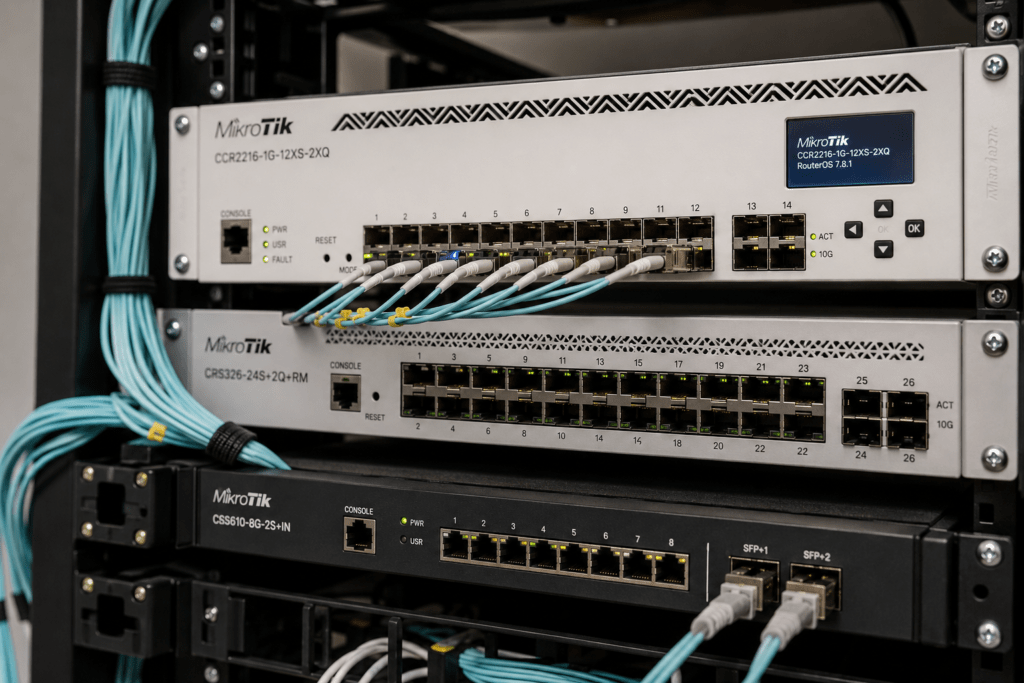
MikroTik business network solutions help organizations build reliable networks for internet connectivity, office Wi-Fi, VLANs, multiple internet connections, CCTV, VoIP, servers and other connected systems. Instead of relying on a basic router and unmanaged switches, businesses can create structured networks that are easier to manage and expand.
At Supreme Networks, we supply MikroTik routers, managed switches, wireless access points and fiber networking equipment to businesses in Nairobi and across Kenya. Whether you are opening a new office, upgrading an existing network or connecting multiple departments, we can help you select MikroTik equipment based on your actual requirements.
Planning a new business network? Contact Supreme Networks for MikroTik equipment, current pricing, availability and a quotation for your requirements.
Your Business Network Is More Important Than Ever
Modern businesses depend on their networks throughout the working day.
Employees need internet access. Computers communicate with servers and cloud applications. Wireless access points connect laptops and smartphones. IP phones carry business calls. CCTV cameras continuously send video across the network.
When the network performs poorly, many parts of the organization can be affected.
Common problems include:
- Slow internet
- Unstable Wi-Fi
- Network congestion
- Poor CCTV performance
- Dropped VoIP calls
- Limited Ethernet ports
- Slow server access
- Lack of network segmentation
- No backup internet connection
- Difficult network expansion
A structured MikroTik network can help address many of these challenges.
Start with the Right Network Design
Buying individual products without considering how they work together can create unnecessary bottlenecks.
A typical business network may follow this structure:
Internet → MikroTik Router → Managed Switch → Users & Network Devices
From the switch, the network can connect:
Computers | Access Points | Servers | Printers | CCTV | VoIP
Larger businesses can add access switches, fiber links and additional wireless access points as required.
This creates a network that can expand without replacing everything whenever the company grows.
Choose the Right Router for Your Business
The router is the gateway between your business network and the internet.
However, business routing requirements can vary considerably.
A small office may need basic internet access, firewall rules and Wi-Fi connectivity.
A larger organization may require:
- Multiple VLANs
- VPN connectivity
- Dual internet connections
- Bandwidth management
- Faster Ethernet interfaces
- SFP or SFP+
- 10 Gigabit uplinks
- More routing performance
MikroTik provides several router families for these different requirements.
hEX for Smaller Wired Networks
The MikroTik hEX family can provide a practical starting point for smaller offices that use separate wireless access points.
A typical installation might use:
Internet → hEX Router → Switch → PCs & Access Points
This keeps routing separate from wireless connectivity.
Therefore, the business can upgrade or add access points later without necessarily replacing the router.
hAP for Small Offices That Need Wi-Fi
Businesses that want routing and wireless connectivity from one device can consider suitable MikroTik hAP models.
Modern options such as the hAP ax² and hAP ax³ combine RouterOS functionality with Wi-Fi 6.
They can work well for:
- Small offices
- Shops
- Branch locations
- Reception areas
- Professional home offices
However, larger offices usually benefit from dedicated access points distributed around the building.
L009 for Growing Business Networks
As an organization grows, the MikroTik L009 provides another step in the router selection process.
It can suit environments that need more structured routing and connectivity than basic entry-level platforms.
Possible applications include:
- Growing offices
- Branch networks
- Schools
- Professional networks
- Managed business environments
The L009 can also provide a useful path toward more advanced MikroTik infrastructure without immediately moving into high-end routing hardware.
RB5009 for Higher-Performance Networks
The MikroTik RB5009 is particularly attractive for businesses that require more performance and faster connectivity.
It provides a combination of Gigabit, multi-gigabit and SFP+ connectivity.
This makes it suitable for environments such as:
- Medium-sized offices
- High-speed internet gateways
- Server networks
- Multi-VLAN networks
- Advanced business networks
- 10G uplinks
For organizations expecting significant network growth, the RB5009 can provide a strong foundation.
Use Managed Switching to Organize Your Network
As businesses add devices, switching becomes increasingly important.
MikroTik’s CRS and CSS families provide managed switching options for different network environments.
A managed switch can help you control and organize connections for:
- Computers
- Access points
- IP phones
- CCTV cameras
- Servers
- Printers
- Other switches
It also allows businesses to introduce VLANs and other network-management features where required.
Separate Your Network with VLANs
Putting every device on the same network may work for a very small office.
However, it becomes less practical as the organization grows.
VLANs allow businesses to logically separate different services.
For example:
Staff | Guests | CCTV | VoIP | Servers
This structure can improve network organization and provide greater control over communication between different services.
A hotel, for example, may want guest Wi-Fi separated from administration.
Likewise, an office may want CCTV cameras separated from employee computers.
Build Reliable Office Wi-Fi
Wireless connectivity has become one of the most important parts of the business network.
Employees may use laptops, tablets and smartphones throughout the office. Visitors may also require guest Wi-Fi.
A single wireless router may not provide sufficient coverage for a large office.
Instead, businesses can deploy multiple access points:
MikroTik Router → PoE Switch → Multiple Access Points
Access points can then be positioned near the users they need to serve.
This approach can improve both coverage and capacity.
Use PoE to Simplify Installations
Power over Ethernet allows compatible network devices to receive power through Ethernet cabling.
PoE can be useful for:
- Wireless access points
- IP cameras
- VoIP phones
- Other compatible devices
A PoE switch can reduce the number of individual power adapters required around the building.
However, always confirm:
- PoE standard
- Required voltage
- Power per device
- Total PoE budget
- Device compatibility
The number of PoE ports alone does not determine how many devices a switch can power.
Connect CCTV to Your Business Network
IP CCTV systems rely heavily on network infrastructure.
Cameras continuously transmit video to NVRs, servers or monitoring systems.
Therefore, the business network should provide enough capacity for surveillance traffic.
Consider:
- Number of cameras
- Camera resolution
- Bitrate
- PoE requirements
- Switch capacity
- NVR location
- Fiber links
- Network segmentation
For larger installations, a dedicated CCTV VLAN can help keep surveillance traffic organized.
Integrate VoIP into the Network
Many businesses now use IP phones and VoIP communication systems.
These systems share the network with computers, Wi-Fi and other services.
A structured network can provide separate VLANs for voice traffic where required.
PoE switches can also power compatible IP phones.
This reduces cabling complexity while keeping the communication infrastructure connected to the central network.
Support Servers and Network Storage
Businesses using local servers or Network Attached Storage can generate substantial internal network traffic.
For example, employees may transfer large files between computers and a central server.
This traffic does not necessarily pass through the internet.
Therefore, a fast internet connection does not automatically mean the local network is fast.
Switch capacity and uplink speed also matter.
When Does a Business Need 10G?
Not every employee needs a 10 Gigabit connection.
However, 10GbE can be useful for high-traffic parts of the network.
These may include:
- Servers
- Network storage
- Core switches
- Virtualization systems
- High-performance workstations
- Switch uplinks
A business network might therefore use:
Router → 10G Core → Gigabit/2.5G Access Switches → Users
This provides more backbone capacity while keeping standard endpoints on lower-cost connections.
Connect Buildings with Fiber
Businesses operating from multiple buildings may need to connect network infrastructure over longer distances.
Fiber can provide a practical backbone between:
- Offices
- Warehouses
- Security buildings
- Server rooms
- Network cabinets
- Separate floors
MikroTik routers and switches with SFP or SFP+ interfaces can form part of these fiber links.
However, transceivers must match the fiber type, speed and required distance.
Keep Your Business Online with Dual Internet
Internet downtime can interrupt cloud applications, communication and customer service.
For this reason, some businesses use two internet connections.
A MikroTik router can form part of a dual-WAN design.
For example:
ISP 1 + ISP 2 → MikroTik Router → Business Network
If the primary connection becomes unavailable, the secondary connection can provide backup connectivity when correctly configured.
This can be especially useful for organizations that depend heavily on cloud services.
Connect Branch Offices Securely
Businesses operating several locations may need secure communication between branches.
VPN connectivity can form part of a multi-site network.
For example:
Nairobi Head Office ⇄ VPN ⇄ Branch Office
This can allow authorized systems at different locations to communicate securely.
VPN requirements should be considered when selecting the router because encryption and traffic levels can affect router workload.
Don’t Let Network Growth Create Bottlenecks
Business networks often grow gradually.
A company may begin with:
10 employees → 1 switch → 1 Wi-Fi router
Several years later, the same business may have:
50 employees → multiple switches → CCTV → VoIP → servers → multiple access points
If the original infrastructure was not designed for expansion, performance problems can appear.
Therefore, consider future growth when choosing routers, switches and uplinks.
How to Choose MikroTik Equipment for Your Business
Before buying networking equipment, answer these questions:
- How many employees use the network?
- How many total devices will connect?
- What is your internet speed?
- How many Ethernet ports do you require?
- How many wireless access points are needed?
- Do you need PoE?
- Will CCTV use the same infrastructure?
- Do you use VoIP?
- Do you require VLANs?
- Do you have local servers?
- Do you need a backup internet connection?
- Will you connect multiple buildings?
- Do you require fiber?
- Do you expect significant growth?
These answers make equipment selection much easier.
MikroTik Business Network Solutions for Kenya
Supreme Networks supplies MikroTik business network solutions to companies and organizations in Nairobi and across Kenya.
Our MikroTik range can include:
- Business routers
- hEX routers
- hAP wireless routers
- L009 routers
- RB5009 routers
- CRS managed switches
- CSS switches
- PoE switches
- Wireless access points
- SFP and SFP+ networking
- Fiber connectivity
- 10 Gigabit networking
Whether you are setting up a new office or upgrading existing infrastructure, we can help you identify equipment that fits your requirements.
Build Your Network Around Your Business
The best network is not necessarily the one with the most expensive router or fastest switch.
It is the one designed around how your organization actually works.
Your users, internet connection, Wi-Fi requirements, CCTV system, servers, VoIP infrastructure and expansion plans should all influence the design.
Contact Supreme Networks for MikroTik routers, switches, wireless equipment and business networking solutions in Nairobi and across Kenya.
Tell us your number of users, internet speed, office size and the systems you need to connect, and we can help you identify suitable MikroTik equipment.