
Choosing the Right MikroTik Router for Your Network
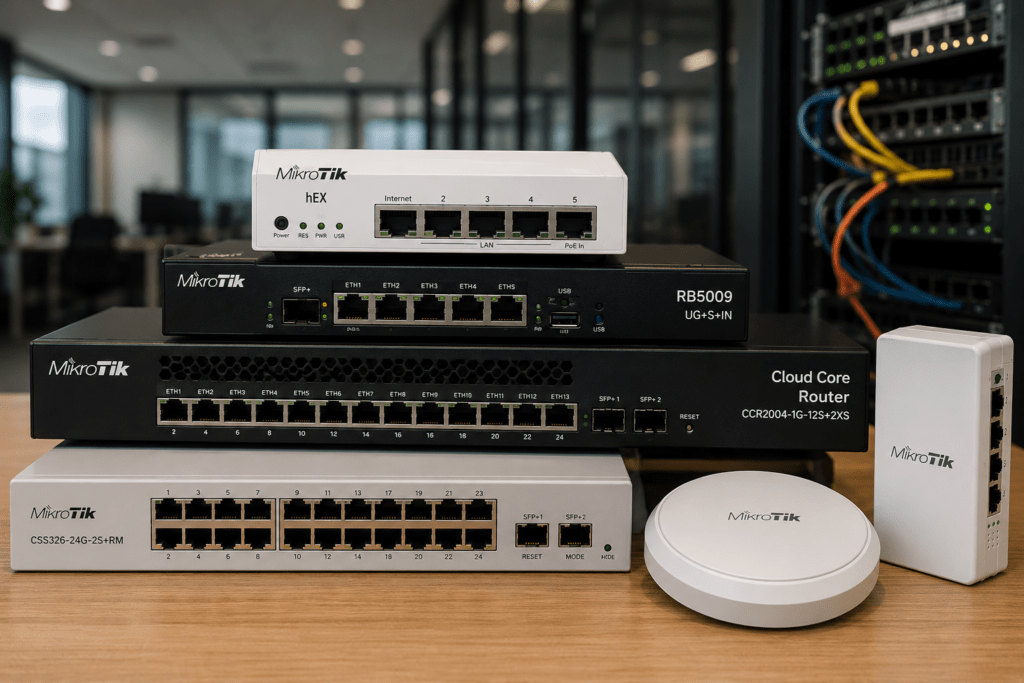
Choosing a MikroTik router can be confusing when models such as the hEX, hAP, L009, RB5009, RB4011 and Cloud Core Router all appear to offer similar networking features. However, these routers are designed for very different workloads.
The right choice depends on your internet speed, number of users, network traffic, interfaces, VPN requirements and plans for future expansion.
At Supreme Networks, we supply MikroTik routers and networking equipment to businesses, organizations and service providers in Nairobi and across Kenya. If you are unsure which model fits your network, we can help you compare available options before you buy.
Need a MikroTik router? Contact Supreme Networks for current prices, availability and a quotation based on your network requirements.
Start With Your Network, Not the Router
It is tempting to compare MikroTik routers by processor speed, RAM and number of Ethernet ports. However, specifications alone do not tell you whether a router is right for your environment.
Start by asking what the network needs to accomplish.
A small office with a 100 Mbps internet connection has different requirements from a company running multiple VLANs, VPN connections and a Gigabit internet connection.
Likewise, an ISP serving hundreds of subscribers needs a different routing platform from a business with 30 employees.
Before comparing MikroTik models, consider:
- Internet connection speed
- Number of users
- Number of connected devices
- Expected network traffic
- VPN requirements
- Number of Ethernet ports
- SFP or SFP+ requirements
- PoE requirements
- VLANs
- Multiple internet connections
- Wireless requirements
- Future expansion
Once these requirements are clear, selecting the right router becomes much easier.
Understanding the MikroTik Router Families
MikroTik has a broad router portfolio. Instead of looking at every model individually, it helps to understand where the main product families fit.
For many customers, the selection can be simplified into:
hEX → hAP → L009 → RB5009 → RB4011 → CCR
This is not a strict performance ranking because individual models have different features. However, it provides a useful starting point when comparing MikroTik routers.
MikroTik hEX: Simple and Capable Wired Routing
The MikroTik hEX family is a practical starting point for smaller wired networks.
A hEX router can suit an environment where Wi-Fi comes from separate wireless access points.
For example:
Internet → MikroTik hEX → Network Switch → Computers & Access Points
This design can work well for:
- Small offices
- Shops
- Home networks
- Branch offices
- Small business networks
- Basic managed networks
Using separate access points also means you can upgrade the wireless network later without replacing the router.
For customers searching for an affordable MikroTik router in Kenya, the hEX family is often worth considering before moving to more powerful platforms.
MikroTik hAP: Routing and Wi-Fi in One Device
If you need both routing and wireless connectivity, the MikroTik hAP series provides an alternative.
The hAP family combines RouterOS capabilities with built-in Wi-Fi.
Models such as the hAP ax² and hAP ax³ bring Wi-Fi 6 into the MikroTik ecosystem.
These routers can work well for:
- Small offices
- Home offices
- Shops
- Small branches
- Professional home networks
However, one wireless router is not always enough for a larger office.
When an organization requires Wi-Fi coverage across multiple rooms or floors, a dedicated router combined with several access points may provide better coverage and scalability.
MikroTik L009: A Step Up for Growing Networks
As network requirements increase, the MikroTik L009 series becomes an interesting option.
The L009 provides a more flexible platform for businesses that have outgrown basic routing but may not require a higher-performance RB5009 or Cloud Core Router.
Depending on the specific model, the L009 family offers useful connectivity options for modern network environments.
It can suit:
- Growing businesses
- Branch offices
- Schools
- Managed office networks
- Network laboratories
- Small service-provider environments
The L009 is particularly worth considering when you want a capable RouterOS platform with room for a more structured network.
When Should You Consider the RB5009?
The MikroTik RB5009 is one of the more interesting choices for customers building higher-performance business networks.
It provides a combination of Gigabit Ethernet, multi-gigabit connectivity and SFP+ that makes it suitable for networks moving beyond conventional Gigabit infrastructure.
The RB5009 can make sense for:
- Medium-sized businesses
- High-speed internet connections
- Advanced office networks
- Multi-VLAN environments
- Server networks
- Small ISP installations
- 10 Gigabit uplinks
- Networks requiring more routing performance
Two models customers commonly compare are the RB5009UG+S+IN and RB5009UPr+S+IN.
The correct version depends partly on whether your deployment requires additional PoE functionality.
We will cover these two models separately in our MikroTik comparison guides.
What About the MikroTik RB4011?
The MikroTik RB4011 remains another important RouterBOARD option for professional networking.
It provides multiple Gigabit Ethernet ports together with SFP+ connectivity.
The RB4011 can serve:
- Business internet gateways
- Managed office networks
- VLAN environments
- Branch networks
- VPN deployments
- Server environments
Customers comparing the RB4011 with the RB5009 should look beyond raw specifications.
Interface requirements, network design, power options and future expansion can all influence which platform makes more sense.
When a Cloud Core Router Makes More Sense
Eventually, network requirements can move beyond conventional business routers.
This is where MikroTik’s Cloud Core Router (CCR) family becomes important.
CCR routers target demanding environments that require significantly more routing capacity and scalability.
They are commonly considered for:
- Internet Service Providers
- Wireless ISPs
- Large organizations
- Enterprise networks
- Data centres
- Network cores
- High-capacity internet gateways
Popular families include the CCR2004, CCR2116 and CCR2216.
However, buying the most powerful CCR available is not automatically the best decision.
The router should match your actual traffic, routing requirements and expected network growth.
Which MikroTik Router Is Suitable for a Small Business?
A small business does not necessarily require expensive routing hardware.
For a simple office, a hEX or suitable hAP model may provide the required functionality.
However, requirements change quickly when the network includes:
- Multiple departments
- Guest Wi-Fi
- CCTV
- VoIP
- VPN connections
- Servers
- Multiple internet connections
- Higher-speed broadband
In these environments, an L009, RB5009 or another more capable MikroTik platform may provide a better foundation.
The decision should therefore be based on the network rather than simply the number of employees.
Choosing a MikroTik Router for an Office
A modern office network might contain dozens or even hundreds of connected devices.
The router may need to handle traffic from computers, printers, wireless access points, servers, IP phones and CCTV systems.
A typical structure could be:
Internet → MikroTik Router → Managed Switch → Network Devices
The network can then use VLANs to separate different services.
For example:
Staff | Guests | CCTV | VoIP | Servers
This approach creates a more organized network and provides greater control over how different devices communicate.
Choosing a MikroTik Router for an ISP
ISP routing is a very different workload.
An Internet Service Provider may have hundreds or thousands of subscribers generating traffic simultaneously.
The network may also require:
- PPPoE
- VLANs
- Bandwidth management
- Advanced routing
- Fiber connectivity
- Network monitoring
- Redundancy
- High-speed uplinks
A smaller ISP may start with an RB5009-class router for certain roles. However, larger networks can require Cloud Core Routers and higher-capacity switching infrastructure.
The number of subscribers alone should not determine the router.
Peak traffic, services, routing configuration and future growth also matter.
How Much Internet Speed Will the Router Handle?
This is one of the most common questions customers ask when purchasing a MikroTik router.
Unfortunately, there is no meaningful answer based only on the Ethernet port speed.
A router with Gigabit ports does not automatically mean every configuration will route traffic at exactly 1 Gbps.
Actual performance can depend on:
- Router model
- Firewall configuration
- Number of rules
- VPN usage
- Queues
- Traffic type
- Routing configuration
- RouterOS features being used
Therefore, router sizing should consider the intended configuration rather than just the advertised port speed.
Do You Need SFP or SFP+?
SFP and SFP+ connectivity becomes increasingly useful as networks grow.
An SFP interface can connect compatible fiber or copper transceivers. Meanwhile, SFP+ commonly provides connectivity for 10 Gigabit Ethernet.
You may want SFP/SFP+ when connecting:
- Core switches
- Fiber links
- Servers
- ISP infrastructure
- Separate buildings
- High-speed network backbones
If you expect your network to move toward 10 Gigabit connectivity, choosing a router with SFP+ can provide a useful upgrade path.
Do You Need PoE on Your MikroTik Router?
Power over Ethernet can simplify network installations by allowing compatible equipment to receive power through Ethernet cabling.
However, MikroTik devices can differ significantly in their PoE capabilities.
Some may accept PoE input. Others may provide PoE output. Certain models provide both.
Therefore, check:
- PoE input requirements
- PoE output
- Voltage
- Supported standards
- Power budget
- Connected device requirements
Do not assume two devices are compatible simply because both mention PoE.
Planning for Multiple Internet Connections
Many businesses in Nairobi and other parts of Kenya use more than one internet provider to reduce downtime.
A MikroTik router can form the centre of a multi-WAN network.
For example:
ISP 1 + ISP 2 → MikroTik Router → Business Network
Depending on the configuration, the secondary connection can provide failover when the primary connection becomes unavailable.
More advanced designs can also distribute traffic between multiple connections.
However, failover and load distribution are different objectives. The router and configuration should reflect what the organization actually requires.
MikroTik for VPN and Remote Connectivity
VPNs are commonly used to connect branches, remote employees and administrators to private network resources.
RouterOS supports multiple VPN technologies, depending on the RouterOS version and configuration.
However, VPN traffic can place additional processing demands on the router.
If VPN performance is important to your organization, consider the expected number of connections, encryption requirements and required throughput when selecting hardware.
Don’t Ignore Future Network Growth
The router you purchase today may still be operating several years from now.
During that time, your organization may add:
- More employees
- Faster internet
- Additional access points
- More CCTV cameras
- Servers
- VoIP phones
- Branch offices
- Cloud services
Therefore, it is sensible to leave some capacity for growth.
However, future-proofing should remain practical. Buying a large Cloud Core Router for a small office simply because the company might expand is rarely necessary.
The better approach is to choose equipment that meets current requirements while providing a clear upgrade path.
Quick MikroTik Router Selection Guide
If you are still unsure where to start, think about the router families this way:
Small wired network → hEX
Small network requiring Wi-Fi → hAP
Growing managed network → L009
Higher-performance business network → RB5009
Professional RouterBOARD environment → RB4011
Enterprise / ISP infrastructure → CCR
This is only a starting point. The final choice should consider the exact model and network configuration.
Buy MikroTik Routers from Supreme Networks
Supreme Networks supplies MikroTik routers in Nairobi and across Kenya for businesses, organizations, ISPs and professional network installations.
Our MikroTik range includes models from the hEX, hAP, L009, RB5009, RB4011 and Cloud Core Router families.
Availability can vary between models. Therefore, contact us for current stock, pricing and quotations.
More importantly, if you are unsure which MikroTik router to purchase, tell us what you are trying to build.
Information such as your internet speed, approximate users, VPN requirements, PoE requirements and required interfaces can help narrow down the available options.
Ready to Choose Your MikroTik Router?
You don’t need to select a MikroTik router based on specifications alone.
Whether you are building a small office network, upgrading to multi-gigabit connectivity or expanding an ISP, choosing hardware based on the actual workload can help you avoid both underpowered and unnecessarily expensive equipment.
Contact Supreme Networks for MikroTik router prices, availability and quotations in Nairobi and across Kenya.
Tell us your internet speed, number of users and intended application, and we can help you identify suitable MikroTik options for your network.