
Build Reliable Wi-Fi Networks with MikroTik Wireless Solutions
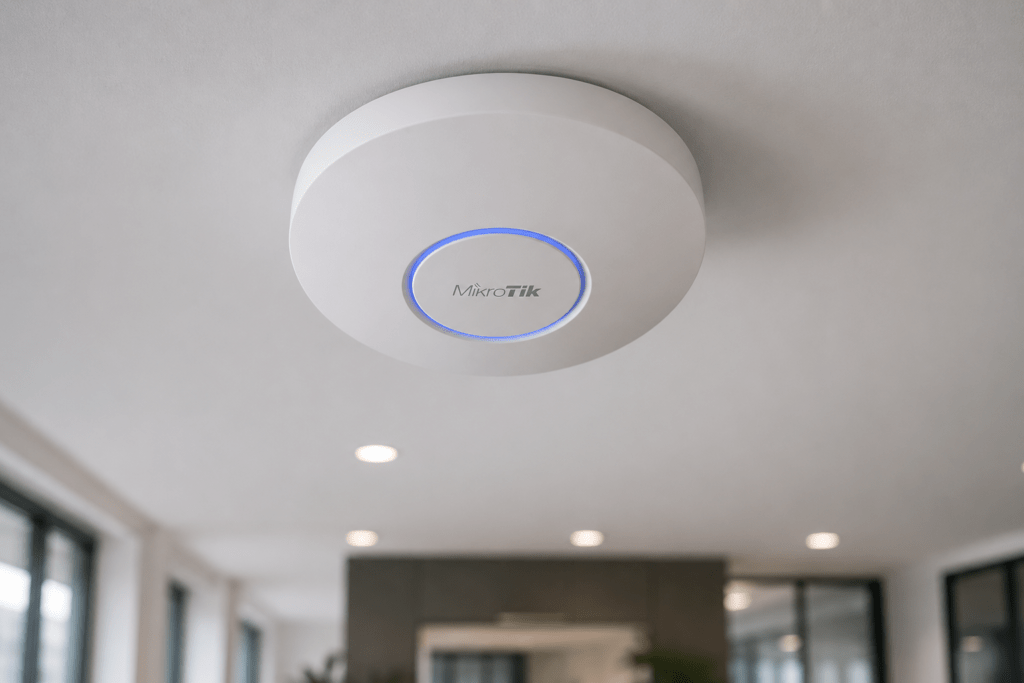
Reliable Wi-Fi is no longer simply about getting a wireless signal. Businesses need stable coverage, sufficient capacity, secure access and consistent performance as more laptops, smartphones, tablets, cameras and connected devices join the network.
MikroTik wireless solutions provide options for offices, hotels, schools, homes, campuses, warehouses, ISPs and outdoor networks. The range includes wireless routers, access points and outdoor wireless devices designed for different coverage and connectivity requirements.
At Supreme Networks, we supply MikroTik wireless networking equipment to customers in Nairobi and across Kenya. Whether you need Wi-Fi for a small office or wireless connectivity across a larger site, the right solution starts with understanding your coverage, users and network environment.
Planning a MikroTik wireless network? Contact Supreme Networks for product availability, pricing, quotations and assistance choosing suitable equipment.
Good Wi-Fi Starts with Good Network Design
A powerful access point does not automatically guarantee good Wi-Fi.
Wireless performance depends on several factors, including:
- Building size
- Number of floors
- Walls and obstacles
- Number of users
- Connected devices
- Internet speed
- Access point placement
- Wireless interference
- Network cabling
- Switch capacity
- PoE availability
For this reason, buying the most powerful access point is not always the correct solution.
A large building may perform better with several correctly positioned access points than with one device trying to cover the entire property.
Understanding MikroTik Wireless Solutions
MikroTik provides wireless equipment for different network environments.
Depending on the product family, MikroTik wireless equipment can be used for:
- Indoor Wi-Fi
- Outdoor Wi-Fi
- Home networking
- Business wireless networks
- Hotel Wi-Fi
- Campus networks
- Public hotspots
- Point-to-point wireless
- Point-to-multipoint networks
- ISP and WISP infrastructure
Understanding the application makes it easier to select the correct equipment.
MikroTik Access Points for Business Wi-Fi
Business Wi-Fi needs to support employees, visitors and connected devices throughout the working environment.
A typical office wireless network might follow this structure:
Internet → MikroTik Router → PoE Switch → Multiple Access Points
This architecture allows access points to be positioned where users actually need coverage.
For example, an office could install separate access points for reception, workspaces, meeting rooms and other areas.
The result can be more consistent than relying on one wireless router positioned near the internet connection.
Wi-Fi 6 and Modern MikroTik Networks
Wi-Fi technology continues to evolve as organizations connect more devices and use increasingly bandwidth-intensive applications.
MikroTik offers products based on Wi-Fi 6 (802.11ax) technology.
Wi-Fi 6 can provide advantages in suitable environments, particularly where many modern devices share the wireless network.
Potential benefits include:
- Improved wireless efficiency
- Better handling of multiple devices
- Higher potential throughput
- Improved performance in busy environments
- Modern wireless security capabilities
However, upgrading to Wi-Fi 6 does not automatically solve every wireless problem.
Coverage, interference, cabling, switching and access point placement remain important.
MikroTik hAP for Smaller Wireless Networks
The MikroTik hAP family combines routing and wireless connectivity in one device.
This can make hAP products suitable for:
- Homes
- Small offices
- Shops
- Branch locations
- Small professional networks
Models such as the MikroTik hAP ax² and hAP ax³ provide Wi-Fi 6 connectivity alongside RouterOS features.
For a small environment, this combination can reduce the amount of hardware required.
However, larger environments may benefit from separating routing and wireless functions.
MikroTik cAP for Ceiling-Mounted Wi-Fi
For offices, hotels and other indoor environments, ceiling-mounted access points can provide a clean and practical wireless deployment.
MikroTik’s cAP family is designed for access point installations where wireless coverage needs to be distributed throughout a building.
A business might install several access points across different areas and connect them back to a central switch.
For example:
Router → PoE Switch → cAP Access Points
This approach can provide a more scalable wireless network than relying on a single Wi-Fi router.
MikroTik wAP for Flexible Wireless Deployments
The MikroTik wAP family provides compact wireless devices suitable for various indoor and outdoor installations, depending on the model.
Their form factor can make them useful where a discreet wireless device is preferred.
Potential applications include:
- Offices
- Hotels
- Residential properties
- Outdoor areas
- Building entrances
- Covered outdoor spaces
As with any access point, the exact model should be selected according to wireless standard, frequency bands, Ethernet requirements and installation environment.
MikroTik Wi-Fi for Office Networks
Modern offices rely heavily on wireless connectivity.
Employees may use laptops, smartphones, tablets and collaboration systems throughout the working day.
Meanwhile, visitors may require guest internet access.
A properly designed MikroTik network can separate these services.
For example:
Staff Wi-Fi | Guest Wi-Fi | Business Systems
VLANs can provide logical separation between different network segments where required.
This helps businesses maintain a more organized network while allowing users to connect wirelessly.
MikroTik Wireless for Hotels and Hospitality
Hotels present a more challenging Wi-Fi environment.
Guests expect reliable connectivity in:
- Guest rooms
- Reception
- Restaurants
- Conference rooms
- Lounges
- Common areas
- Outdoor spaces
Trying to cover an entire hotel using only one or two powerful access points can result in inconsistent performance.
Instead, multiple access points can distribute coverage throughout the property.
A typical hotel network may look like:
Internet → MikroTik Router → Managed PoE Switches → Access Points
VLANs can then separate guest traffic from hotel administration and other operational networks.
Wireless Networks for Schools and Campuses
Schools and universities can have hundreds or thousands of wireless devices.
Students, teachers, administrative staff and visitors may all require connectivity.
Access points may need to cover:
- Classrooms
- Offices
- Libraries
- Laboratories
- Computer rooms
- Meeting spaces
- Outdoor areas
Large educational environments should therefore focus on both coverage and capacity.
Several access points connected through a managed wired network can provide a more scalable solution.
Fiber links may also connect separate buildings across a campus.
MikroTik Wi-Fi for Warehouses
Warehouses create unique wireless challenges.
Large open spaces, shelving, machinery and building materials can influence wireless signal behaviour.
Reliable connectivity may be required for:
- Barcode scanners
- Laptops
- Mobile terminals
- Inventory systems
- Smartphones
- IoT equipment
Access point placement becomes especially important in these environments.
A wireless site assessment can help identify coverage areas and potential obstacles before equipment is installed.
MikroTik Outdoor Wireless Solutions
Wireless connectivity is not limited to indoor spaces.
MikroTik provides outdoor wireless equipment for applications where network connectivity must extend beyond the building.
Outdoor wireless solutions can be useful for:
- Compounds
- Schools
- Hotels
- Farms
- Warehouses
- Residential developments
- Outdoor business areas
- ISP networks
Outdoor devices should be selected based on their intended environment, wireless frequency, coverage requirement and mounting location.
Point-to-Point Wireless Connectivity
Sometimes running fiber or Ethernet cable between two locations is difficult or expensive.
A point-to-point wireless link can provide an alternative where there is a suitable wireless path between locations.
For example:
Building A ⇄ Wireless Link ⇄ Building B
This can be useful for connecting:
- Office buildings
- Warehouses
- Security posts
- Schools
- Remote network cabinets
- CCTV locations
Distance alone does not determine whether a wireless link will work well.
Line of sight, frequency, interference, antenna characteristics and installation height also matter.
MikroTik Wireless for ISPs and WISPs
Wireless Internet Service Providers often need to distribute connectivity across areas where conventional wired infrastructure is difficult to deploy.
MikroTik wireless products can form part of WISP infrastructure alongside MikroTik routers and switches.
A WISP network may include:
Internet Gateway → MikroTik Router → Core Network → Wireless Distribution → Customers
The equipment required depends on coverage distance, subscriber numbers, spectrum conditions and expected bandwidth.
For larger service-provider networks, careful frequency planning becomes particularly important.
What Is CAPsMAN?
Managing one wireless access point is straightforward.
Managing many access points across an office, hotel or campus can become more complicated.
MikroTik provides CAPsMAN, a system designed to help centrally manage compatible MikroTik wireless access points.
Centralized management can simplify tasks such as wireless configuration and administration across multiple devices.
This can be useful for organizations operating several access points.
However, compatibility and available features can vary depending on device generation and RouterOS configuration.
2.4 GHz vs 5 GHz Wi-Fi
Modern wireless networks commonly use both 2.4 GHz and 5 GHz frequency bands.
2.4 GHz generally provides greater range and better penetration through some obstacles. However, it can experience more interference and offers less spectrum.
5 GHz can provide higher capacity and more available channels, although coverage characteristics differ.
A good wireless network does not simply choose one frequency.
Instead, both bands can be used strategically depending on the environment and connected devices.
How Many Access Points Do You Need?
There is no universal formula based only on floor area.
Two buildings of the same size can require very different numbers of access points.
The number depends on:
- Wall construction
- Building layout
- Number of floors
- User density
- Device count
- Required applications
- Interference
- Ceiling height
- Access point model
For example, an open office and a hotel with many individual rooms may require very different access point densities.
Therefore, avoid assuming that one access point will cover a particular number of square metres in every building.
Don’t Forget the Wired Network
Every wireless access point ultimately depends on the network behind it.
Fast Wi-Fi connected to an overloaded switch or slow uplink will still deliver poor performance.
When designing a MikroTik wireless network, also consider:
- Ethernet cabling
- PoE switches
- Router performance
- VLANs
- Internet capacity
- Switch uplinks
- Fiber backbone
- 1G, 2.5G and 10G connectivity
The wireless network and wired infrastructure should be designed together.
PoE Makes Access Point Installation Easier
Many professional wireless deployments use Power over Ethernet.
PoE allows compatible access points to receive power and network connectivity through Ethernet cabling.
A typical installation can therefore use:
PoE Switch → Ethernet Cable → Wireless Access Point
This avoids installing a separate power socket next to every access point.
However, PoE compatibility must always be confirmed.
Check the required standard, voltage and power consumption before connecting equipment.
Where Should Access Points Be Installed?
Access point placement can have as much impact on performance as the access point model itself.
Avoid installing wireless equipment simply where cabling is easiest.
Instead, consider where users actually require connectivity.
Access points may need to serve:
- Work areas
- Meeting rooms
- Guest areas
- Corridors
- Classrooms
- Hotel rooms
- Outdoor spaces
Physical obstacles and interference should also be considered.
For larger networks, planning coverage before installation can reduce dead zones and unnecessary access points.
Choosing the Right MikroTik Wireless Solution
Before purchasing MikroTik wireless equipment, answer several questions.
Where will the equipment be installed?
Indoor and outdoor environments require different hardware.
How many users will connect?
User density influences access point requirements.
How large is the coverage area?
Larger environments normally require multiple access points.
Do you need Wi-Fi 6?
Modern devices and busy environments may benefit from newer wireless technology.
Will you use PoE?
Confirm the access point and switch power requirements.
Do you require centralized management?
Multiple-access-point environments may benefit from centralized administration.
Do you need point-to-point connectivity?
This requires different equipment from normal indoor Wi-Fi.
Answering these questions helps narrow down the available options.
Build Wireless Networks That Can Grow
Wi-Fi requirements rarely remain static.
Businesses add employees. Hotels add connected devices. Schools introduce more digital learning equipment. Warehouses deploy additional mobile terminals.
Therefore, design the network with reasonable room for expansion.
A scalable architecture could use:
MikroTik Router → Managed PoE Switch → Multiple Access Points
Additional access points can then be introduced as coverage or capacity requirements increase.
MikroTik Wireless Equipment from Supreme Networks
Supreme Networks supplies MikroTik wireless products and access points in Nairobi and across Kenya.
Our MikroTik networking range can support:
- Office Wi-Fi
- Business wireless networks
- Hotel Wi-Fi
- School networks
- Outdoor wireless
- ISP/WISP networks
- Point-to-point connectivity
- Wi-Fi 6 deployments
Available products may include MikroTik hAP, cAP, wAP and other wireless networking families.
Specific stock and models can change. Therefore, contact us for current product availability and quotations.
Ready to Improve Your Wireless Network?
Good Wi-Fi requires more than purchasing an access point.
Coverage, users, interference, cabling, switching, PoE and network capacity all influence the final result.
If you are unsure which MikroTik wireless product fits your environment, tell us where you need coverage, approximate number of users, building size and intended application.
Contact Supreme Networks for MikroTik wireless equipment, access point prices and networking solutions in Nairobi and across Kenya.