
Build a Faster, Smarter Network with MikroTik Managed Switches
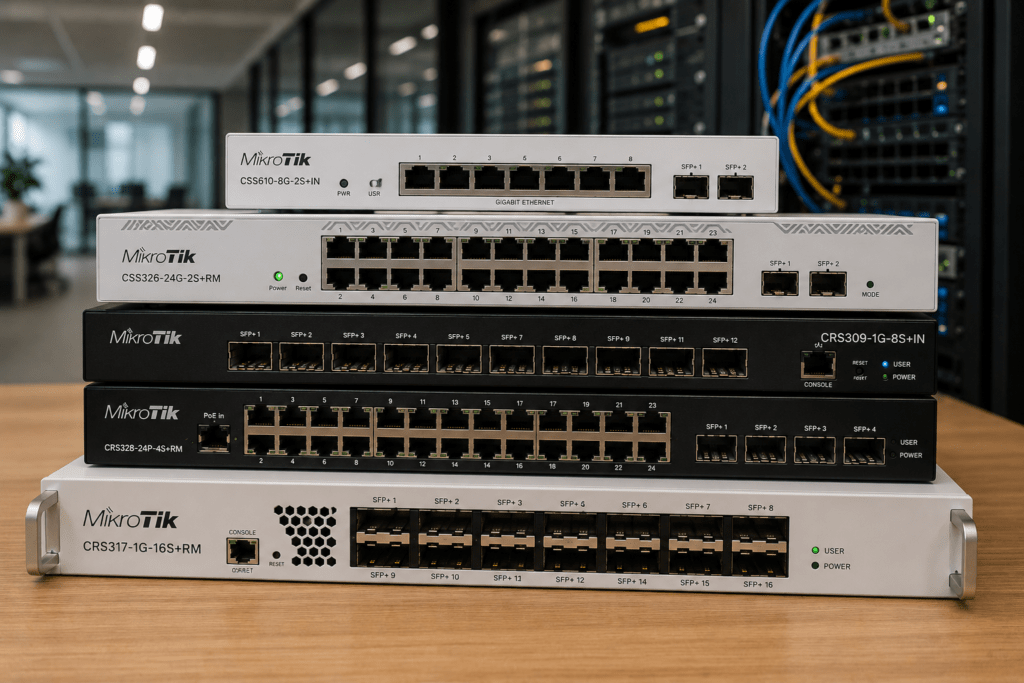
Your router may control the connection, but your network switch determines how devices connect and communicate across the local network. As businesses add wireless access points, IP cameras, servers, VoIP phones and faster workstations, choosing the right switching infrastructure becomes increasingly important.
MikroTik switches range from compact Gigabit models to powerful managed switches with PoE, fiber, SFP+ and 10 Gigabit connectivity. This makes them suitable for offices, CCTV installations, hotels, schools, enterprise networks and ISP infrastructure.
Supreme Networks supplies MikroTik networking equipment to customers in Nairobi and across Kenya. Whether you need a simple access switch or a high-speed network core, the first step is understanding which MikroTik switch fits your network.
Need help choosing a MikroTik switch? Contact Supreme Networks for current availability, pricing and quotations.
Why Your Network Switch Matters
A switch connects devices within your local network.
These devices can include:
- Desktop computers
- Servers
- Wireless access points
- CCTV cameras
- Network video recorders
- IP phones
- Printers
- Network storage
- Other switches
- Routers
In a small network, almost any suitable Gigabit switch may appear to work.
However, requirements become more demanding as the network grows.
You may need VLANs to separate departments, PoE to power access points, fiber to connect buildings or 10 Gigabit uplinks to prevent network bottlenecks.
Therefore, switch selection should be based on the complete network design rather than port count alone.
Understanding MikroTik CRS and CSS Switches
Two names appear frequently when shopping for MikroTik switches: CRS and CSS.
Understanding the difference can make product selection much easier.
MikroTik CRS – Cloud Router Switch
CRS stands for Cloud Router Switch.
These products are designed primarily around advanced switching while offering the flexibility of MikroTik’s RouterOS environment on supported devices.
CRS switches are available in many configurations, including models with:
- Gigabit Ethernet
- PoE
- SFP
- SFP+
- 10 Gigabit Ethernet
- Higher-speed interfaces
- Rackmount designs
They can be suitable for business networks, ISPs, CCTV deployments, server environments and network cores.
MikroTik CSS – Cloud Smart Switch
CSS stands for Cloud Smart Switch.
These devices focus on switching and use MikroTik’s SwOS platform.
For networks that need managed switching without the broader RouterOS feature set, a CSS model can provide a straightforward option.
The correct choice between CRS and CSS depends on what you expect the switch to do.
Managed vs Unmanaged Switching
An unmanaged switch provides basic network connectivity with little or no configuration.
A managed switch provides significantly more control.
Depending on the model, managed switching can provide capabilities such as:
- VLANs
- Port configuration
- Traffic monitoring
- Link aggregation
- Network segmentation
- Spanning Tree
- Port isolation
- Management access
For a small temporary network, unmanaged switching may be enough.
However, businesses operating CCTV, guest Wi-Fi, VoIP, servers and multiple departments can benefit from managed infrastructure.
How Many Ports Does Your Network Need?
Port count is one of the first decisions when selecting a switch.
Common requirements include:
5–8 ports for small offices and network cabinets.
16 ports for growing networks.
24 ports for medium-sized business installations.
48 ports for larger offices, campuses and high-density deployments.
However, avoid buying a switch that provides exactly the number of ports you need today.
If your installation currently requires 20 connections, a 24-port switch leaves very little room for access points, cameras or additional users.
Some spare capacity makes future expansion easier.
MikroTik PoE Switches: Power and Data Together
Power over Ethernet allows compatible network devices to receive both data and power through Ethernet cabling.
This can simplify installations for devices such as:
- Wireless access points
- IP cameras
- VoIP phones
- Wireless radios
- Other compatible network devices
A typical PoE network may look like:
Internet → MikroTik Router → MikroTik PoE Switch → Access Points / Cameras / IP Phones
This can reduce the number of separate power adapters required around the building.
However, PoE requires careful planning.
Check the PoE Standard Before You Buy
Not every PoE device works with every PoE switch.
Before purchasing, check:
- PoE standard
- Output voltage
- Power per port
- Total PoE budget
- Number of powered devices
- Device power requirements
This is particularly important when mixing networking equipment from different manufacturers.
For example, having eight PoE ports does not necessarily mean a switch has enough power to run eight high-consumption devices simultaneously.
The total PoE power budget matters.
MikroTik Switches for Wi-Fi Networks
Business Wi-Fi depends heavily on the wired network behind the access points.
Modern access points can generate significant network traffic. Therefore, switches need sufficient capacity and suitable uplinks.
For a wireless deployment, consider:
- Number of access points
- PoE requirements
- Ethernet speed
- VLAN support
- Uplink capacity
- Future Wi-Fi upgrades
A typical deployment might use:
Router → Managed PoE Switch → Multiple Wireless Access Points
VLANs can then separate staff Wi-Fi, guest Wi-Fi and other network services.
As Wi-Fi technology becomes faster, 2.5G and 10G connectivity can also become more important within the wired infrastructure.
MikroTik Switches for CCTV Networks
IP CCTV systems can generate continuous network traffic.
Each camera sends video across the network toward an NVR, server or monitoring platform.
Therefore, CCTV switch selection should consider more than the number of camera ports.
You should also consider:
- Number of cameras
- Camera resolution
- Camera bitrate
- PoE requirements
- Recording server location
- Uplink capacity
- Fiber requirements
- Network segmentation
For larger CCTV systems, several access switches may connect to a central core switch.
Fiber can also connect remote buildings or distant camera network cabinets.
MikroTik Switches for Office Networks
A modern office may contain computers, printers, access points, CCTV cameras, IP phones and servers.
A managed switch allows these devices to share the same physical infrastructure while remaining logically separated where necessary.
For example:
Internet → MikroTik Router → MikroTik Managed Switch
From the switch, connections can go to:
Computers | Wi-Fi | CCTV | VoIP | Servers
VLANs can then provide logical separation between these services.
This creates a cleaner and more scalable network architecture.
MikroTik Switches for Hotels
Hotel networks can be particularly demanding because many systems share the same infrastructure.
These may include:
- Guest Wi-Fi
- Administration
- CCTV
- VoIP
- Access control
- Servers
- Smart devices
Managed MikroTik switches can form part of a structured hotel network that separates services using VLANs while providing high-speed uplinks between network cabinets.
PoE switches can also simplify wireless access point deployment throughout the property.
MikroTik Switching for Schools and Campuses
Schools and universities often operate networks across several buildings.
A campus network may connect classrooms, laboratories, offices, libraries, CCTV cameras and wireless access points.
In these environments, MikroTik switches can operate at different network levels.
Access switches connect users and devices.
Distribution switches aggregate traffic from different areas.
A higher-capacity core can then connect major parts of the network.
Fiber is especially useful when linking buildings across a campus.
Fiber Connectivity with MikroTik Switches
Many MikroTik switches provide SFP or SFP+ interfaces.
These interfaces can be used with compatible transceiver modules.
Fiber is useful when:
- Connecting separate buildings
- Covering longer distances
- Building campus networks
- Connecting ISP infrastructure
- Creating high-speed backbones
- Connecting remote network cabinets
The correct transceiver depends on factors such as fiber type, wavelength, distance and interface speed.
Therefore, always confirm compatibility before purchasing modules.
When Should You Use SFP+?
SFP+ is commonly associated with 10 Gigabit Ethernet.
A 10G uplink can be useful when several Gigabit devices share one connection to another switch or server.
Imagine a 24-port Gigabit switch with many active users.
If all that traffic needs to pass through a single 1Gbps uplink, the uplink can become a bottleneck.
Using a suitable 10Gbps SFP+ uplink can provide considerably more backbone capacity.
Building a 10 Gigabit MikroTik Network
Not every device needs a 10 Gigabit connection.
Instead, 10GbE can be deployed where the network needs additional capacity.
For example:
MikroTik Router → 10G Core Switch → Access Switches → Users
Servers and network storage can also connect directly to the 10G core.
This architecture can work well for:
- Growing businesses
- Server environments
- Video production
- Network storage
- Enterprise Wi-Fi
- ISP infrastructure
- Large CCTV systems
Gigabit Ethernet can remain at the network edge while 10GbE carries aggregated traffic through the backbone.
MikroTik CRS326 for Business Switching
The MikroTik CRS326 family is a popular option for networks requiring multiple Gigabit Ethernet ports together with SFP+ uplinks.
Models within this family can be useful for office networks, network cabinets and other managed switching environments.
A typical use case might involve connecting user devices through Gigabit Ethernet while using SFP+ for a high-speed uplink to another switch or network core.
This makes the CRS326 family worth considering when building structured business networks.
MikroTik CRS309 for 10G Connectivity
When the requirement shifts toward SFP+ and 10 Gigabit connectivity, the MikroTik CRS309 becomes an interesting option.
It can form part of a network connecting:
- Servers
- Storage
- High-speed switches
- Fiber infrastructure
- Workstations
- Network backbones
Rather than replacing an existing Gigabit access network, a switch such as the CRS309 can form a high-speed layer connecting bandwidth-intensive devices.
MikroTik CRS317 for High-Density SFP+ Networks
Networks requiring more 10 Gigabit interfaces may need a higher-density solution.
The MikroTik CRS317 provides multiple SFP+ interfaces and is designed for environments where high-speed fiber or copper SFP+ connectivity is required.
Potential applications include:
- ISP infrastructure
- Server rooms
- Data environments
- Enterprise network cores
- High-capacity fiber networks
As with any high-performance switch, the rest of the network should also be designed to take advantage of the available capacity.
MikroTik CRS112 for PoE Deployments
The MikroTik CRS112-8P-4S-IN is another useful option where PoE and fiber connectivity are required.
It can fit applications involving compatible access points, cameras or other powered network devices.
However, always calculate the PoE requirements of connected equipment before deployment.
PoE compatibility and power budget are just as important as the number of available ports.
Choosing a Switch for Your Internet Speed
A common mistake is selecting a switch based entirely on internet speed.
Your local network can carry much more traffic than your internet connection.
For example, employees may transfer files between computers and servers without that traffic ever reaching the internet.
CCTV cameras may also continuously send video to an NVR over the local network.
Therefore, consider both:
Internet traffic
and
Local network traffic
when choosing switching capacity.
Don’t Forget the Uplinks
Customers often focus on access ports and overlook uplinks.
However, the uplink carries traffic from the switch toward the router, server or another switch.
If many Gigabit devices share a single Gigabit uplink, congestion can occur even though each individual port supports 1Gbps.
For growing networks, SFP+ and 10GbE uplinks can provide additional capacity where it matters most.
How to Choose the Right MikroTik Switch
Before purchasing a MikroTik switch, answer these questions:
- How many Ethernet devices will connect?
- How many additional devices might you add?
- Do you need PoE?
- What is the total PoE power requirement?
- Do you require VLANs?
- Do you need fiber?
- Do you require SFP or SFP+?
- Is a 1Gbps uplink sufficient?
- Do you need 10GbE?
- Will the switch connect to servers or storage?
- Is rackmount installation required?
- Will the network expand?
These questions can quickly narrow down the appropriate MikroTik switch family.
Build Your Network for Tomorrow
Switching infrastructure often remains installed for years.
During that period, a business may add more users, cameras, access points, servers and faster internet connections.
Therefore, consider reasonable expansion capacity when designing the network.
That could mean choosing additional Ethernet ports, leaving unused PoE capacity or selecting SFP+ uplinks even if the network does not fully use 10GbE today.
The objective is not to overspend.
Instead, the goal is to avoid creating obvious bottlenecks that require premature replacement.
Buy MikroTik Switches from Supreme Networks
Supreme Networks supplies MikroTik switches in Nairobi and across Kenya for businesses, ISPs, schools, hotels, CCTV systems and other network installations.
Our MikroTik switching range can include CRS, CSS, PoE and SFP/SFP+ solutions for both conventional Gigabit and high-speed networks.
Popular requirements include:
- 8-port MikroTik switches
- 24-port MikroTik switches
- MikroTik PoE switches
- MikroTik managed switches
- MikroTik SFP switches
- MikroTik SFP+ switches
- MikroTik 10G switches
- MikroTik CRS switches
Specific models and availability can change. Therefore, contact us for current stock and quotations.
Need Help Selecting a MikroTik Switch?
Choosing the correct switch becomes much easier once we know what you intend to connect.
Tell us your number of devices, PoE requirements, required port count, uplink speed and whether you need fiber or 10G connectivity.
Supreme Networks can help you identify suitable MikroTik switching options for your network.
Contact us for MikroTik switch pricing, availability and quotations in Nairobi and across Kenya.